StarTech.com
Netværkskort/adapter
P041GI-NETWORK-CARD
StarTech.com P041GI-NETWORK-CARD Brugsanvisning
Her er StarTech.com P041GI-NETWORK-CARD (Netværkskort/adapter) brugervejledning. 2 sider på sprog med en vægt på 577,721.0 Mb. Hvis du ikke kan finde svar på dit problem Spørg vores community.
Side 1/2
Quick-Start Guide
To view manuals, FAQs, videos, drivers, downloads, technical drawings, and more, visit www.startech.com/support
Manual Revision: June 1, 2023
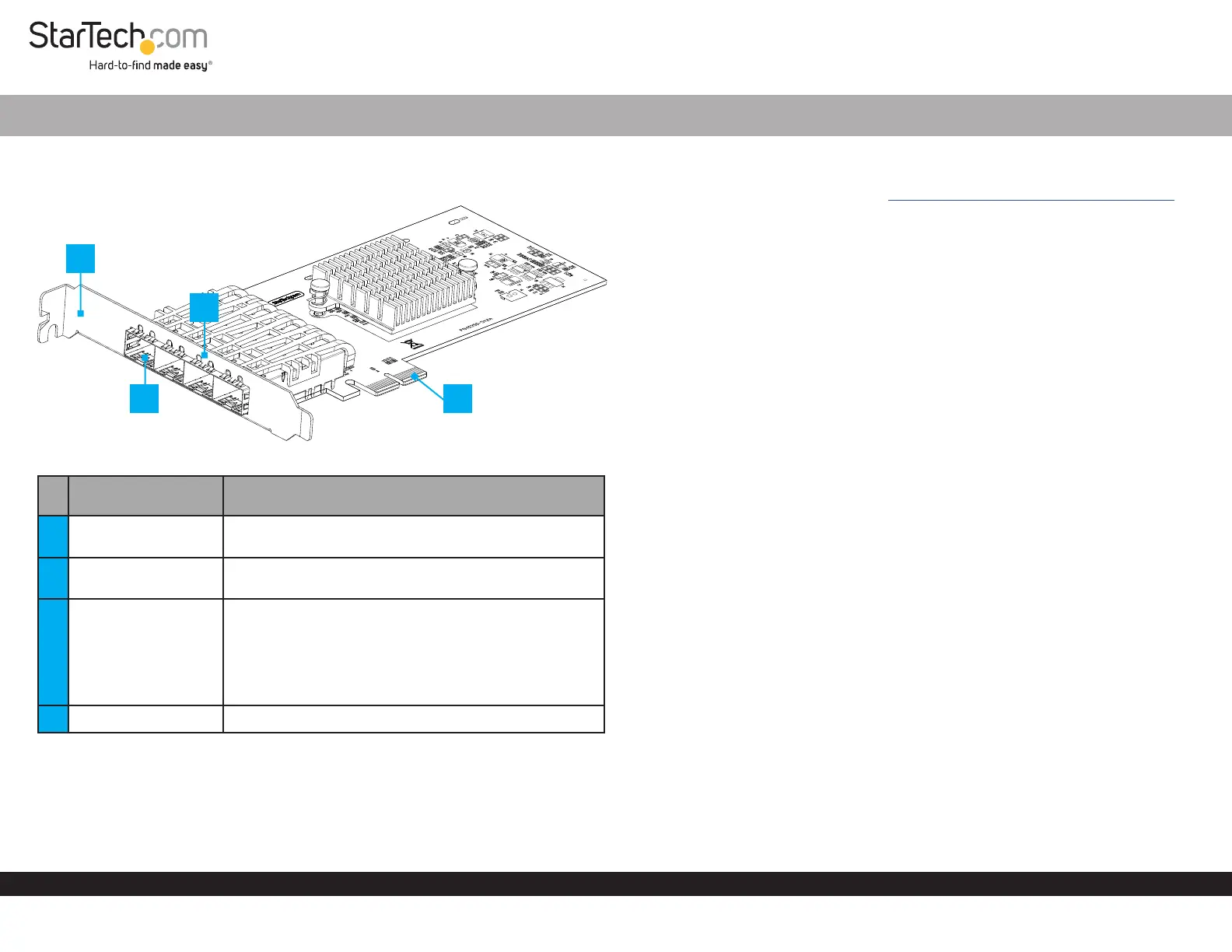
Product Diagram
P041GI-NETWORK-CARD
Port/LED/Connector Function
1 Bracket
• Secures the card to the Host Computer Case
• The Full Prole Bracket comes pre-installed
2 Open SFP Slot x 4
• Add a MSA-Compliant SFP Transceiver Module
• Supports Fiber or Ethernet 1 Gbps SFPs
3 LED Indicators
• Left LED Indicator is Link Speed
• Solid Green: 1 Gbps
• Right LED Indicator is Link Status
• Solid Green: Active link
• Flashing Green: Activity
4 PCIe 2.0 p1-x2 Connector • Insert into a PCI Express Slot on the Host Computer
Package Contents
• Open SFP Network Card x 1
• Quick-Start Guide x 1
4-Port Open SFP Gigabit Network Card
Requirements
For the latest requirements, please visit www.startech.com/P041GI-NETWORK-CARD
• Host computer with an available PCI Express 2.0 or greater slot (x2, x4, x8, or x16)
Installation
Install the PCI Express Card
WARNING!
Static Electricity can severely damage PCI Express Cards. Ensure that you are
adequately Grounded before you open your Host Computer Case or touch the PCI
Express Card. You should wear an Anti-Static Strap or use an Anti-Static Mat when
installing any Host Computer component. If an Anti-Static Strap isn’t available,
discharge any built-up static electricity by touching a large Grounded Metal Surface
for several seconds. Only handle the PCI Express Card by its edges and don’t touch
the gold connectors.
1. Turn o the Host Computer and any Peripheral Devices that are connected to it
(e.g. printers, external hard drives, etc.).
2. Unplug the Power Cable from the back of the Host Computer.
3. Disconnect any Peripheral Devices that are connected to the Host Computer.
4. Remove the Cover from the Host Computer Case. Consult the documentation that
came with the Host Computer for details about doing this safely.
5. Locate an open PCI Express Slot and remove the corresponding Slot Cover Plate
from the back of the Host Computer Case.
Note: Consult the documentation that came with the Host Computer for details
about doing this safely. This card works in PCI Express x2, x4, x8, or x16 Slots.
6. Gently insert the PCI Express Card into the open PCI Express Slot and fasten the
Bracket to the back of the Host Computer Case.
7. Return the Cover onto the Host Computer Case.
8. Insert a compatible 1G SFP Transceiver Module, into the SFP Slot onto the PCI
Express Card.
9. Reconnect the Power Cable to the back of the Host Computer.
10. Reconnect all of the Peripheral Devices disconnected in Step 3.
11. Connect a Fiber or Ethernet Network Cable depending on the SFP Transceiver
Module used. Connect the other end of the cable to a Network Device.
3
*Product may vary from image
1
4
2
Problemløsning StarTech.com P041GI-NETWORK-CARD
Hvis du har læst manualen omhyggeligt, men ikke fundet en løsning på dit problem, bed andre brugere om hjælp
Specifikationer
| Bredde: | 83 mm |
| Dybde: | 167 mm |
| Højde: | 10 mm |
| Produktfarve: | Sort |
| Pakkevægt: | 135 g |
| Pakkedybde: | 207 mm |
| Pakkebredde: | 144 mm |
| Pakkehøjde: | 38 mm |
| Opbevaringstemperatur (T-T): | -10 - 70 °C |
| Relativ luftfugtighed ved drift (H-H): | 5 - 90 % |
| Driftstemperatur (T-T): | 0 - 50 °C |
| Hurtig installationsvejledning: | Ja |
| Forbindelsesteknologi: | Ledningsført |
| Netværksstandarder: | IEEE 802.1AX, IEEE 802.1Q, IEEE 802.3ab, IEEE 802.3ap, IEEE 802.3az, IEEE 802.3z |
| Understøttede netværksprotokoller: | IPv4, IPv6, TCP/UDP |
| LED-indikatorer: | Speed, Status |
| Understøttede Windows-operativsystemer: | Windows 10, Windows 10 Education, Windows 10 Education x64, Windows 10 Enterprise, Windows 10 Enterprise x64, Windows 10 Home, Windows 10 Home x64, Windows 10 IOT Core, Windows 10 IoT Enterprise, Windows 10 Pro, Windows 10 Pro x64, Windows 10 x64, Windows 11, Windows 11 Enterprise, Windows 11 Enterprise x64, Windows 11 Home, Windows 11 Pro, Windows 11 x64 |
| Understøttede Linux-operativsystemer: | Ja |
| Hovedkassen højde (udvendigt): | 320 mm |
| Hovedkassens længde (udvendigt): | 420 mm |
| Hovedkassens bredde (udvendigt): | 440 mm |
| Værtsgrænseflade: | PCI Express |
| Grænseflade: | Fiber |
| Intern: | Ja |
| Maksimal dataoverførselshastighed: | 1000 Mbit/s |
| Fiber optisk strømstik: | SFP |
| Produkter pr. hovedkasse (udvendigt): | 40 stk |
| Fuld duplex: | Ja |
| Komponent til: | PC |
| Understøttede operativsystemer til servere: | Windows Server 2012, Windows Server 2012 R2, Windows Server 2016, Windows Server 2019, Windows Server 2022 |
| Jumbo Frames support: | Ja |
| Jumbo rammer: | 9000 |
| Auto MDIX IEEE: | Ja |
| Fiberkanal porte: | 4 |
| PCI version: | 2.0 |