StarTech.com
Netværkskort/adapter
HB30C3A1GEA
StarTech.com HB30C3A1GEA Brugsanvisning
Her er StarTech.com HB30C3A1GEA (Netværkskort/adapter) brugervejledning. 2 sider på sprog med en vægt på 430,385.0 Mb. Hvis du ikke kan finde svar på dit problem Spørg vores community.
Side 1/2
Quick-Start Guide
To view manuals, FAQs, videos, drivers, downloads, technical drawings, and more, visit www.startech.com/support.
Manual Revision: March 11, 2022 11:00 AM
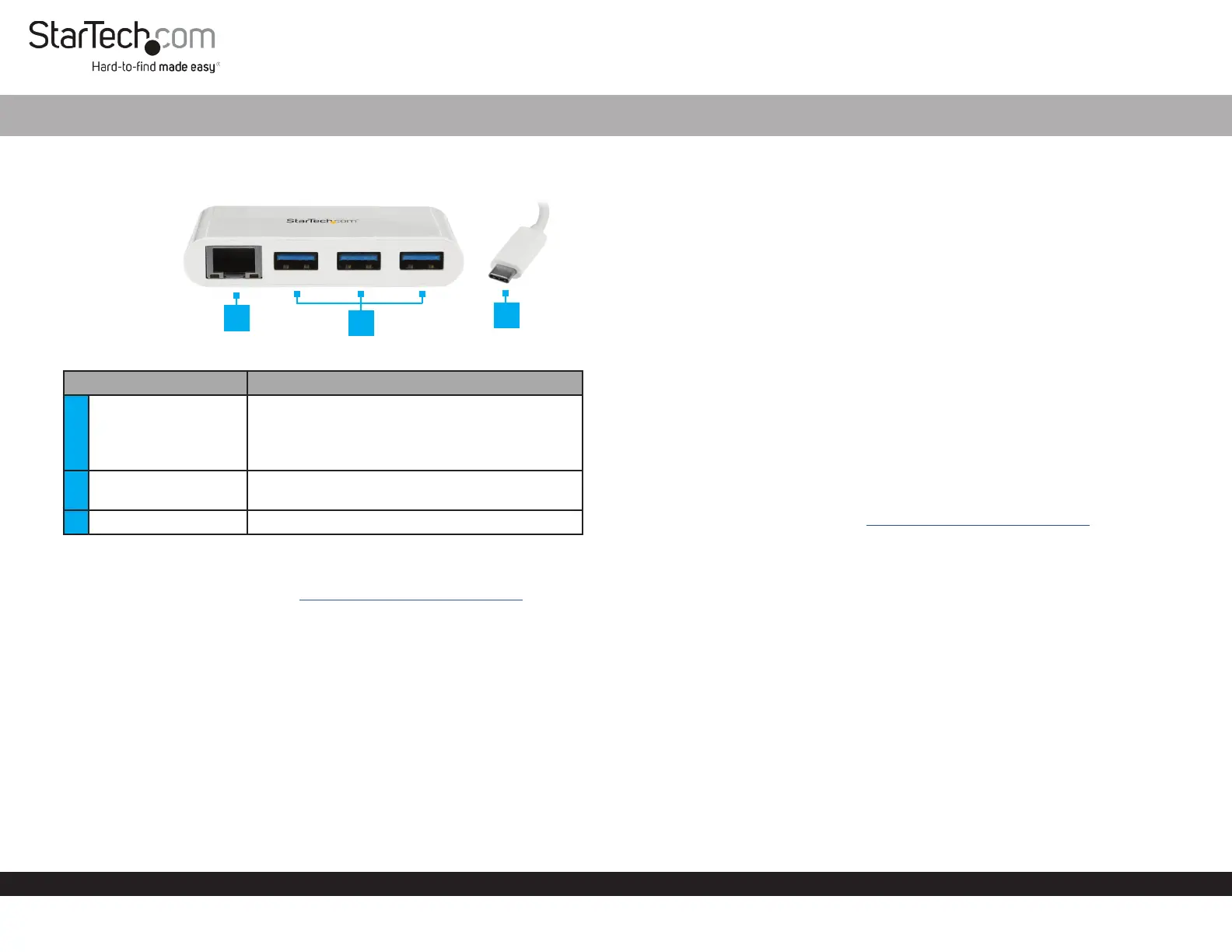
Product Diagram (HB30C3A1GEA)
Port Function
1 RJ45 Port
• Used to connect the Hub to a Network Device.
• Green: Indicates that a network connection is
established.
• Amber: Indicates network activity.
2 USB-A Port (x3)
• Used to connect USB Devices (Mouse, Flash
Drive, etc.) to the Hub.
3 USB-C Connector • Used to connect the Hub to a Host Computer.
Requirements
For the latest requirements, please visit www.startech.com/HB30C3A1GEA
Package Contents
• USB-A Hub x 1
3-Port USB 3.0 Hub with Gigabit Ethernet | USB-C™ | White
Installation
Hardware Installation
1. Connect the integrated USB Type-C Host Cable to a USB-C port on the Host
Computer.
2. Connect each of your USB Devices (x 3) to the USB-A Ports on the Hub.
3. Connect a CAT5e/6 Cable (sold separately) to the RJ45 Port on the Hub and to a
Network Device.
Driver Installation
Installing the Drivers
Windows:
If the required driver does not automatically install after connecting the Network
Adapter to the host laptop, complete the driver installation manually:
1. Connect the Network Adapter to the Host Computer (see Hardware Installation),
the Found New Hardware pop-up will appear.
2. On the Found New Hardware pop-up, click the Cancel button.
3. Using a web browser, navigate to www.startech.com/HB30C3A1GEA.
4. On the Product page, click the Support tab located in the middle of the screen.
5. In the Drivers and Downloads section, click on the driver link that corresponds with
the operating system running on the Host Computer.
6. Click Save As to choose a location to download the .Zip le.
7. Click Open to open the contents of the .Zip le.
8. Select the folder that corresponds to the operating system on the Host Computer.
9. Select the Setup.exe le from the list.
10. Right click the Setup.exe le and select Run as Administrator from the pop-up
menu.
11. Follow the on-screen prompts to complete the installation.
Note: you may need to restart the Computer to complete the installation.
2
3
1
Problemløsning StarTech.com HB30C3A1GEA
Hvis du har læst manualen omhyggeligt, men ikke fundet en løsning på dit problem, bed andre brugere om hjælp
Specifikationer
| Bredde: | 41 mm |
| Dybde: | 78 mm |
| Højde: | 15 mm |
| Vægt: | 36 g |
| Produktfarve: | Hvid |
| Pakkevægt: | 102 g |
| Pakkedybde: | 170 mm |
| Pakkebredde: | 142 mm |
| Pakkehøjde: | 30 mm |
| Opbevaringstemperatur (T-T): | -10 - 70 °C |
| Relativ luftfugtighed ved drift (H-H): | 5 - 90 % |
| Ethernet LAN-porte (RJ-45): | 1 |
| Ethernet LAN: | Ja |
| Driftstemperatur (T-T): | 0 - 45 °C |
| Ethernet LAN-datahastigheder: | 10,100,1000 Mbit/s |
| Husmateriale: | Plast |
| Forbindelsesteknologi: | Ledningsført |
| Certificering: | CE, FCC |
| Kabelteknologi: | 10/100/1000BaseT(X) |
| Netværksstandarder: | IEEE 802.1Q, IEEE 802.1p, IEEE 802.3, IEEE 802.3ab, IEEE 802.3az, IEEE 802.3u, IEEE 802.3x |
| Kabellængde: | 0.095 m |
| Harmoniseret systemkode (HS): | 85176990 |
| USB version: | 3.2 Gen 1 (3.1 Gen 1) |
| Antal USB-porte: | 3 |
| Bæredygtighedscertifikater: | RoHS |
| Understøttede Mac-operativsystemer: | Mac OS X 13.0 Ventura |
| Hovedkassen højde (udvendigt): | 310 mm |
| Hovedkassens længde (udvendigt): | 530 mm |
| Hovedkassens bredde (udvendigt): | 330 mm |
| Værtsgrænseflade: | USB |
| Grænseflade: | Ethernet |
| Intern: | Ingen |
| Maksimal dataoverførselshastighed: | 1000 Mbit/s |
| Plug and play: | Ja |
| USB-drevet: | Ja |
| Produkter pr. hovedkasse (udvendigt): | 60 stk |
| Fuld duplex: | Ja |
| Ethernet-grænsefladetype: | Gigabit Ethernet |
| Flowkontrol support: | Ja |
| Jumbo Frames support: | Ja |
| Jumbo rammer: | 9000 |
| Understøtter hot-plug: | Ja |
| Auto-forhandling: | Ja |
| Auto MDIX IEEE: | Ja |
| Wake-on-LAN klar: | Ja |
| Hot-swap: | Ja |
| Understøtter UASP: | Ja |
| Antal USB 3.2 Gen 1 (3.1 Gen 1) Type-A hub porte: | 3 |
| VLAN mærkning: | Ja |
| Chipsæt: | VIA/VLI - VL812, Realtek - RTL8153 |