StarTech.com
Netværkskort/adapter
AF221C-POE-INJECTOR
StarTech.com AF221C-POE-INJECTOR Brugsanvisning
Her er StarTech.com AF221C-POE-INJECTOR (Netværkskort/adapter) brugervejledning. 2 sider på sprog Engelsk med en vægt på 0.2 Mb. Hvis du ikke kan finde svar på dit problem Spørg vores community.
Side 1/2
Quick-Start Guide
To view manuals, FAQs, videos, drivers, downloads, technical drawings, and more, visit www.startech.com/support.
Manual Revision: September 5, 2024
Product ID
AF221C-POE-INJECTOR
AF221CE-POE-INJECTOR
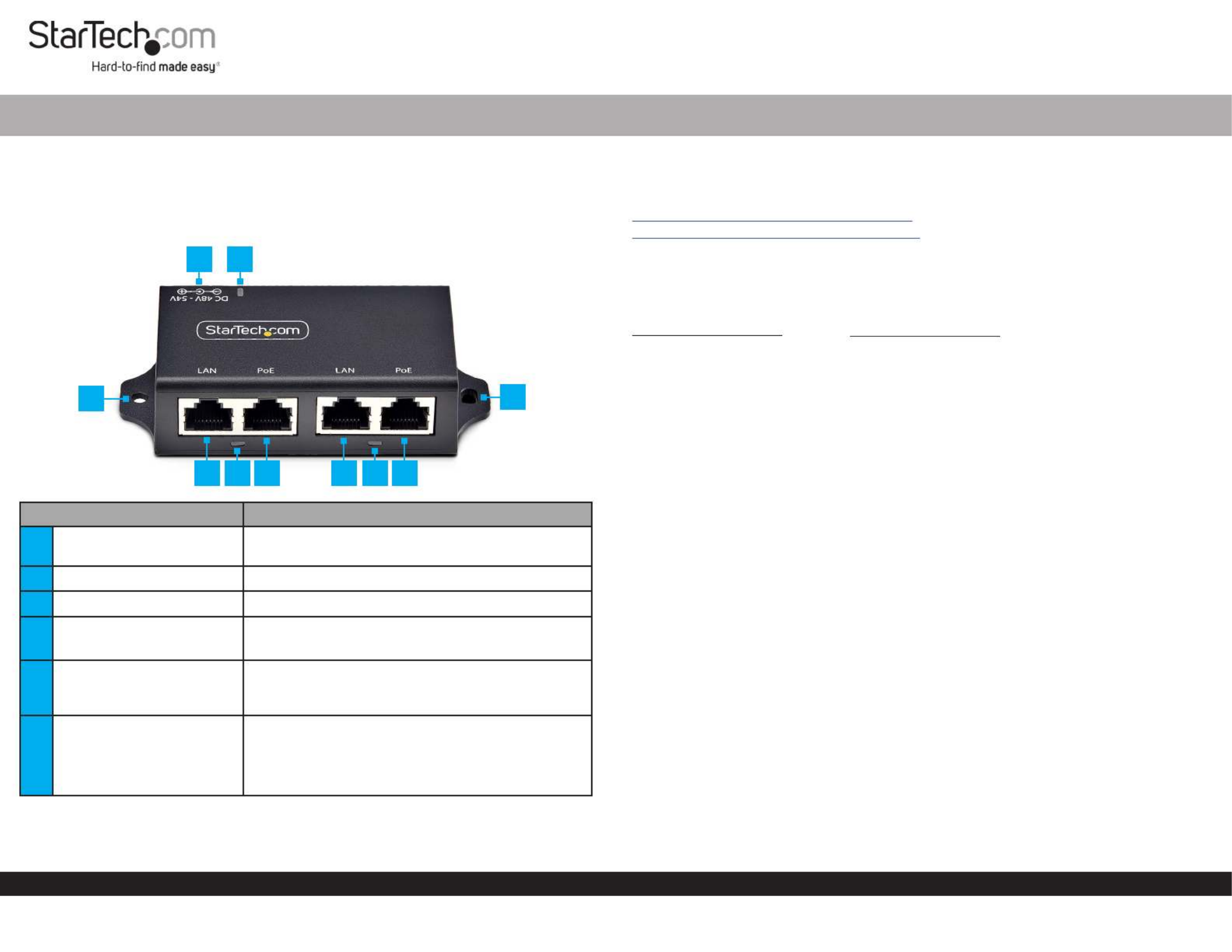
Component Function
1DC Power Input
(Not Shown) • Connect the included Power Adapter
2LED Indicator • Solid Green: PoE Injector is receiving power
3Mounting Holes Mount the to an appropriate surface• PoE Injector
4Data Ports • Connect an to a Ethernet Cable Network Device
• Supports , , and 1Gbps 100Mbps 10Mbps
5PoE Indicator
• Solid Green: Indicates PoE has been negotiated
and power is being supplied to the Powered
Device
6PoE+ Ports
(Data + PoE)
• Connect an to a Ethernet Cable PD (Powered
Device)
• Supports , , and 1Gbps 100Mbps 10Mbps
• Supports and 802.3af 802.3at
2-Port 802.3at 30W Gigabit PoE+ Injector
Product Information
For the latest product information, technical specications, and declarations of
conformance, please visit:
www.StarTech.com/AF221C-POE-INJECTOR
www.StarTech.com/AF221CE-POE-INJECTOR
Requirements
• Network Cables x 4
Package Contents
AF221C-POE-INJECTOR
• PoE Injector x 1
• NA Power Adapter x 1
• Quick-Start Guide x 1
Installation
(Optional) Mount the PoE Injector
1. Determine the and for the . Mounting Surface Location PoE Injector
2. Mount the to the desired using the appropriate PoE Injector Mounting Surface
Mounting Hardware (e.g. Wood Screws).
Install the PoE Injector
1. Connect an from the (i.e., router, modem, or Ethernet Cable Source Network Device
non-PoE switch) to the on the . Data Port(s) PoE Injector
2. Connect an to the appropriate on the . Ethernet Cable PoE+ Port(s) PoE Injector
3. Connect the other end of the used in to either a Ethernet Cable Step 2 PD (Powered
Device) PoE Splitter Data Poweror a to separate and .
4. Plug the included into an and connect it to the Power Adapter AC Outlet DC Power
Port Power LED . Verify that the is illuminated.
AF221C-POE-INJECTOR
• PoE Injector x 1
• EU/UK Power Adapter x 1
• Quick-Start Guide x 1
2
4 6 4 6
1
33
5 5
Problemløsning StarTech.com AF221C-POE-INJECTOR
Hvis du har læst manualen omhyggeligt, men ikke fundet en løsning på dit problem, bed andre brugere om hjælp
Specifikationer
| Mærke: | StarTech.com |
| Kategori: | Netværkskort/adapter |
| Model: | AF221C-POE-INJECTOR |