StarTech.com
Hukommelseskortlæser
4SD4FCRU31C
StarTech.com 4SD4FCRU31C Brugsanvisning
Her er StarTech.com 4SD4FCRU31C (Hukommelseskortlæser) brugervejledning. 2 sider på sprog med en vægt på 344,723.0 Mb. Hvis du ikke kan finde svar på dit problem Spørg vores community.
Side 1/2
Quick-Start Guide
FR: Guide de l’utilisateur - fr.startech.com
DE: Bedienungsanleitung - de.startech.com
ES: Guía del usuario - es.startech.com
NL: Gebruiksaanwijzing - nl.startech.com
PT: Guia do usuário - pt.startech.com
IT: Guida per l’uso - it.startech.com
JP: 取扱説明書 - jp.startech.com
Manual Revision: 04/17/2018
For the latest information, technical specications, and support for
this product, please visit www.startech.com/4SD4FCRU31C.
Package Contents
• 1 x SD Card Reader
• 1 x USB-C to USB-C Cable
• 1 x USB-A to USB-C Cable
• 1 x Universal Power Adapter (NA/JP, EU, UK, or ANZ)
• 1 x Quick-Start Guide
Requirements
Desktop/Laptop
• A USB-C Port or USB-A Port
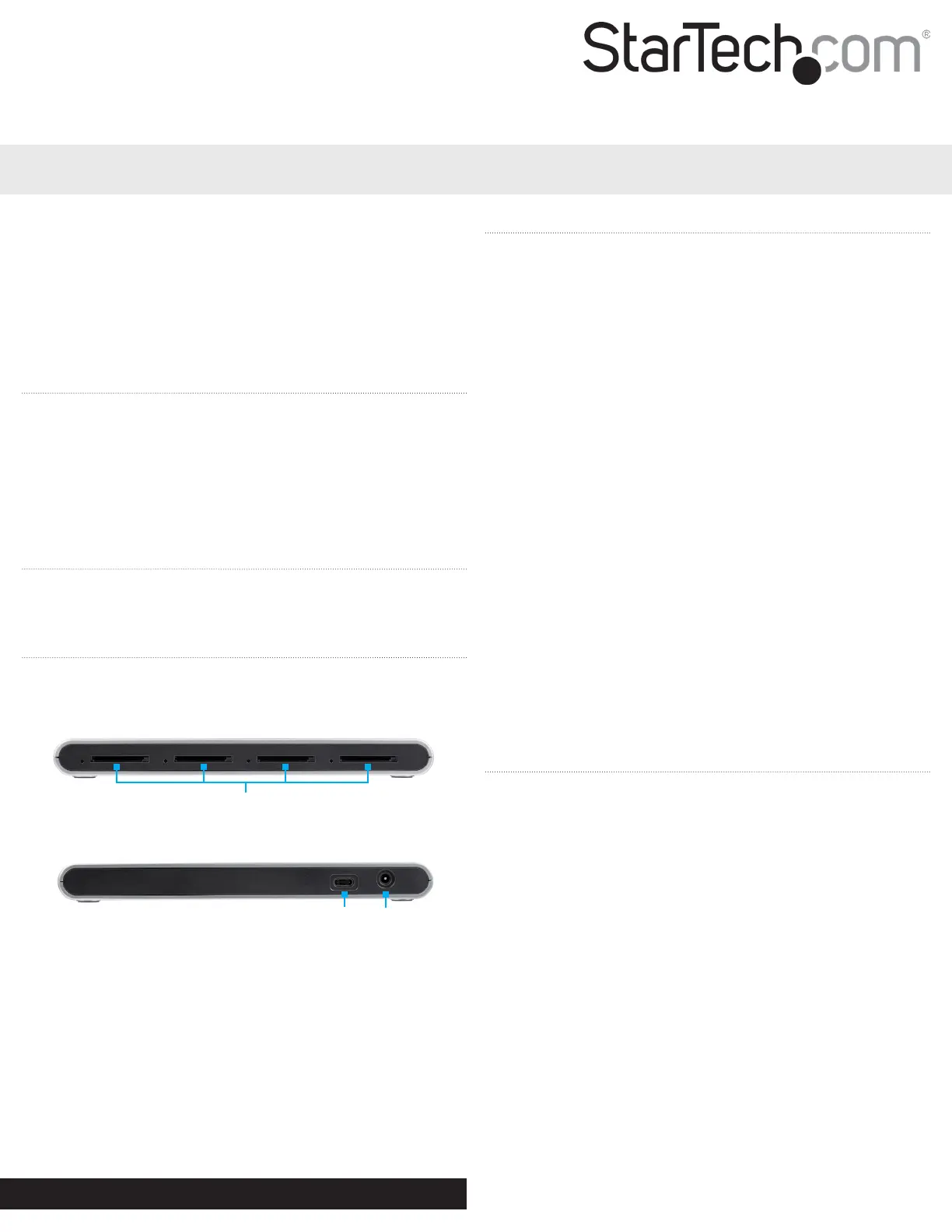
Product Diagram
Actual product may vary from photos.
Front View
Rear View
4SD4FCRU31C
4-Slot SD™ Card Reader - USB-C™ - USB 3.1 (10Gbps) - SD 4.0, UHS-II
Connecting the SD Card Reader
Note: Depending on your host computer’s USB port conguration,
use either the USB-C to USB-C Cable or the USB-A to USB-C Cable to
connect the SD Card Reader to the host.
1. Connect one end of the USB-C to USB-C Cable to the USB-C Port
on the back of the SD Card Reader.
2. Connect the other end of the USB-C to USB-C Cable to a USB-C
port on the host computer.
3. Connect the Universal Power Adapter to the Power Port on the
back of the SD Card Reader and connect the other end to an AC
power outlet.
Note: Driver installation is not required.
Inserting an SD Card
1. Insert an SD Card label side up into one of the SD Card Slots on
the front of the SD Card Reader.
2. Once inserted, push the SD Card into the SD Card Slot until it
clicks into place.
Note: The host computer’s Operating System (OS) will automatically
detect the SD Card and install the required driver software.
3. Using the host computer’s OS, navigate to the SD Card’s location
(e.g. root folder).
4. Access the data stored on the SD Card inserted in step 1.
Removing an SD Card
Warning: Removal of the SD Card before it is safe could result in the
loss or corruption of data on the SD Card.
Windows
1. Click on the Up arrow on the right side of the Taskbar.
2. The System Tray will pop up, revealing a set of icons.
3. Click on the Safely Remove Hardware icon.
4. The Safely Remove Hardware screen will appear.
5. Select the SD Card you wish to remove.
6. A message will appear telling you when it is safe to remove the
Card from the SD Card Reader.
macOS
1. Close any open screens associated with the SD Card Reader.
2. On the Desktop, click and drag the USB storage icon to the Trash
Can icon. The Trash Can icon will turn into an Eject icon indicating
that it is safe to remove the SD Card from the SD Card Reader.
USB-C
Port
Power
Port
SD Card Slots 1-4
Problemløsning StarTech.com 4SD4FCRU31C
Hvis du har læst manualen omhyggeligt, men ikke fundet en løsning på dit problem, bed andre brugere om hjælp
Specifikationer
| Bredde: | 70 mm |
| Dybde: | 177 mm |
| Højde: | 17 mm |
| Vægt: | 335 g |
| Antal pr. pakke: | 1 stk |
| Produktfarve: | Sort, sølv |
| Pakkevægt: | 500 g |
| Pakkedybde: | 195 mm |
| Pakkebredde: | 142 mm |
| Pakkehøjde: | 50 mm |
| Kompatible hukommelseskort: | MMC, SD, SDHC, SDXC |
| Opbevaringstemperatur (T-T): | -20 - 70 °C |
| Relativ luftfugtighed ved drift (H-H): | 0 - 60 % |
| Driftstemperatur (T-T): | 0 - 40 °C |
| Hurtig start guide: | Ja |
| Kabler inkluderet: | USB Type-A to USB Type-C, USB Type-C |
| LED-indikatorer: | Aktivitet |
| Udgangsspænding: | 5 V |
| Harmoniseret systemkode (HS): | 84719000 |
| Bæredygtighedscertifikater: | CE, RoHS |
| Indgangsspænding: | 100 - 240 V |
| Hovedkassen højde (udvendigt): | 337 mm |
| Hovedkassens længde (udvendigt): | 417 mm |
| Hovedkassens bredde (udvendigt): | 300 mm |
| Intern: | Ingen |
| Indgangsstrøm: | 1 A |
| Produkter pr. hovedkasse (udvendigt): | 20 stk |
| Overholdelse af bæredygtighed: | Ja |
| Strømstiktype: | Type B |
| Udgående strøm: | 2400 mA |
| Antal USB 3.2 Gen 1 (3.1 Gen 1) -porte: | 1 |
| Antal porte: | 4 |
| Integreret USB-kabel: | Ingen |
| Antal hukommelseskortholdere: | 4 |
| Inkluderede strømstik typer: | ANZ, EU, JP, UK, US |
| Organisering af chips: | Genesys Logic - GL3590, Genesys Logic - GL3227 |