StarTech.com
Hukommelseskortlæser
FCREADHCU3
StarTech.com FCREADHCU3 Brugsanvisning
Her er StarTech.com FCREADHCU3 (Hukommelseskortlæser) brugervejledning. 2 sider på sprog med en vægt på 594,806.0 Mb. Hvis du ikke kan finde svar på dit problem Spørg vores community.
Side 1/2
Instruction Manual
DE: Bedienungsanleitung - de.startech.com
FR: Guide de l'utilisateur - fr.startech.com
ES: Guía del usuario - es.startech.com
I T: Guida per l'uso - it.startech.com
NL: Gebruiksaanwijzing - nl.startech.com
P T: Guia do usuário - pt.startech.com
Manual Revision: 10/06/2014
For the most up-to-date information, please visit: www.startech.com
Packaging Contents
• 1 x USB 3.0 Card Reader
• 1 x USB 3.0 Cable
• 1 x Instruction Manual
System Requirements
• USB enabled computer system with available USB port
• Microsoft® Windows® XP/ Server 2003/ Vista/ Server 2008 R2/ 7
(32/64-bit)
FCREADHCU3
External USB 3.0 Flash Memory Card Reader
Installation
1. While the computer is running, connect the USB cable from the
back of the card reader, to an available USB port on the host
computer. The LED on the top of the card reader will light up.
2. Windows will automatically detect the card reader and install the
drivers.
3. Once the drivers are installed, the card reader will be ready for
use.
4. Gently insert a memory card into the appropriate card slot, with
the label side facing up. The card should not have to be forced.
5. Access the memory card like any other removable storage device,
from the “My Computer” window.
6. To remove the memory card, make sure it is not currently being
accessed, and simply pull the card the card from the slot.
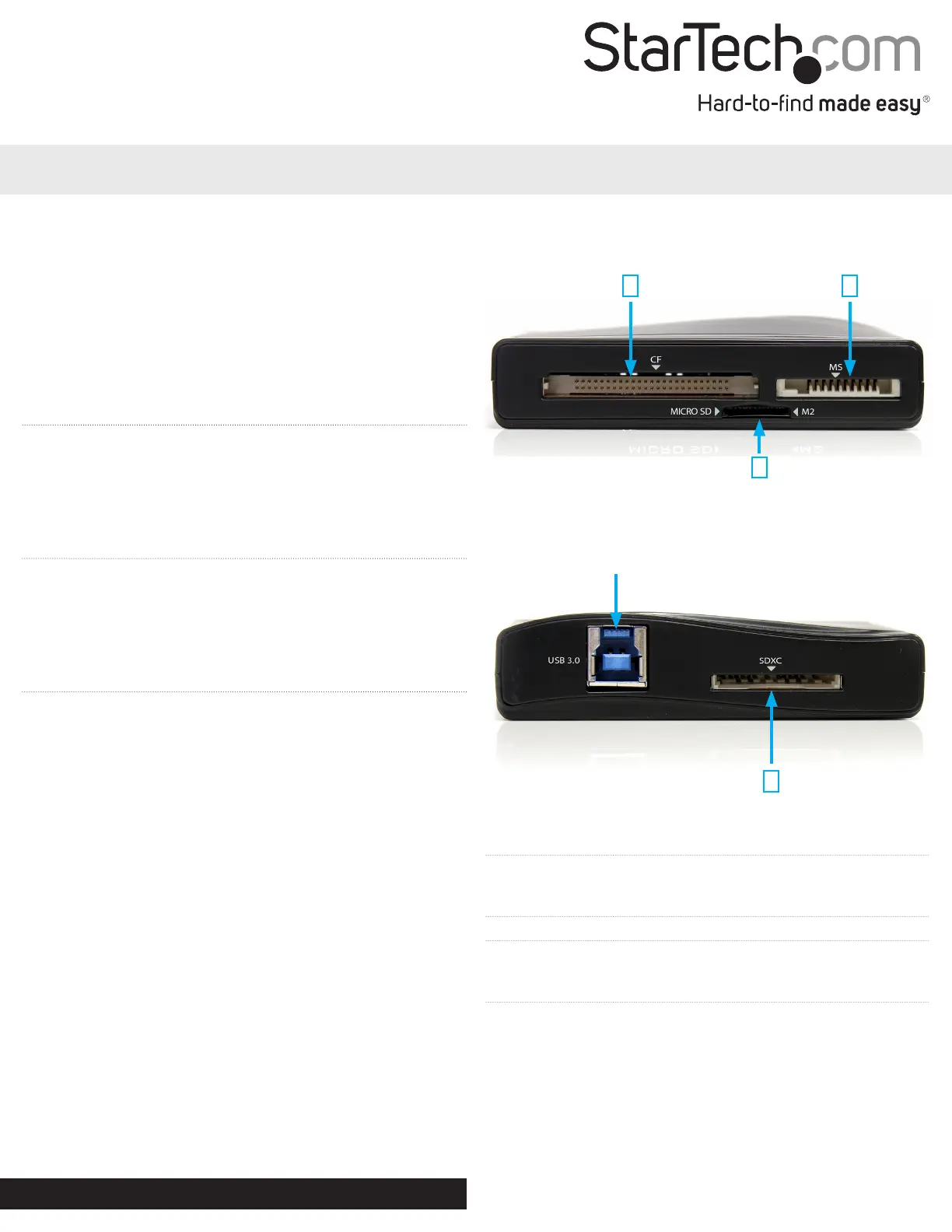
Card Slot 1 CompactFlash® type I/II
Card Slot 2
Memory Stick® (MS), MS Duo, MS PRO,
MS Select, MS PRO Duo, MS-ROM, MSXC
*MagicGate™ and High Speed modes supported
Card Slot 3 MicroSD, MicroSDHC, Memory Stick Micro (M2)
Card Slot 4
Secure Digital® (SD), SDHC, SDXC,
MultiMediaCard™ (MMC), DV-MMC, RS-MMC,
DV-RS MMC, MMCplus, MMCmobile
1 2
3
4
Front View
Rear View
*actual product may vary from photos
USB 3.0 Connector (host)
Problemløsning StarTech.com FCREADHCU3
Hvis du har læst manualen omhyggeligt, men ikke fundet en løsning på dit problem, bed andre brugere om hjælp
Specifikationer
| Bredde: | 55 mm |
| Dybde: | 85 mm |
| Højde: | 20 mm |
| Vægt: | 54 g |
| Brugervejledning: | Ja |
| Produktfarve: | Sort |
| Pakkevægt: | 169 g |
| Pakkedybde: | 173 mm |
| Pakkebredde: | 143 mm |
| Pakkehøjde: | 32 mm |
| Kompatible hukommelseskort: | CF, Memory Stick (MS), MicroSD (TransFlash), MicroSDHC, MiniSD, MMC, MS Duo, MS Micro (M2), MS PRO, MS PRO Duo, MS Pro-HG Duo, MSXC, RS-MMC, SD, SDHC, SDXC |
| Opbevaringstemperatur (T-T): | -65 - 150 °C |
| Relativ luftfugtighed ved drift (H-H): | 5 - 90 % |
| Driftstemperatur (T-T): | -40 - 80 °C |
| Husmateriale: | Plast |
| Kabler inkluderet: | USB |
| Certificering: | CE, FCC, RoHS |
| LED-indikatorer: | Strøm |
| Udgangsspænding: | 5 V |
| Harmoniseret systemkode (HS): | 84719000 |
| Indgangsspænding: | 100 - 240 V |
| Understøttede Mac-operativsystemer: | Mac OS X 10.6 Snow Leopard, Mac OS X 10.7 Lion, Mac OS X 10.8 Mountain Lion, Mac OS X 10.9 Mavericks |
| Understøttede Linux-operativsystemer: | Ja |
| Intern: | Ingen |
| Plug and play: | Ja |
| Indgangsstrøm: | 0.8 A |
| Udgående strøm: | 4000 mA |
| Understøtter SIM-kort: | Ingen |
| Chipsæt: | Genesys Logic - GL3220 |