StarTech.com
Hukommelseskortlæser
35FCREADBK2
StarTech.com 35FCREADBK2 Brugsanvisning
Her er StarTech.com 35FCREADBK2 (Hukommelseskortlæser) brugervejledning. 2 sider på sprog med en vægt på 563,971.0 Mb. Hvis du ikke kan finde svar på dit problem Spørg vores community.
Side 1/2
Instruction Manual
DE: Bedienungsanleitung - de.startech.com
FR: Guide de l'utilisateur - fr.startech.com
ES: Guía del usuario - es.startech.com
IT: Guida per l'uso - it.startech.com
NL: Gebruiksaanwijzing - nl.startech.com
PT: Guia do usuário - pt.startech.com
Manual Revision: 08/07/2012
For the most up-to-date information, please visit: www.startech.com
35FCREADBK2
3.5in Front Bay USB 2.0 22-in-1 Memory Card Reader
Packaging Contents
• 1xInternalCardReader
• 1x9-pinIDCcable
• 1xBagofmountingscrews
• 1xInstallationGuide
*actual product may vary from photos
System Requirements
• Computerchassiswithavailable3.5infrontbay
• Computersystemwithavailableinternal9-pinUSBheader
• Windows2000/XP(32/64-bit)/Server2003(32/64-bit)/Vista(32/64-
bit)/7/8(32/64-bit)/Server2008R2,Linuxkernel2.4orlater
Installation
WARNING! Computerpartscanbeseverelydamagedbystatic
electricity.Besurethatyouareproperlygroundedbeforeopening
yourcomputercase.StarTech.comrecommendsthatyouwearan
anti-staticstrapwheninstallinganycomputercomponent.Ifananti-
staticstrapisunavailable,dischargeyourselfofanystaticelectricity
build-upbytouchingalargegroundedmetalsurface(suchasthe
computercase)forseveralseconds.
1. Turnyourcomputeroandanyperipheralsconnectedtothe
computer(i.e.Printers,externalharddrives,etc.).Unplugthe
powercablefromtherearofthepowersupplyonthebackofthe
computeranddisconnectallperipheraldevices.
2. Removethecoverfromthecomputercase.Referto
documentationforyourcomputersystemfordetails.
3. Removethecoverforafrontpanel3.5inbay.Referto
documentationforyourcomputersystemfordetails.
4. Slidetheinternalcardreaderintothe3.5inbayfromtheoutside.
Oncethemountingholesalongthesidesofthecardreaderline
upwiththemountingholesforthe3.5inbay,fastenthecard
readerinplace.Refertodocumentationforyourcomputersystem
fordetails.
5. ConnecttheUSBcablefromtherearofthecardreadertoan
available9-pinUSBheaderonthemotherboard.Theconnector
iskeyedtohelppreventincorrectinstallation.Seesystemor
motherboarddocumentationforspecicdetails.
6. Placethecoverbackontothecomputercase.
7. Insertthepowercableintothesocketonthepowersupplyand
reconnectallotherconnectorsremovedinStep1.
8. Nodriverinstallationisrequired,astheoperatingsystemshould
detectandinstallitautomatically.Onceinstalled,memorycards
maybeinsertedintothereaderandused(onlyonecardata
timesupported).
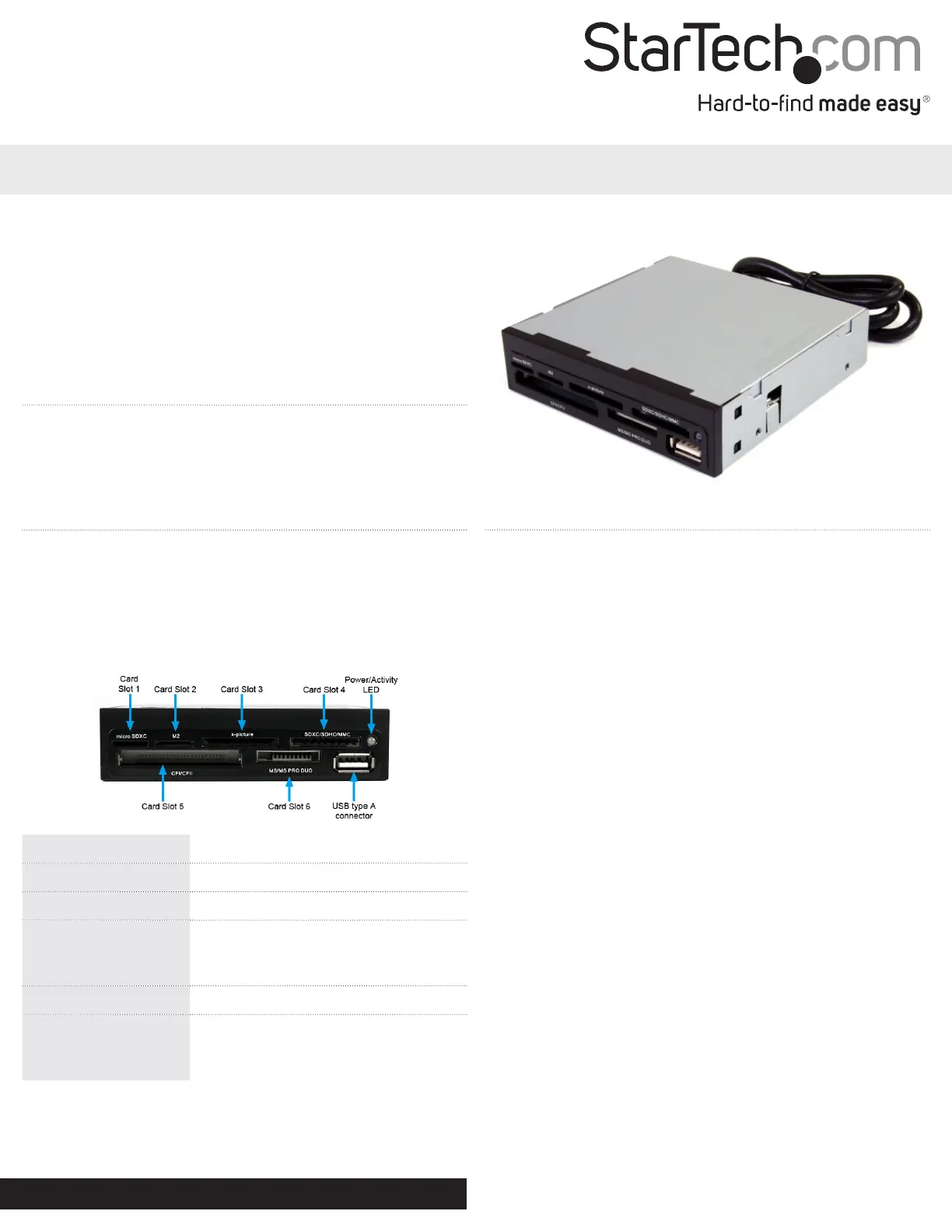
Card Slot 1 MicroSD/SDHC/SDXC
Card Slot 2 MemoryStickMicro(M2™)
Card Slot 3 xD-Picturecard™
Card Slot 4
SD/SDHC/SDXC/SM,MMC/RS-MMC/
HS-MMC/MMCmobile/MMCplus/
MMCmicro/HC-MMC
Card Slot 5 CompactFlash™typeI/II
Card Slot 6
MemoryStick™(MS/MSDuo/HS-MS/
MSPRO/MSPRODuo/MSPRO-HGDuo/
MS-ROM)
Problemløsning StarTech.com 35FCREADBK2
Hvis du har læst manualen omhyggeligt, men ikke fundet en løsning på dit problem, bed andre brugere om hjælp
Specifikationer
| Vægt: | 180 g |
| Produktfarve: | Sort |
| Pakkevægt: | 250 g |
| Pakkedybde: | 165 mm |
| Pakkebredde: | 140 mm |
| Pakkehøjde: | 36 mm |
| Kompatible hukommelseskort: | CF, Memory Stick (MS), microSDHC, miniSD, MMC, MS Duo, MS PRO, MS PRO Duo, MS Pro-HG, SD, SDHC, SDXC, xD |
| Opbevaringstemperatur (T-T): | -40 - 125 °C |
| Relativ luftfugtighed ved drift (H-H): | 15 - 85 % |
| Antal USB 2.0-porte: | 1 |
| Driftstemperatur (T-T): | 0 - 70 °C |
| Husmateriale: | Plastic, Steel |
| Dimensioner (BxDxH): | 100 x 130 x 125 mm |
| LED-indikatorer: | Ja |
| Kompatible operativsystemer: | Windows 2000/ XP(32/64-bit)/ Server 2003 (32/64-bit)/ Vista (32/64-bit)/ 7 (32/64-bit)/ Server 2008 R2, Linux 2.4 |
| Intern: | Ja |
| Dataoverførselshastighed: | 480 Mbit/s |
| Understøtter SIM-kort: | Ingen |
| Antal porte: | 6 |