StarTech.com
Netværkskort/adapter
PAX2235-WIFI-6E-CARD
StarTech.com PAX2235-WIFI-6E-CARD Brugsanvisning
Her er StarTech.com PAX2235-WIFI-6E-CARD (Netværkskort/adapter) brugervejledning. 2 sider på sprog med en vægt på 446,928.0 Mb. Hvis du ikke kan finde svar på dit problem Spørg vores community.
Side 1/2
Quick-Start Guide
To view manuals, FAQs, videos, drivers, downloads, technical drawings, and more, visit www.startech.com/support.
Manual Revision: October 6, 2023 11:25 AM
Product ID
PAX2235-WIFI-6E-CARD
PCIe Wi-Fi 6/6E Network Adapter Card - 802.11ax
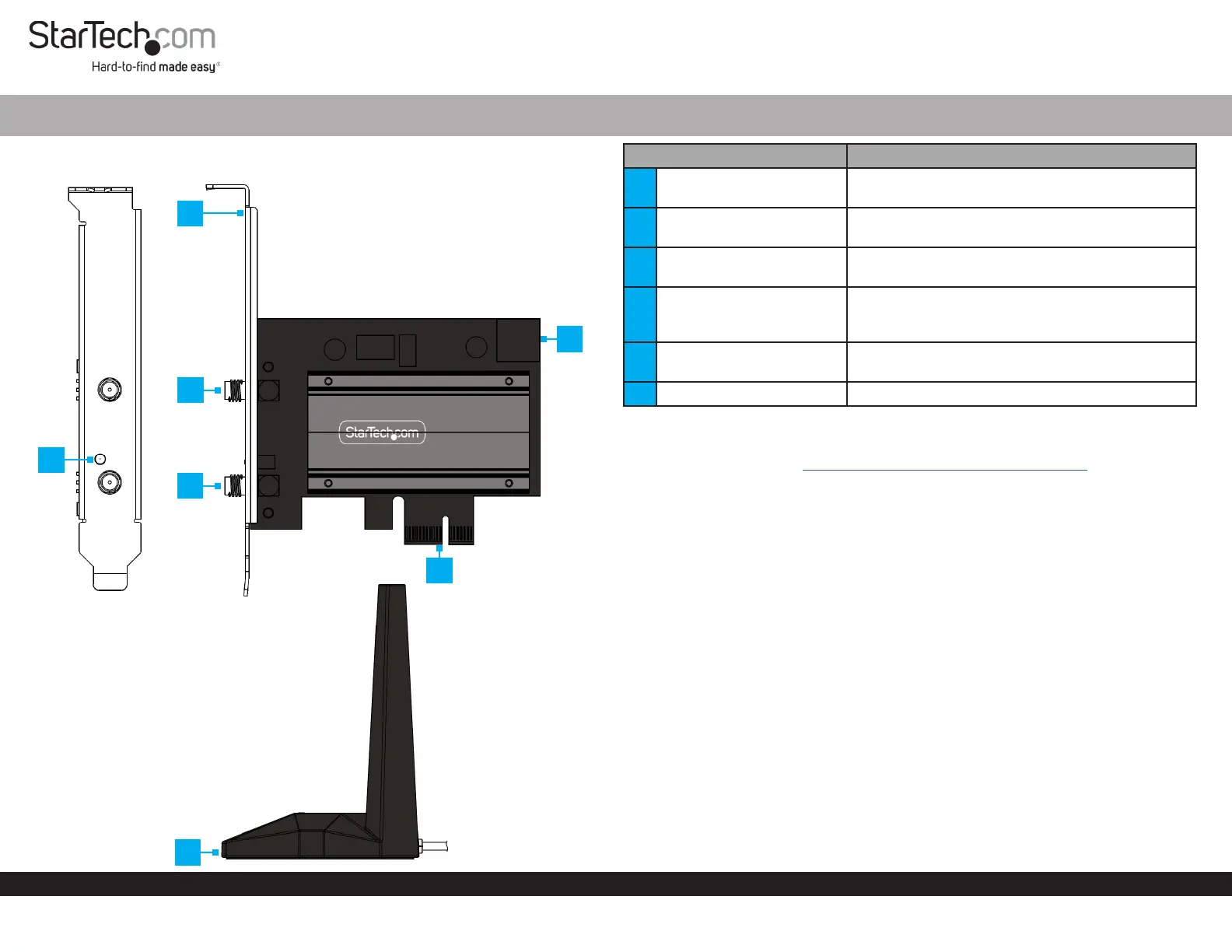
Component Function
1 LED Indicator
• Solid Green: PCIe Wi-Fi Card is installed and
receiving power
2 Full Prole Bracket
• Secure the PCIe Wi-Fi Card to the Computer
Case
3 Antenna Connectors
• Connect the Antenna Cables from the Magnetic
Antenna Stand
4 Bluetooth USB 2.0 Header
• Connect to a USB 2.0 Header on the Computer’s
Motherboard, using the included Bluetooth
Cable
5 PCIe p1-x1 Connector
• Connect the PCIe Wi-Fi Card to a PCIe Slot in a
Computer
6 Magnetic Antenna Stand • Provides adjustable placement of the Antenna
Requirements
For the latest drivers/software, technical specications, and declarations of
conformance, please visit: www.StarTech.com/PAX2235-WIFI-6E-CARD
Package Contents
• PCIe Wi-Fi Card x 1
• Magnetic Antenna Stand x 1
• Bluetooth Cable x 1
• Low-Prole Bracket x 1
• Quick-Start Guide x 1
Installation
Warning: PCIe Cards can be damaged by static electricity. Ensure that the Installer
is properly grounded before they open the Computer Case or touch the PCIe Wi-Fi
Card. The Installer should wear an Anti-Static Strap when installing any computer
component. If an Anti-Static Strap is not available, discharge any built-up static
electricity by touching a large Grounded Metal Surface for several seconds. Only
handle the PCIe Wi-Fi Card by its edges and do not touch the gold connectors.
(Optional) Installing the Low Prole Bracket
Note: By default the Full Prole Bracket is attached to the PCIe Wi-Fi Card.
Depending on the system conguration the Full Prole Bracket may need to be
removed and replaced with the Low Prole Bracket (included).
1. Ensure the Antenna Cables are disconnected from the PCIe Wi-Fi Card.
2. Using a Small Phillips Head Screwdriver, remove the two Bracket Screws securing
the Full Prole Bracket to the PCIe Wi-Fi Card. Set the Bracket Screws aside as
they will be used to attach the Low Prole Bracket.
2
1
3
3
5
6
4
Problemløsning StarTech.com PAX2235-WIFI-6E-CARD
Hvis du har læst manualen omhyggeligt, men ikke fundet en løsning på dit problem, bed andre brugere om hjælp
Specifikationer
| Bredde: | 62 mm |
| Dybde: | 120 mm |
| Højde: | 18 mm |
| Vægt: | 200 g |
| Produktfarve: | Sort |
| Pakkevægt: | 365 g |
| Pakkedybde: | 150 mm |
| Pakkebredde: | 107 mm |
| Pakkehøjde: | 136 mm |
| Wi-Fi: | Ja |
| Bluetooth: | Ja |
| Opbevaringstemperatur (T-T): | -10 - 70 °C |
| Relativ luftfugtighed ved drift (H-H): | 10 - 90 % |
| Wi-Fi-standarder: | 802.11a, 802.11b, 802.11g, Wi-Fi 4 (802.11n), Wi-Fi 5 (802.11ac), Wi-Fi 6 (802.11ax), Wi-Fi 6E (802.11ax) |
| Driftstemperatur (T-T): | 0 - 40 °C |
| Sikkerhedsalgoritmer: | AES, WPA2, WPA3 |
| Hurtig installationsvejledning: | Ja |
| Bluetooth-version: | 5.3 |
| Frekvensområde: | 2.4 - 6 GHz |
| Forbindelsesteknologi: | Trådløs |
| Wi-Fi-bånd: | Tri-band (2,4 GHz/5 GHz/6 GHz) |
| Netværksstandarder: | IEEE 802.11a, IEEE 802.11ac, IEEE 802.11ax, IEEE 802.11b, IEEE 802.11g, IEEE 802.11n |
| Antennedesign: | Ekstern |
| LED-indikatorer: | Ja |
| Kabellængde: | 1 m |
| Bæredygtighedscertifikater: | Federal Communications Commission (FCC) |
| Understøttede Windows-operativsystemer: | Windows 10, Windows 10 Education, Windows 10 Education x64, Windows 10 Enterprise, Windows 10 Enterprise x64, Windows 10 Home, Windows 10 Home x64, Windows 10 IOT Core, Windows 10 IoT Enterprise, Windows 10 Pro, Windows 10 Pro x64, Windows 10 x64, Windows 11, Windows 11 Enterprise, Windows 11 Enterprise x64, Windows 11 Home, Windows 11 Pro, Windows 11 x64 |
| Understøttede Linux-operativsystemer: | Ja |
| Hovedkassen højde (udvendigt): | 295 mm |
| Hovedkassens længde (udvendigt): | 470 mm |
| Hovedkassens bredde (udvendigt): | 560 mm |
| Værtsgrænseflade: | PCI |
| Grænseflade: | WLAN / Bluetooth |
| Intern: | Ja |
| Antenne: | Ja |
| Maksimal dataoverførselshastighed: | 2400 Mbit/s |
| Understøttede WLAN-dataoverførselshastigheder: | 574,2402 Mbit/s |
| Modulation: | 1024-QAM, OFDMA |
| Bluetooth Low Energy (BLE): | Ja |
| Produkter pr. hovedkasse (udvendigt): | 30 stk |
| Fuld duplex: | Ja |
| Overholdelse af bæredygtighed: | Ja |
| Komponent til: | PC/Laptop |
| Gennemsnitstid mellem fejl (MTBF): | 50000 t |
| Monteringsbeslag inkluderet: | Ja |
| Niveau for antennestyrke (maks.): | 5 dBi |
| PCI version: | 3.0 |
| MU-MIMO: | Ja |