StarTech.com HD2A Brugsanvisning
Her er StarTech.com HD2A (Audio/video konverter) brugervejledning. 2 sider på sprog med en vægt på 509,178.0 Mb. Hvis du ikke kan finde svar på dit problem Spørg vores community.
Side 1/2
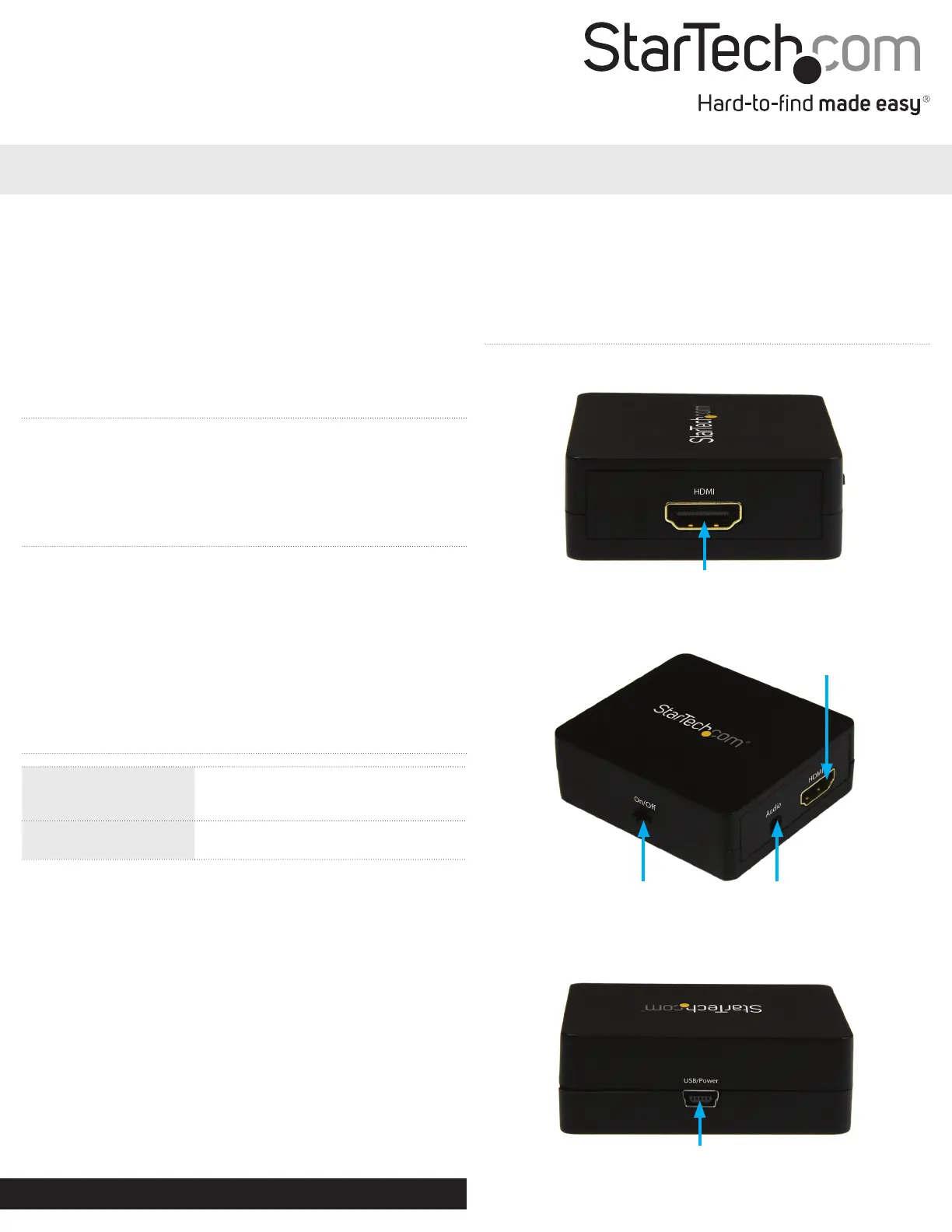
USB power source
Power switch 3.5mm analog
and SPDIF
output port
HDMI output port
HDMI input port
Quick start guide
FR: Guide de l’utilisateur - fr.startech.com
DE: Bedienungsanleitung - de.startech.com
ES: Guía del usuario - es.startech.com
NL: Gebruiksaanwijzing - nl.startech.com
PT: Guia do usuário - pt.startech.com
IT: Guida per l’uso - it.startech.com
Manual Revision: 08/10/2016
For the latest information, technical specications, and support for
this product, please visit www.startech.com/HD2A.
Packaging contents
• 1 x HDMI audio extractor
• 1 x USB power cable
• 1 x Toslink adapter
• 1x quick install guide
System requirements
• HDMI source device (e.g. Blu-ray player, computer)
• SPDIF or 3.5mm audio destination device, such as an audio
receiver or speakers
• HDMI cabling for the source device
• SPDIF or 3.5mm audio cabling for the destination device
Operating system requirements are subject to change. For the latest
requirements, please visit www.startech.com/HD2A..
HD2A
HDMI® Audio Extractor
*actual product may vary from photos
Product Overview
Front View
Left side and back view
Right side view
Operation notes
• The USB power source port must be connected to a USB power
source such as a computer or a USB power adapter. This is required
in all congurations for the adapter to operate.
• For SPDIF audio, connect the included Toslink adapter to the
3.5mm analog and SPDIF output port, then connect your SPDIF
cabling to the adapter.
• If, once connected, the output of your destination device plays
static with no audio, it’s likely your source device is set to bit
stream audio (unprocessed). As a result it will be necessary to
adjust this setting to PCM (Pulse-code modulation) in the output
settings of your audio source device. Please consult the manual
included with your HDMI source device for instructions.
Maximum supported
resolution for video
pass-through
Up to 1920 x 1200 or 1080p
Audio specications
SPDIF audio – up to 2.1 surround sound
3.5mm audio – 2-channel stereo
Specications
• If an HDMI audio source that’s higher than 2.1-channel is sent
through the adapter, it will not be audible. It will be necessary to
adjust this setting in your video source to output to 2.1 channel.
Problemløsning StarTech.com HD2A
Hvis du har læst manualen omhyggeligt, men ikke fundet en løsning på dit problem, bed andre brugere om hjælp
Specifikationer
| Bredde: | 55 mm |
| Dybde: | 60 mm |
| Højde: | 20 mm |
| Vægt: | 38 g |
| Pakkevægt: | 135 g |
| Pakkedybde: | 143 mm |
| Pakkebredde: | 170 mm |
| Pakkehøjde: | 32 mm |
| Understøttede videotilstande: | 480p, 720p, 1080p |
| HDCP: | Ja |
| Kabler inkluderet: | USB |
| Lyd-output kanaler: | 2.1 kanaler |
| Certificering: | CE, FCC |
| Harmoniseret systemkode (HS): | 85176990 |
| Maksimal videoopløsning: | 1920 x 1080 pixel |
| Værtsgrænseflade: | HDMI |
| USB-drevet: | Ja |
| Lydudgang: | 3,5 mm |
| Output-grænseflade: | HDMI |
| Chipsæt: | Explore-EP93Z3E |
| Understøttelse af lyd: | Ja |