StarTech.com
Hukommelseskortlæser
MSDREADU3C
StarTech.com MSDREADU3C Brugsanvisning
Her er StarTech.com MSDREADU3C (Hukommelseskortlæser) brugervejledning. 2 sider på sprog Engelsk med en vægt på 348,780.0 Mb. Hvis du ikke kan finde svar på dit problem Spørg vores community.
Side 1/2
Instruction manual
FR: Guide de l’utilisateur - fr.startech.com
DE: Bedienungsanleitung - de.startech.com
ES: Guía del usuario - es.startech.com
NL: Gebruiksaanwijzing - nl.startech.com
PT: Guia do usuário - pt.startech.com
IT: Guida per l’uso - it.startech.com
Manual Revision: 07/10/2016
For the latest information, technical specications, and support for
this product, please visit www.StarTech.com/MSDREADU3C.
Package contents
• 1 x USB 3.0 card reader/writer for microSD cards - USB-C
• 1 x quick-start guide
System requirements
• microSD card
• Computer, tablet, or device enabled with a USB Type-C™ port
The MSDREADU3C is OS independent and doesn’t require any
additional drivers or software. The MSDREADU3C receives enough
power through the USB bus and doesn’t require an additional power
source.
System requirements are subject to change. For the latest
requirements, please visit www.startech.com/MSDREADU3C.
MSDREADU3C
USB 3.0 Card Reader/Writer for microSD Cards - USB-C
Make sure that you assemble this product according to the
instructions. Failure to do so might result in personal injury or
property damage.
Introduction
The MSDREADU3C provides a quick and easy way to transfer photos
and videos from a microSD™ card to a computer, tablet, or device
that’s enabled with a USB-C™ port. The MSDREADU3C also provides
a safe and portable alternative to storing your microSD cards when
they’re not in use.
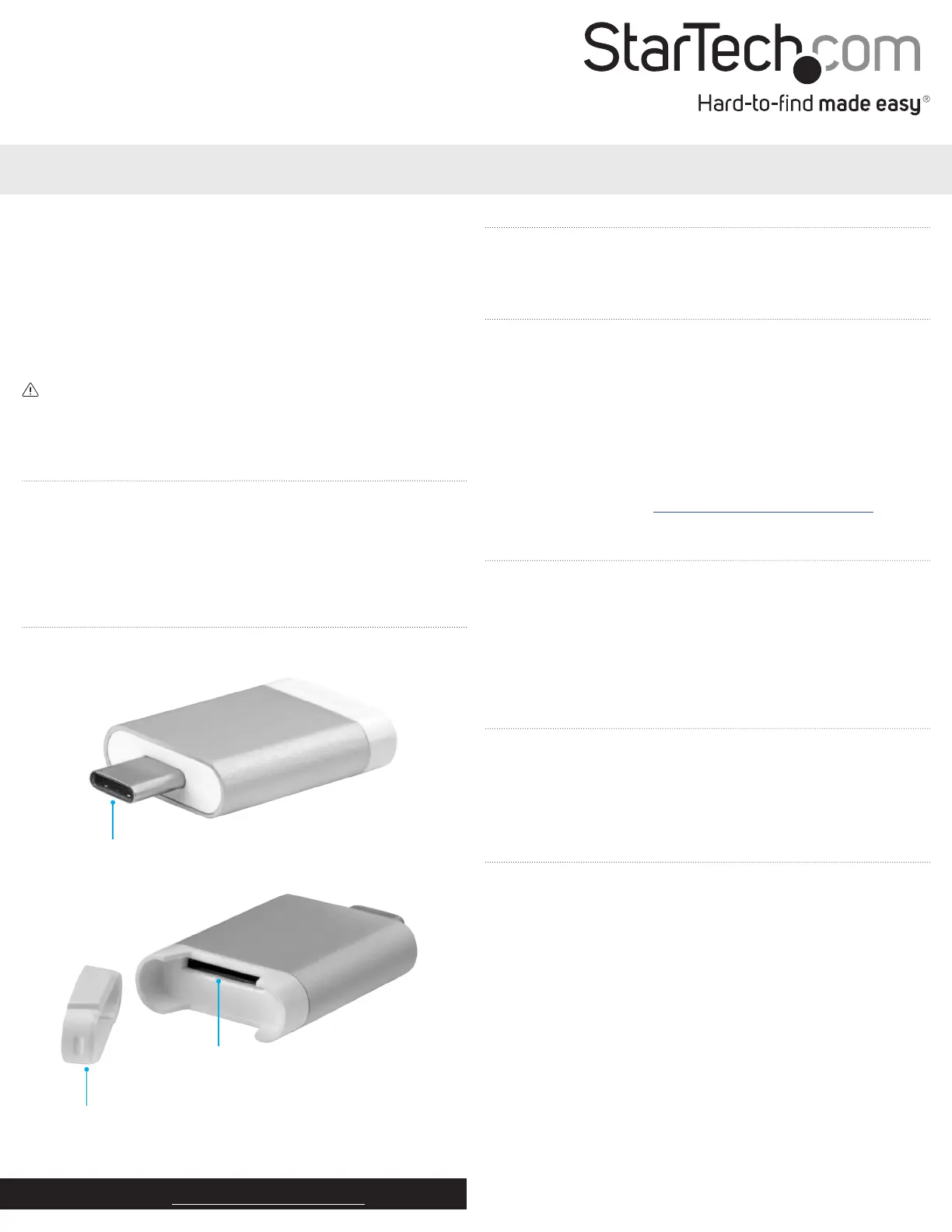
Product diagram
Slot cover
microSD card slot
*actual product may vary from photos
About USB 3.0 and USB 3.1 Gen 1
USB 3.0 is also known as USB 3.1 Gen 1. This connectivity standard
oers speeds up to 5Gbps.
Note: Data transfer rates are dependent upon the speed of the
memory card you are using and the speed capabilities of the USB
port on your host device.
Card support
The MSDREADU3C supports the following card types:
• microSD
• T-Flash
Use the MSDREADU3C
1. Remove the Slot cover from the end of the MSDREADU3C.
2. Gently slide a microSD card into the microSD card slot on the USB
card reader until you feel resistance and the card is fully inserted.
3. Replace the Slot cover onto the end of the USB card reader.
4. Insert the USB-C plug on the USB card reader into the USB port
on your computer, tablet, or device.
5. Follow the instructions specic to the OS that you’re running to
access content on the USB card reader.
USB-C plug
Problemløsning StarTech.com MSDREADU3C
Hvis du har læst manualen omhyggeligt, men ikke fundet en løsning på dit problem, bed andre brugere om hjælp
Specifikationer
| Bredde: | 22 mm |
| Dybde: | 28.8 mm |
| Højde: | 7.4 mm |
| Vægt: | 3 g |
| Produktfarve: | Sort |
| Pakkevægt: | 40 g |
| Pakkedybde: | 100 mm |
| Pakkebredde: | 50 mm |
| Pakkehøjde: | 22 mm |
| Kompatible hukommelseskort: | MicroSD (TransFlash), MicroSDHC, MicroSDXC |
| Opbevaringstemperatur (T-T): | -20 - 75 °C |
| Relativ luftfugtighed ved drift (H-H): | 0 - 80 % |
| Driftstemperatur (T-T): | 0 - 70 °C |
| Husmateriale: | Aluminium, Plastic |
| Hurtig start guide: | Ja |
| Strømkilde type: | USB |
| Intern: | Ingen |
| Maksimal størrelse på hukommelseskort: | 64 GB |
| Dataoverførselshastighed: | 5000 Mbit/s |
| Understøtter UASP: | Ingen |
| Organisering af chips: | Genesys Logic - GL3224 |