CRUX
Ikke kategoriseret
AUX-BM4
CRUX AUX-BM4 Brugsanvisning
Her er CRUX AUX-BM4 (Ikke kategoriseret) brugervejledning. 2 sider på sprog med en vægt på 412,097.0 Mb. Hvis du ikke kan finde svar på dit problem Spørg vores community.
Side 1/2
Crux Interfacing Solutions • 21541 Nordhoff St., Unit C, Chatsworth, CA 91311
phone: (818) 609-9299 • fax: (818) 996-8188 • www.cruxinterfacing.com
rev.080719
1 of 2
R
INTERFACING SOLUTIONS
- The AUX-BM4 will enable the Auxiliary Audio Input on the OEM navigation radio menu.
PRODUCT FEATURES:
PARTS INCLUDED:
INSTALLATION INSTRUCTIONS:
AUX-BM4 OBD Coder Audio Input Cable
AUX-BM4
Auxiliary Input Interface and OBD Coder for Select
BMW Vehicles with Business or Professional Navigation System
1. Locate OBD-port and remove cover (commonly located under the dashboard on the driver side).
2. Turn ignion switch to ACC.
3. Wait unl the navigaon has booted.
4. Plug coder into OBD-port.
5. The navigaon will re-boot.
6. When the navigaon startup-screen shows, remove coder from OBD-port.
7. Your radio’s Auxiliary Audio input feature is now enabled.
To remove the Auxiliary Audio feature from the navigaon’s menu repeat steps 1-6. Aer the rst use on a
vehicle, the coder AUX-BM4 is personalized to this vehicle. On this vehicle the enabling and removing the
Audio-AUX feature can be repeated without limit.
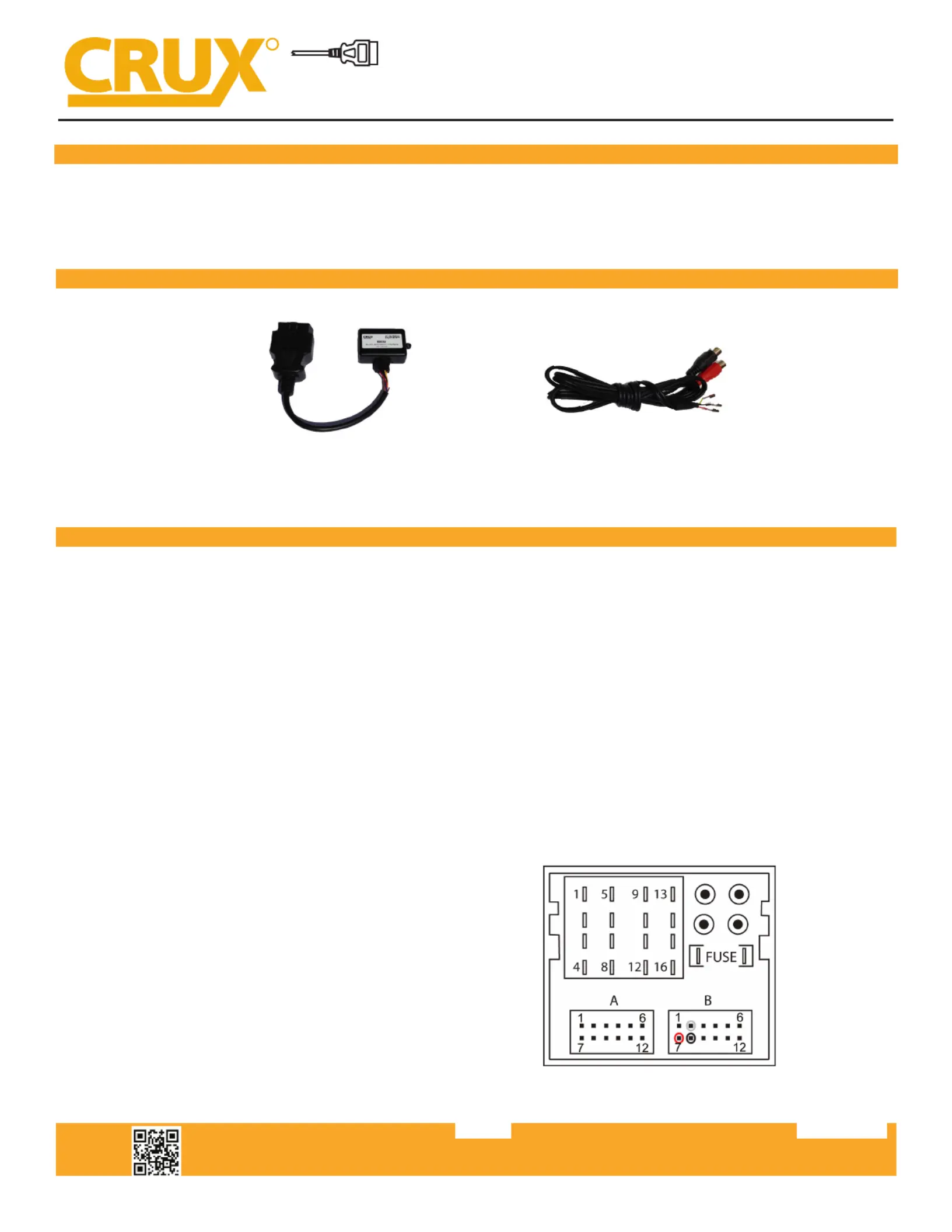
The AUX-cable must be connected into the female Quadlock connector of the vehicle harness on the
back of the radio (receiver under the AC vents).
Quadlock connector, chamber B
Pin 2 ● Audio (+) le (white)
Pin 7 ● Audio (+) right (red)
Pin 8 ● Audio (-) ground (black)
Problemløsning CRUX AUX-BM4
Hvis du har læst manualen omhyggeligt, men ikke fundet en løsning på dit problem, bed andre brugere om hjælp
Specifikationer
| Mærke: | CRUX |
| Kategori: | Ikke kategoriseret |
| Model: | AUX-BM4 |