StarTech.com
Andet computertilbehør
TB3DKM2HDL
StarTech.com TB3DKM2HDL Brugsanvisning
Her er StarTech.com TB3DKM2HDL (Andet computertilbehør) brugervejledning. 2 sider på sprog med en vægt på 523,599.0 Mb. Hvis du ikke kan finde svar på dit problem Spørg vores community.
Side 1/2
Quick-Start Guide
To view manuals, FAQs, videos, drivers, downloads, technical drawings, and more, visit www.startech.com/support.
Manual Revision: March 31, 2020 9:44 AM
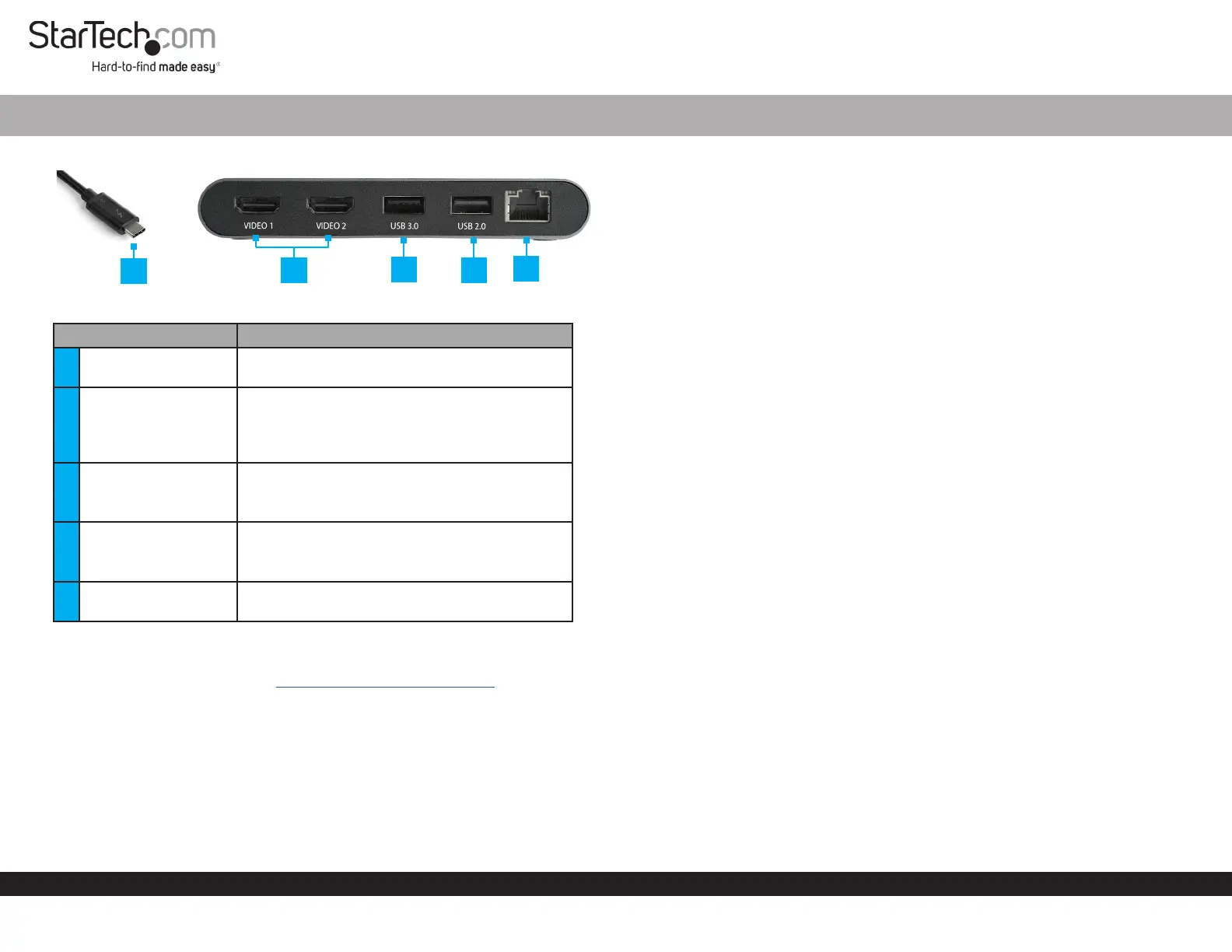
Product Diagram (TB3DKM2HDL)
Component Function
1
Thunderbolt 3 Host
Connector
• Connect the Docking Station to the Host
Laptop.
2
HDMI Ports x 2
• Connect an HDMI Display Device to the
Docking Station.
• Two HDMI or 4K Display Devices can be
connected to the Docking Station.
3 USB 3.0 Port
• Connect a USB Peripheral (mouse, ash drive,
etc.) to the Docking Station.
• Data transfer up to 5Gbps.
4 USB 2.0 Port
• Connect a USB Peripheral (mouse, ash drive,
etc.) to the Docking Station.
• Data transfer up to 480Mbps.
5 RJ45 Port
• Connect a Network Device to the Docking
Station.
Requirements
For the latest requirements, please visit www.startech.com/TB3DKM2HDL
• Host Laptop w/ Thunderbolt 3 port x 1
• HDMI Display Device x 2
Notes: A 4K-capable display is required to achieve 4096 x 2160p resolution.
Video output capabilities are dependent on the video card and hardware specications of
your connected host laptop.
You can connect a dierent type of display, such as a DisplayPort or VGA monitor using
an active video adapter (sold separately):
Thunderbolt™ 3 Dual HDMI Mini Bus Powered Docking Station for Laptops | 4K 60Hz | 28 cm Cable
• HDMI Cables x 2
Operating System:
• Windows® 10, 8, and 8.1
• macOS 10.13 and 10.12
Installing the Docking Station
When you connect the Docking Station to a computer that’s running Windows 10,
Windows 8/8.1 or macOS, the required drivers are automatically installed.
1. Connect an HDMI Cable (sold separately) to the HDMI Port on the Docking Station
and the other end to an HDMI port of a Display Device.
2. Repeat step 1 to connect a second Display Device.
3. Connect a USB Peripheral Device to the USB 3.0 and USB 2.0 Ports on the
Docking Station (e.g. USB devices, etc.).
4. Connect a CAT5e/6 Cable to the RJ45 Port on the Docking Station and the other
end to an RJ45 port on a Network Device.
5. Connect the Thunderbolt 3 Host Connector on the Docking Station to a
Thunderbolt 3 port on the Host Laptop.
Note: In Windows 10 or 8/8.1 you might see a pop-up message requesting permission
to allow the docking station to connect to your computer. If you see this pop-up
message, select Always Connect from the list and click OK. If required, follow any
other on-screen instructions to complete the installation.
Congure your display device
Use the Windows or macOS to adjust display settings for each connected monitor.
Supported Video Resolutions
Thunderbolt technology supports both video and data throughput. However, it
prioritizes video bandwidth to help ensure seamless display performance. The
performance of the remaining docking station functions depends entirely on the
display conguration you used.
1
2
3
5
4
Problemløsning StarTech.com TB3DKM2HDL
Hvis du har læst manualen omhyggeligt, men ikke fundet en løsning på dit problem, bed andre brugere om hjælp
Specifikationer
| Bredde: | 69 mm |
| Dybde: | 124 mm |
| Højde: | 27 mm |
| Vægt: | 147.8 g |
| Brugervejledning: | Ja |
| Produktfarve: | Grå |
| Pakkevægt: | 270 g |
| Pakkedybde: | 195 mm |
| Pakkebredde: | 139 mm |
| Pakkehøjde: | 37 mm |
| Opbevaringstemperatur (T-T): | -20 - 70 °C |
| Relativ luftfugtighed ved drift (H-H): | 0 - 95 % |
| Antal HDMI-porte: | 2 |
| Ethernet LAN-porte (RJ-45): | 1 |
| Antal USB 2.0-porte: | 1 |
| Antal USB 3.2 Gen 1 (3.1 Gen 1) type-A-porte: | 1 |
| Ethernet LAN: | Ja |
| Driftstemperatur (T-T): | 5 - 40 °C |
| Ethernet LAN-datahastigheder: | 10,100,1000 Mbit/s |
| Forbindelsesteknologi: | Ledningsført |
| Netværksstandarder: | IEEE 802.3ab, IEEE 802.3i, IEEE 802.3u |
| Kabellængde: | 0.28 m |
| Indbygget kortlæser: | Ingen |
| Harmoniseret systemkode (HS): | 84733020 |
| Bæredygtighedscertifikater: | RoHS |
| Mikrofonindgang: | Ingen |
| Understøttede Mac-operativsystemer: | Mac OS X 10.10 Yosemite, Mac OS X 10.11 El Capitan, Mac OS X 10.12 Sierra, Mac OS X 10.13 High Sierra, Mac OS X 10.14 Mojave, Mac OS X 10.15 Catalina |
| Hovedkassen højde (udvendigt): | 270 mm |
| Hovedkassens længde (udvendigt): | 437 mm |
| Hovedkassens bredde (udvendigt): | 300 mm |
| Værtsgrænseflade: | Thunderbolt 3 |
| Produkter pr. hovedkasse (udvendigt): | 24 stk |
| Understøttede operativsystemer til servere: | Windows Server 2008 R2, Windows Server 2012, Windows Server 2012 x64 |
| Maksimal digital opløsning: | 3840 x 2160 pixel |
| Wake-on-LAN klar: | Ja |
| Antal understøttede skærme: | 2 |
| Chipsæt: | Intel JHL6540 (Alpine Ridge), Texas Instruments TPS65983A, Parade PS176, ASMedia ASM1042A, Intel WGI210 |