StarTech.com
AV forlænger
ST121WHDS2
StarTech.com ST121WHDS2 Brugsanvisning
Her er StarTech.com ST121WHDS2 (AV forlænger) brugervejledning. 2 sider på sprog med en vægt på 444,046.0 Mb. Hvis du ikke kan finde svar på dit problem Spørg vores community.
Side 1/2
Quick-Start Guide
To view manuals, FAQs, videos, drivers, downloads, technical drawings, and more, visit www.startech.com/support.
Manual Revision: March 8, 2024
HDMI Over Wireless Extender - 4K 60Hz - 50m (165ft)
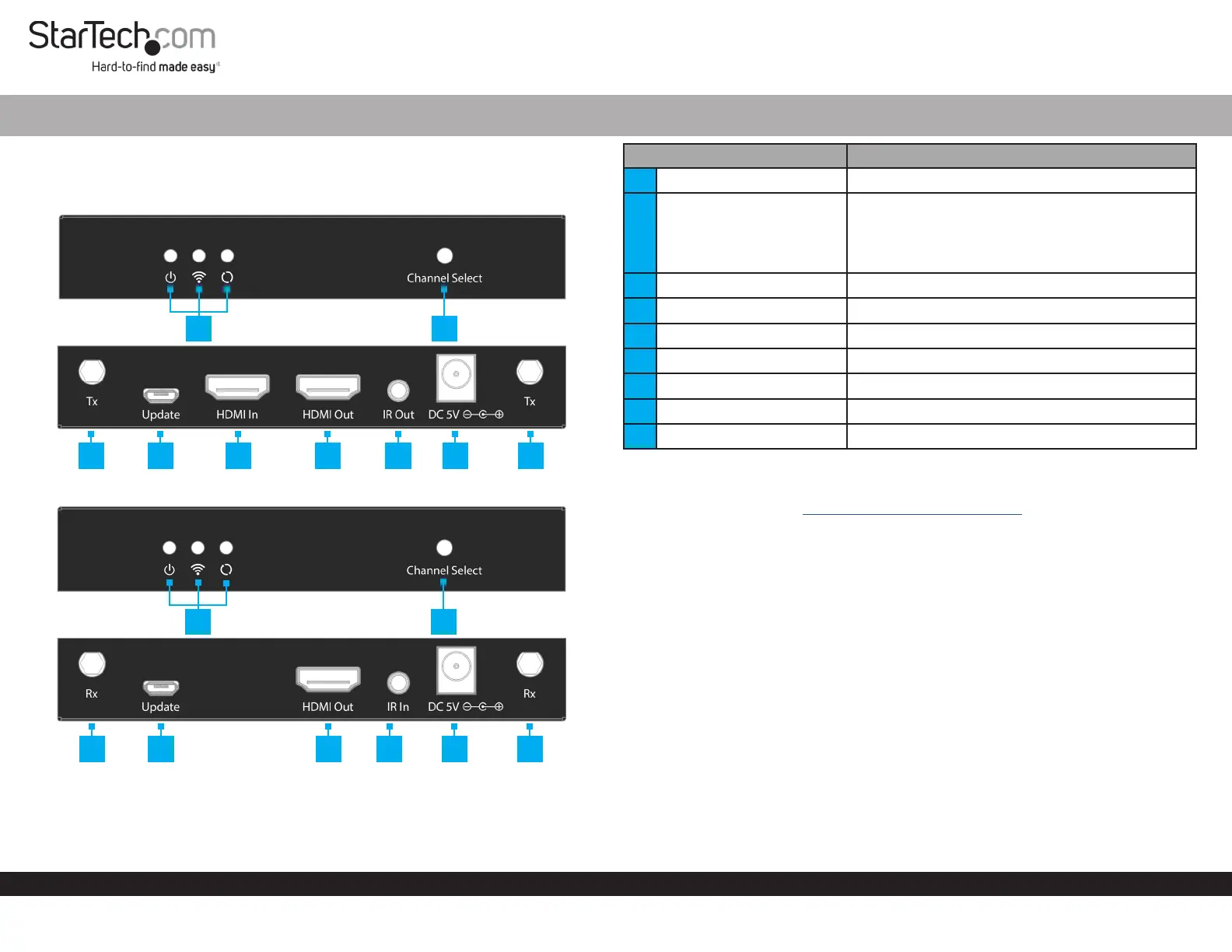
Component Function
1 LED Indicators • Refer to LED Chart
2 Channel Select Button
• Press to change Wireless Channels
• Press and Hold for 5 sec to initiate Pairing
• Press and Hold for 10 sec to Restore Default
Settings
3 Antenna Connectors • Connect the included Wireless Antennas
4 Update Port • Transmitter/Receiver: For manufacturer use only
5 HDMI Input • Connect to an HDMI Source Device
6 HDMI Output • Connect to an HDMI Display
7 IR Output Port • Connect the IR Blaster to the Transmitter
8 DC Power Input • Connect the included Universal Power Adapter
9 IR Input Port • Connect the IR Receiver to the Receiver
Product Information
For the latest product information, technical specications, and declarations of
conformance, please visit: www.StarTech.com/ST121WHDS2
Requirements
• HDMI Source Device x 1
• HDMI Display x 1
• HDMI Cables x 2
• (Optional) Local HDMI Display x 1
• (Optional) Phillips Head Screwdriver for Mounting x 1
Package Contents
• Wireless Transmitter x 1
• Wireless Receiver x 1
• IR Blaster x 1
• IR Receiver x 1
• Wireless Antenna x 4
• Universal Power Adapter (NA/EU/UK) x 2
• Mounting Kit x 2
• Set of Rubber Feet x 1
• Quick-Start Guide x 1
Product ID
ST121WHDS2
Transmitter
Receiver
1
2
3 4 5 6 7 8 3
3 4 6 9 8 3
1
2
Problemløsning StarTech.com ST121WHDS2
Hvis du har læst manualen omhyggeligt, men ikke fundet en løsning på dit problem, bed andre brugere om hjælp
Specifikationer
| Mærke: | StarTech.com |
| Kategori: | AV forlænger |
| Model: | ST121WHDS2 |