StarTech.com
AV forlænger
4K70IC-EXTEND-HDMI
StarTech.com 4K70IC-EXTEND-HDMI Brugsanvisning
Her er StarTech.com 4K70IC-EXTEND-HDMI (AV forlænger) brugervejledning. 2 sider på sprog med en vægt på 459,898.0 Mb. Hvis du ikke kan finde svar på dit problem Spørg vores community.
Side 1/2
Quick-Start Guide
To view manuals, FAQs, videos, drivers, downloads, technical drawings, and more, visit www.startech.com/support.
Manual Revision: August 10, 2022 8:43 AM
Product ID
4K70IC-EXTEND-HDMI
Transmitter
Receiver
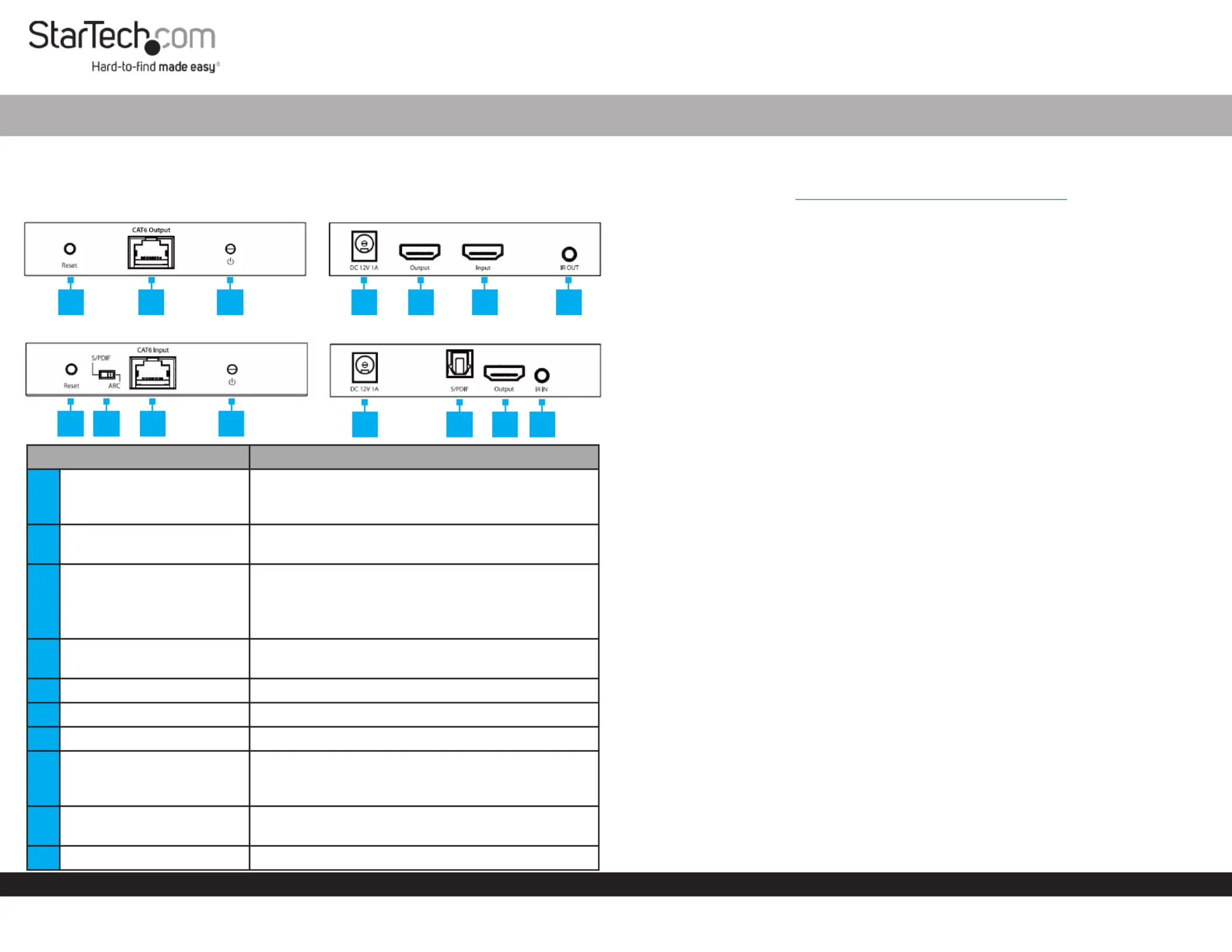
Port Function
1Reset Button
• Transmitter and Receiver: Reboots the unit
which will cause a renegotiation of connected
devices
2RJ45 Port
• Connect the and together, Transmitter Receiver
using a (sold separately)CAT6/6a Ethernet Cable
3Power Indicator
• Flashing Blue: Power connected, but no HDMI
input signal is detected
• Solid Blue: Power connected, and a HDMI input
signal is detected
4DC 12V Port
• Power the or using the Transmitter Receiver
included Power Adapter
5HDMI Output Port • Connect to an HDMI Display
6HDMI Input Port • Connect to an HDMI Source Device
7IR Output Port • Connect the to the IR Blaster Transmitter
8Audio Input Selector
• Switch audio input source between Receiver’s
the , or Transmitter’s HDMI Input Port Receiver’s
HDMI Output Port
9Optical Audio Output
• Connect to an on a S/PDIF Input Audio Device
(i.e. A/V Receiver)
10 IR Input Port • Connect the to the IR Receiver Receiver
HDMI over CAT6/6A Extender - 4K 60Hz - 230ft (70m)
Product Information
For the latest product information, technical specications, and declarations of
conformance, please visit: Iwww.StarTech.com/4K70IC-EXTEND-HDM
Package Contents
• Local HDMI Transmitter Unit x 1
• Remote HDMI Receiver Unit x 1
• IR Blaster x 1
• IR Receiver x 1
• Rubber Feet x 8
• Mounting Kit x 1
• Power Adapter x 1
• Quick-Start Guide x 1
Installation
(Optional) Mounting Kit
Note: Before mounting the make sure that the surface you are HDMI Extender
mounting to is strong enough to support the weight of the . It is HDMI Extender
recommended that you mount the on a wall stud to provide the HDMI Extender
correct support.
1. Determine the for the .Mounting Surface HDMI Extender
2. Place the on each side of the . Align the Mounting Brackets HDMI Extender Holes
in the with the on the sides of the Mounting Brackets Holes HDMI Extender’s
Transmitter Receiverand .
3. Insert two through each and into the . Screws Mounting Bracket HDMI Extender
4. Tighten each using a .Screw Phillips Head Screwdriver
5. Mount the to the desired using the appropriate HDMI Extender Mounting Surface
Mounting Hardware (e.g. Wood Screws).
Installing the HDMI Transmitter and Receiver
1. On the , use the to set which audio output the Transmitter Audio Output Selector
setup requires.
Note: If changing the audio output after initial installation, a power cycle may be
required.
2. Position the near the .Transmitter HDMI Source Device
3. Connect an (not included) from the to the HDMI Cable HDMI Source Device HDMI
Input Port Transmitter on the .
4. (Optional) Connect an (not included) from the on HDMI Cable HDMI Output Port
the , to a .Transmitter Local HDMI Display
1 2 3 4 5 6 7
1 8 2 3
4 9 5 10
Problemløsning StarTech.com 4K70IC-EXTEND-HDMI
Hvis du har læst manualen omhyggeligt, men ikke fundet en løsning på dit problem, bed andre brugere om hjælp
Specifikationer
| Type: | AV sender & modtager |
| Vekselstrømsindgangsspænding: | 100 - 240 V |
| Bredde: | 99 mm |
| Dybde: | 106 mm |
| Højde: | 26 mm |
| Vægt: | 210 g |
| Produktfarve: | Sort |
| Pakkevægt: | 900 g |
| Pakkedybde: | 176 mm |
| Pakkebredde: | 240 mm |
| Pakkehøjde: | 80 mm |
| Opbevaringstemperatur (T-T): | -30 - 70 °C |
| Relativ luftfugtighed ved drift (H-H): | 0 - 90 % |
| HDCP: | Ja |
| Digital akustisk og optisk udgang: | 1 |
| Strømforbrug (typisk): | 0.1 W |
| Driftstemperatur (T-T): | -20 - 60 °C |
| Maksimal opløsning: | 3840 x 2160 pixel |
| Hurtig start guide: | Ja |
| Understøttede grafikopløsninger: | 1280 x 720 (HD 720), 1920 x 1080 (HD 1080), 1920 x 1200 (WUXGA), 2560 x 1600 (WQXGA), 3840 x 2160 |
| High Dynamic Range (HDR) understøttet: | Ja |
| Materiale: | Metal |
| Forbindelsesteknologi: | Ledningsført |
| Lyd-output kanaler: | 7.1 kanaler |
| DC-in-stik: | Ja |
| LED-indikatorer: | Ja |
| Udgangsstrøm: | 1 A |
| AC-adapter inkluderet: | Ja |
| Bæredygtighedscertifikater: | CE, RoHS |
| Hovedkassen højde (udvendigt): | 420 mm |
| Hovedkassens længde (udvendigt): | 270 mm |
| Hovedkassens bredde (udvendigt): | 380 mm |
| Plug and play: | Ja |
| Indgangsstrøm: | 0.3 A |
| Maksimal overførselsafstand: | 70 m |
| Maksimal opdateringshastighed: | 60 Hz |
| HDMI-version: | 2.0 |
| Ekstern strømadapter: | Ja |
| Produkter pr. hovedkasse (udvendigt): | 10 stk |
| Overholdelse af bæredygtighed: | Ja |
| Monteringssæt: | Ja |
| Strømstiktype: | Type M |
| HSMI-indgang: | 1 |
| RJ-45 indgangs-porte: | 1 |
| Antal HDMI-udgange: | 2 |
| Stativ-montering: | Ingen |
| HDCP-version: | 2.2 |
| Fjernbetjening (IR) indgang: | 1 |
| Fjernbetjening (IR) udgang: | 1 |
| Understøttede kabeltyper: | Cat5e, Cat6 |
| RJ-45 udgangs-porte: | 1 |
| Gummifødder: | Ja |
| Driftsspænding (sender): | 12 V |
| Daisy kæde: | Ja |
| IR blaster inkluderet: | Ja |
| IR-modtager inkluderet: | Ja |
| Elektrostatisk udledningsbeskyttelse (ESD): | Ja |
| Elektrostatisk afladning association (ESD): | 8 kV |