StarTech.com
Audio/video konverter
MSTDP124DP
StarTech.com MSTDP124DP Brugsanvisning
Her er StarTech.com MSTDP124DP (Audio/video konverter) brugervejledning. 2 sider på sprog med en vægt på 530,236.0 Mb. Hvis du ikke kan finde svar på dit problem Spørg vores community.
Side 1/2
DE: Bedienungsanleitung - de.startech.com
FR: Guide de l'utilisateur - fr.startech.com
ES: Guía del usuario - es.startech.com
IT: Guida per l'uso - it.startech.com
NL: Gebruiksaanwijzing - nl.startech.com
PT: Guia do usuário - pt.startech.com
Manual Revision: 06/10/2021
For the most up-to-date information, please visit: www.startech.com
Quick Install Guide
Packaging Contents
• 1x 4-Port Multi Monitor DisplayPort MST Hub
• 1x Universal power adapter (NA/EU/UK/AUS)
• 1x Quick install guide
System Requirements
• DisplayPort 1.2 enabled computer system
• Up to 4 DisplayPort monitors with cabling
Note: Dierent types of displays such as HDMI, DVI and VGA are
supported provided DisplayPort adapters are used. DisplayPort
adapters are not included.
Note: Certain graphics adapters have limited MST support and will
only output to three displays in total. If more than three monitors
are attached the fourth will be disabled.
MSTDP124DP
Multi Stream Transport Hub – DisplayPort™ to quad head DisplayPort MST hub
*actual product may vary from photos
Installation
1. Ensure your computer system and monitors are powered o.
2. Connect the integrated DisplayPort input cable to the DisplayPort
connector on your computer system.
3. Connect up to four DisplayPort monitors to the DisplayPort
output ports on the MST Hub, using your video cabling.
4. Connect the included power adapter from an available outlet to
the power adapter port on the MST hub.
5. Power on your DisplayPort monitors followed by your computer
system.
6. The system will now detect the MST Hub, and add the attached
displays to the Display Settings of the System just as if the
monitors were connected directly to your native video card.
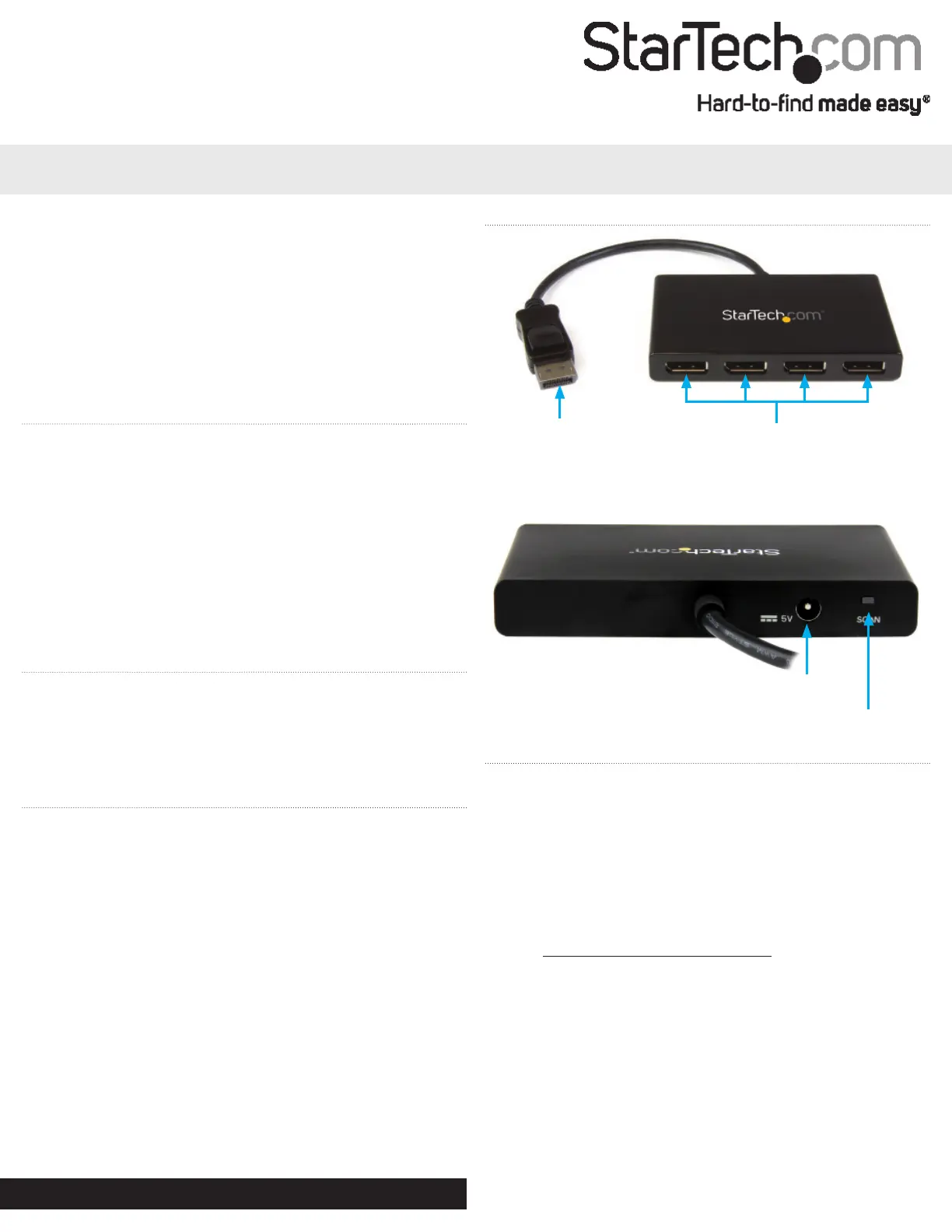
Product Overview
Front View
Rear View
Integrated DisplayPort
input cable
DisplayPort output
ports
Power adapter port
Important operation notes
• MST is certied for operation with Microsoft® Windows 10, 8/8.1
and 7 devices.
• MST is currently not supported by other operating systems
such as Mac OS X and Chrome OS™.
• Other operating systems might adopt MST in the
future. Verify MST support with your operating system
manufacturer.
• Operating system support is subject to change. For the
latest requirements, please visit:
www.StarTech.com/MSTMDP124DP.
• After the MST hub has been connected to your computer it may
be necessary to initiate the operation of additional displays from
within your Windows Display Settings.
• The SCAN button resyncs all of the attached displays, and can be
utilized if any of the displays are not detected.
Sync button
Problemløsning StarTech.com MSTDP124DP
Hvis du har læst manualen omhyggeligt, men ikke fundet en løsning på dit problem, bed andre brugere om hjælp
Specifikationer
| Vekselstrømsindgangsspænding: | 110 - 240 V |
| Bredde: | 65 mm |
| Dybde: | 105 mm |
| Højde: | 15 mm |
| Vægt: | 127 g |
| Brugervejledning: | Ja |
| Produktfarve: | Sort |
| Pakkevægt: | 500 g |
| Pakkedybde: | 242 mm |
| Pakkebredde: | 154 mm |
| Pakkehøjde: | 66 mm |
| Opbevaringstemperatur (T-T): | -20 - 70 °C |
| Strømforbrug (typisk): | 15 W |
| Driftstemperatur (T-T): | 0 - 45 °C |
| Maksimal opløsning: | 3840 x 2160 pixel |
| Husmateriale: | Plast |
| Hurtig installationsvejledning: | Ja |
| Understøttede grafikopløsninger: | 1024 x 768 (XGA),1280 x 720 (HD 720),1920 x 1080 (HD 1080),1920 x 1200 (WUXGA),2560 x 1440,2560 x 1600 (WQXGA),3840 x 2160 |
| Certificering: | CE, FCC, RoHS |
| DC-in-stik: | Ja |
| Udgangsspænding: | 5 V |
| Udgangsstrøm: | 3 A |
| AC-adapter inkluderet: | Ja |
| Harmoniseret systemkode (HS): | 85176990 |
| Bæredygtighedscertifikater: | RoHS |
| Indgangsspænding: | 100 - 240 V |
| Hovedkassen højde (udvendigt): | 227 mm |
| Hovedkassens længde (udvendigt): | 501 mm |
| Hovedkassens bredde (udvendigt): | 336 mm |
| Værtsgrænseflade: | DisplayPort |
| Plug and play: | Ja |
| Indgangsstrøm: | 0.5 A |
| Maksimal opdateringshastighed: | 30 Hz |
| Produkter pr. hovedkasse (udvendigt): | 10 stk |
| Strømstiktype: | Type N |
| Videoudgang: | 4x DisplayPort |
| Dataoverførselshastighed: | - Mbit/s |
| Video porttype: | DisplayPort |
| Porte, antal: | 4 |
| Antal videoporte: | 4 |
| Hub-grænseflader: | DisplayPort |
| Chipsæt: | STDP4320 |
| Inkluderede strømstik typer: | AU, EU, NA, UK |