StarTech.com
Ikke kategoriseret
LTANCHOR
StarTech.com LTANCHOR Brugsanvisning
Her er StarTech.com LTANCHOR (Ikke kategoriseret) brugervejledning. 2 sider på sprog med en vægt på 369,130.0 Mb. Hvis du ikke kan finde svar på dit problem Spørg vores community.
Side 1/2
Quick-Start Guide
To view manuals, FAQs, videos, drivers, downloads, technical drawings, and more, visit www.startech.com/support.
Manual Revision: November 22, 2018 11:38 AM
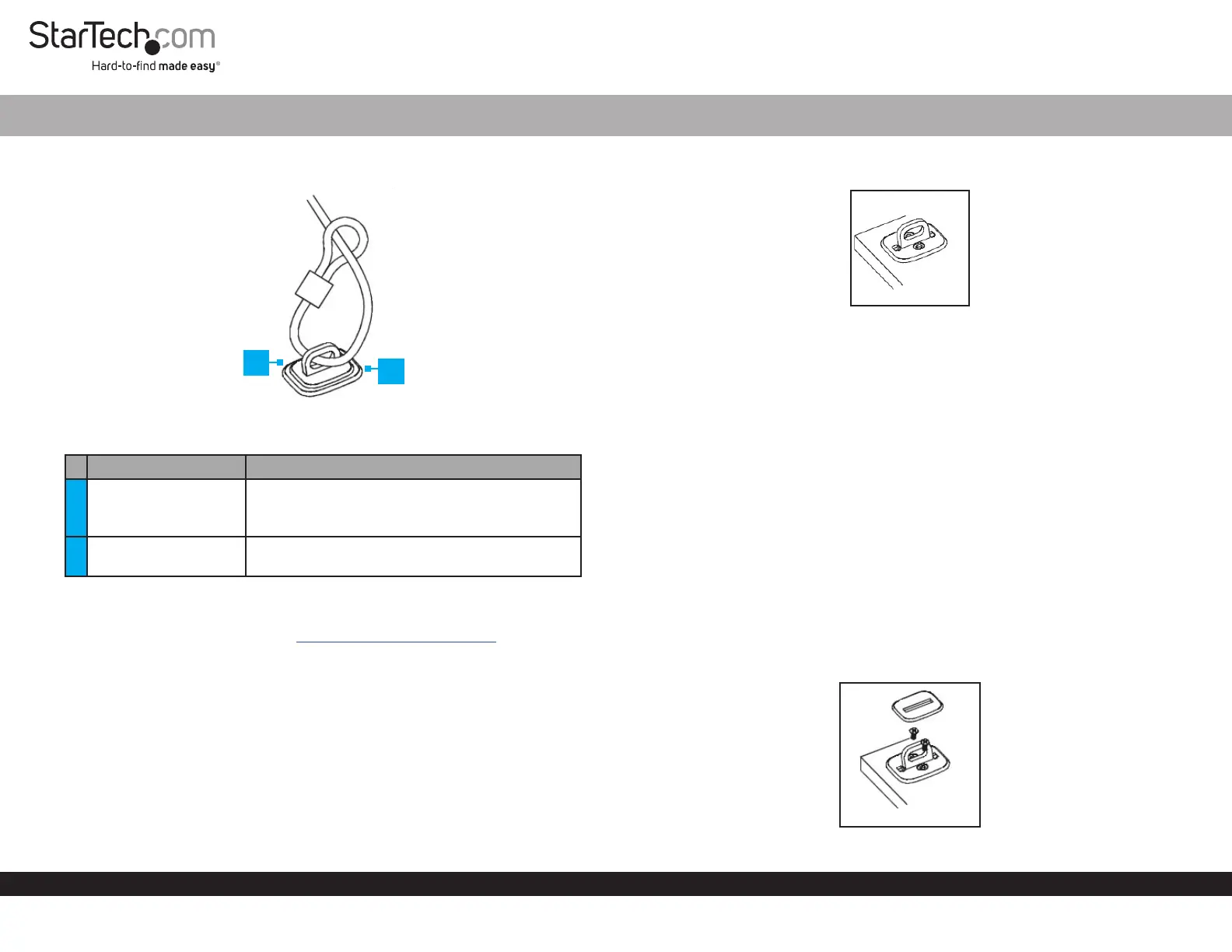
Product Diagram (LTANCHOR)
Note: Security Cable and Lock sold separately.
Port Function
1 Security Plate
• Used to hide the Mounting Screws.
• Used to prevent access to the Mounting
Screws.
2 Desk Anchor
• Used in place of a stationary object to secure a
connected Device.
Requirements
For the latest requirements, please visit www.startech.com/LTANCHOR.
Installation
Notes: The Desk Anchor is not recommend for use in high humidity conditions, on
glass, ceramic tile, or water absorbent materials.
The following surface types must have a primer applied before the Desk Anchor can
be properly installed: copper, brass, or plasticized vinyl.
For maximum security, it is recommended that both Adhesive Backing and
Mounting Screws are used when installing the Desk Anchor.
Desk Anchor for Cable Lock
1
1. Position the Desk Anchor on the surface you wish to mount it to.
Desk Anchor
Note: Use a pencil to draw an outline around the Desk Anchor. This will ensure that
you know the area you need to score using the Abrasive Pad.
2. Use the Abrasive Pad (included) to score the surface area you intend to mount the
Desk Anchor on. Be careful to only score the surface that the Desk Anchor will
cover.
3. Use the Alcohol Pad (included) to clean the scored surface prior to installation.
Allow the alcohol to dry before installing the Desk Anchor on the surface.
Note: (Optional) Use the Screw Holes on the Desk Anchor as a guide to drill pilot
holes.
4. Remove the Adhesive Backing on the back of the Desk Anchor, exposing the
adhesive surface. Secure the Desk Anchor to the scored area. Apply the adhesive
backing to the surface at room temperature 60 Fahrenheit (16 Celsius).
5. Before connecting a Security Cable to the Desk Anchor, allow the adhesive
backing at least 24 hours to bond to the surface.
6. Insert the Mounting Screws (x2) into the Mounting Holes on the Desk Anchor.
Installing the Mounting Screws
2
Problemløsning StarTech.com LTANCHOR
Hvis du har læst manualen omhyggeligt, men ikke fundet en løsning på dit problem, bed andre brugere om hjælp
Specifikationer
| Type: | Kabelbinder beslag |
| Bredde: | 44 mm |
| Dybde: | 45.8 mm |
| Højde: | 28 mm |
| Vægt: | 61 g |
| Antal pr. pakke: | 1 stk |
| Produktfarve: | Sølv |
| Pakkevægt: | 100 g |
| Pakkedybde: | 223 mm |
| Pakkebredde: | 130 mm |
| Pakkehøjde: | 27.8 mm |
| Hurtig start guide: | Ja |
| Materiale: | Stål |
| Certificering: | CE, TAA, REACH |
| Bæredygtighedscertifikater: | RoHS |
| Formål: | Skrivebord |
| Hovedkassen højde (udvendigt): | 237 mm |
| Hovedkassens længde (udvendigt): | 320 mm |
| Hovedkassens bredde (udvendigt): | 290 mm |
| Produkter pr. hovedkasse (udvendigt): | 60 stk |
| Skruer inkluderet: | Ja |
| Antal skruer: | 2 |
| Ringe, antal: | 1 |