StarTech.com
Ikke kategoriseret
ET90110SC2
StarTech.com ET90110SC2 Brugsanvisning
Her er StarTech.com ET90110SC2 (Ikke kategoriseret) brugervejledning. 2 sider på sprog med en vægt på 826,102.0 Mb. Hvis du ikke kan finde svar på dit problem Spørg vores community.
Side 1/2
Instruction Manual
DE: Bedienungsanleitung - de.startech.com
FR: Guide de l'utilisateur - fr.startech.com
ES: Guía del usuario - es.startech.com
I T: Guida per l'uso - it.startech.com
NL: Gebruiksaanwijzing - nl.startech.com
P T: Guia do usuário - pt.startech.com
Manual Revision: 06/17/2016
For the most up-to-date information, please visit: www.startech.com
ET90110SC2 / ET90110ST2
10/100 Mbps Ethernet to Multi Mode SC/ST Fiber Media Converter - 2 km
Packaging Contents
• 1 x Fiber Media Converter
• 1 x Universal Power Adapter
• 4 x Power Adapter Plug (NA/ UK/ EU/AU)
• 1 x Grounding Screw
• 1 x Instruction Manual
System Requirements
• 10BASE-T or 100Base-TX compatible Ethernet network equipment
• RJ45 terminated UTP Cat5 or better Ethernet cable
• 100BASE-FX compatible ber optic network equipment
• SC or ST terminated multi mode ber optic cable
• Available AC electrical outlet
Installation
1. Make sure the DIP switches are set appropriately for your network
conguration (see “DIP Switch Settings“ section for details).
2. Connect the ber optic network cable from a computer/switch/
media converter to the SC/ST connector on the media converter.
NOTE: When connecting the ber cable, make sure to connect the
Tx (transmit) terminal on one end, with the Rx (receive) terminal on
the other end.
3. Connect a UTP Ethernet cable, from a computer/switch to the
RJ45 jack on the media converter.
4. Connect the power adapter to the media converter.
5. The following example illustrates the connection scheme when
connecting from a 10BASE-T or 100BASE-TX Ethernet port of
a hub/switch to a 100BASE-FX port of another hub/switch,
through the ber media converter:
6. The following example illustrates the connection scheme when
connecting from a 100BASE-TX Ethernet port on a hub/switch
to a 100BASE-TX Ethernet Network Interface Card (NIC) in a
computer through the ber media converter:
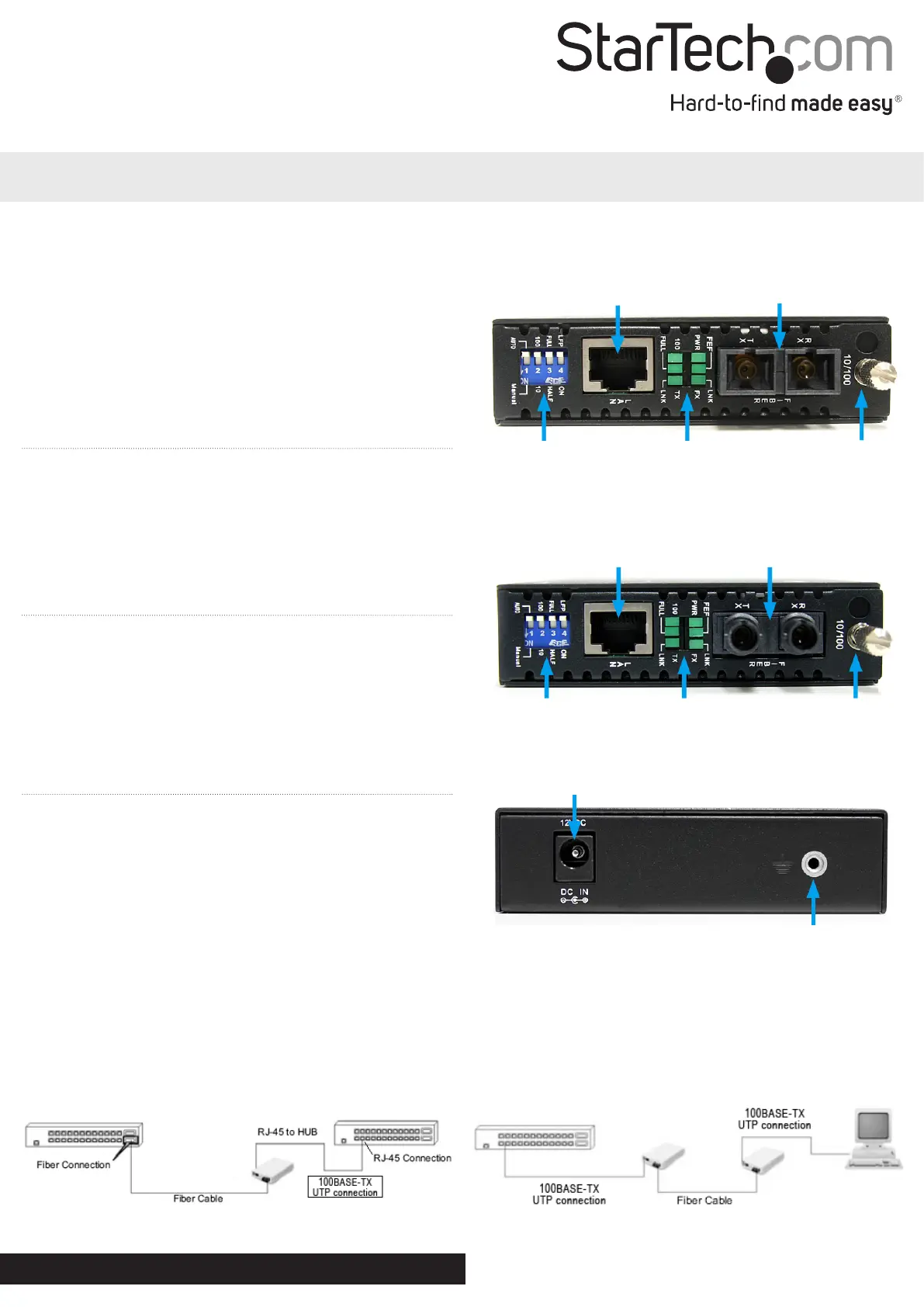
ET90110SC2
ET90110ST2
*actual product may vary from photos
RJ45 Ethernet
connector
SC Duplex ber
connector
DIP Switches LED indicators Card Release
Thumbscrew
DIP Switches LED indicators Card Release
Thumbscrew
RJ45 Ethernet
connector
SC Duplex ber
connector
DC Power connector
Ground Point (optional)
Rear View (ET90110SC2/ET90110ST2)
Problemløsning StarTech.com ET90110SC2
Hvis du har læst manualen omhyggeligt, men ikke fundet en løsning på dit problem, bed andre brugere om hjælp
Specifikationer
| Bredde: | 87 mm |
| Dybde: | 153 mm |
| Højde: | 24 mm |
| Vægt: | 600 g |
| Brugervejledning: | Ja |
| Produktfarve: | Sort |
| Pakkevægt: | 779 g |
| Pakkedybde: | 233 mm |
| Pakkebredde: | 190 mm |
| Pakkehøjde: | 77 mm |
| Ethernet LAN-porte (RJ-45): | 1 |
| Husmateriale: | Stål |
| Dimensioner (BxDxH): | 95 x 160 x 20 mm |
| Forbindelsesteknologi: | Ledningsført |
| Certificering: | CE, FCC |
| Netværksstandarder: | IEEE 802.3, IEEE 802.3u |
| Udgangsspænding: | 12 V |
| Udgangsstrøm: | 1.6 A |
| AC-adapter inkluderet: | Ja |
| Harmoniseret systemkode (HS): | 85176990 |
| Bæredygtighedscertifikater: | RoHS |
| Indgangsspænding: | 100 - 240 V |
| Intern: | Ingen |
| Maksimal dataoverførselshastighed: | 200 Mbit/s |
| Fiber optisk strømstik: | SC |
| Maksimal overførselsafstand: | 2000 m |
| Bølgelængde: | 1310 nm |
| Fuld duplex: | Ja |
| Strøm over Ethernet (PoE): | Ingen |
| Strømstiktype: | Type M |
| Auto MDI/MDI-X: | Ja |
| Fiberkanal porte: | 1 |
| Fibertilstandsstruktur: | Multitilstand |
| Duplex system: | Full, Half |
| Bølgelængde-division multipleksing (WDM): | Ingen |