StarTech.com
Andet computertilbehør
BNDDKT30CAHV
StarTech.com BNDDKT30CAHV Brugsanvisning
Her er StarTech.com BNDDKT30CAHV (Andet computertilbehør) brugervejledning. 2 sider på sprog med en vægt på 453,938.0 Mb. Hvis du ikke kan finde svar på dit problem Spørg vores community.
Side 1/2
DE: Bedienungsanleitung - de.startech.com
FR: Guide de l'utilisateur - fr.startech.com
ES: Guía del usuario - es.startech.com
I T: Guida per l'uso - it.startech.com
NL: Gebruiksaanwijzing - nl.startech.com
P T: Guia do usuário - pt.startech.com
Manual Revision: 09/10/2015
For the most up-to-date information, please visit: www.startech.com
Instruction Manual
Packaging Contents
• 1x USB 3.0 Mini Docking Station
• 1x Instruction Manual
• 1x Driver CD
System Requirements
• USB enabled computer system with an available USB 3.0 port
• Windows® 8 / 8.1 (32/64bit), 7 (32/64), Vista (32/64), XP SP3 (32),
Mac OS® 10.6 and up (Tested up to 10.9)
• HDMI® or VGA enabled display device if desired
Note: Only a single video output port can be used at one time,
HDMI® or VGA. If two displays are connected, the HDMI port will
take priority.
USB3SMDOCKHV
USB 3.0 Mini Docking Station with HDMI® or VGA, GbE, and USB Pass-through
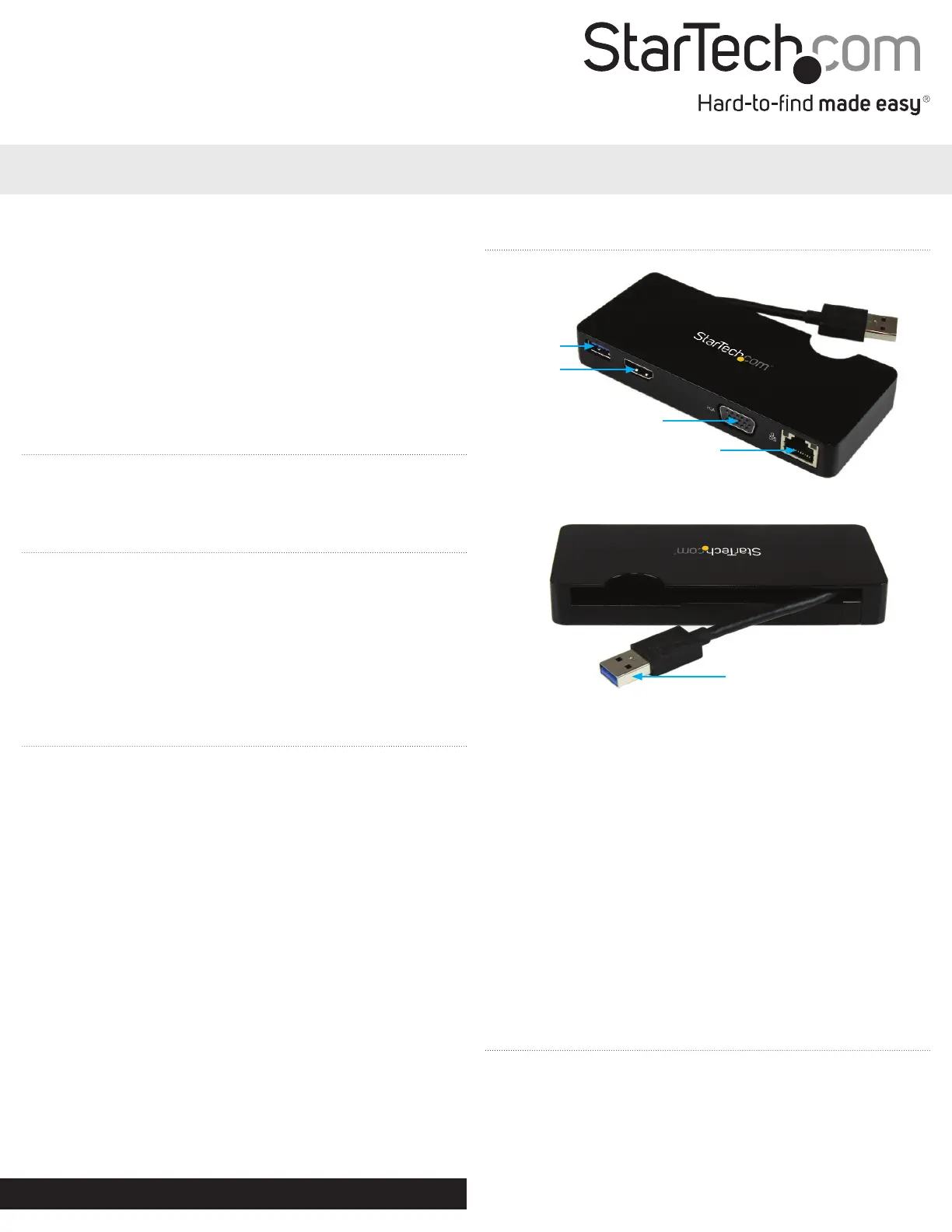
Product Overview
Front View
Rear View
USB 3.0
HDMI®
VGA
RJ-45
Driver Installation
Windows / Mac
1. Download the latest drivers from the www.startech.com website
(recommended) applicable to your host Operating System that
you are connecting to, or, insert the included Driver CD into your
computer’s CD/DVD-ROM drive.
2. If AutoPlay is enabled, select the “Open folder to view les”
option when the dialog appears and run the DisplayLink “.exe”
application.
3. If AutoPlay is disabled, browse to your CD/DVD drive location (or
to where the driver was downloaded) and run the DisplayLink
“.exe” application.
4. Follow any on-screen instructions to complete the driver
installation.
Note: You may be prompted to restart your system.
Installation
Depending on your Operating System version and whether or not
you have an active network connection, the Mini Docking Station
may auto-install once connected to an available USB 3.0 port on the
host system.
If the Mini Docking Station does not auto-install, follow the steps
below to complete the Driver Installation process.
Hardware Installation
1. Connect the Mini Docking Station to an available USB 3.0 port
on the computer via the built-in USB Upstream Cable.
2. Connect a HDMI® monitor to the HDMI® port on the adapter,
or, connect a VGA monitor to the VGA port on the adapter and
power on the monitor.
Note: Only a single video output can be used at one time, HDMI®
or VGA. If a display is connected to each video output port at the
same time, then the HDMI® port will take priority.
3. Connect your Cat 5e/6 network connection to the RJ-45 port on
the adapter if desired
4. Connect your USB 3.0 peripheral to the USB 3.0 downstream
(USB Pass-through) port on the adapter if desired.
USB 3.0 Upstream Cable
Display Conguration
Use your Windows or Mac operating system to adjust display
settings for multiple monitors.
Problemløsning StarTech.com BNDDKT30CAHV
Hvis du har læst manualen omhyggeligt, men ikke fundet en løsning på dit problem, bed andre brugere om hjælp
Specifikationer
| Bredde: | 55 mm |
| Dybde: | 125 mm |
| Højde: | 17 mm |
| Vægt: | 97 g |
| Brugervejledning: | Ja |
| Produktfarve: | Sort |
| Pakkevægt: | 200 g |
| Pakkedybde: | 143 mm |
| Pakkebredde: | 167 mm |
| Pakkehøjde: | 43 mm |
| Opbevaringstemperatur (T-T): | -20 - 70 °C |
| Relativ luftfugtighed ved drift (H-H): | 0 - 90 % |
| Antal HDMI-porte: | 1 |
| Ethernet LAN-porte (RJ-45): | 1 |
| Antal USB 3.2 Gen 1 (3.1 Gen 1) type-A-porte: | 1 |
| Ethernet LAN: | Ja |
| Driftstemperatur (T-T): | 0 - 40 °C |
| Ethernet LAN-datahastigheder: | 10,100,1000 Mbit/s |
| Husmateriale: | Plast |
| Forbindelsesteknologi: | Ledningsført |
| Certificering: | CE, FCC |
| Netværksstandarder: | IEEE 802.3, IEEE 802.3ab, IEEE 802.3u |
| LED-indikatorer: | Activity, Link |
| Strømkilde type: | USB |
| Kabellængde: | 0.09 m |
| Indbygget kortlæser: | Ingen |
| Harmoniseret systemkode (HS): | 84733020 |
| Mac kompabilitet: | Ja |
| Bæredygtighedscertifikater: | RoHS |
| Mikrofonindgang: | Ingen |
| Understøttede Mac-operativsystemer: | Mac OS X 10.11 El Capitan, Mac OS X 10.12 Sierra, Mac OS X 10.14 Mojave, Mac OS X 13.0 Ventura |
| Andre understøttede operativsystemer: | ChromeOS |
| Hovedkassen højde (udvendigt): | 309 mm |
| Hovedkassens længde (udvendigt): | 448 mm |
| Hovedkassens bredde (udvendigt): | 346 mm |
| Værtsgrænseflade: | USB 3.2 Gen 1 (3.1 Gen 1) Type-A |
| Drivere inkluderet: | Ja |
| Antal VGA-porte (D-sub): | 1 |
| USB-stik type: | USB Type-A |
| Produkter pr. hovedkasse (udvendigt): | 40 stk |
| Fuld duplex: | Ja |
| Auto MDI/MDI-X: | Ja |
| Maksimal digital opløsning: | 2048 x 1152 pixel |
| Dataoverførselshastighed: | 5 Gbit/sek. |
| Maksimal analog opløsning: | 2048 x 1152 pixel |
| Understøtter UASP: | Ja |
| Chipsæt: | DisplayLink - DL-3700 |