StarTech.com
Andet computertilbehør
103B-USBC-MULTIPORT
StarTech.com 103B-USBC-MULTIPORT Brugsanvisning
Her er StarTech.com 103B-USBC-MULTIPORT (Andet computertilbehør) brugervejledning. 2 sider på sprog med en vægt på 309,978.0 Mb. Hvis du ikke kan finde svar på dit problem Spørg vores community.
Side 1/2
Quick-Start Guide
To view manuals, FAQs, videos, drivers, downloads, technical drawings, and more, visit www.startech.com/support.
Manual Revision: April 26, 2022 2:14 PM
Product ID
103B-USBC-MULTIPORT
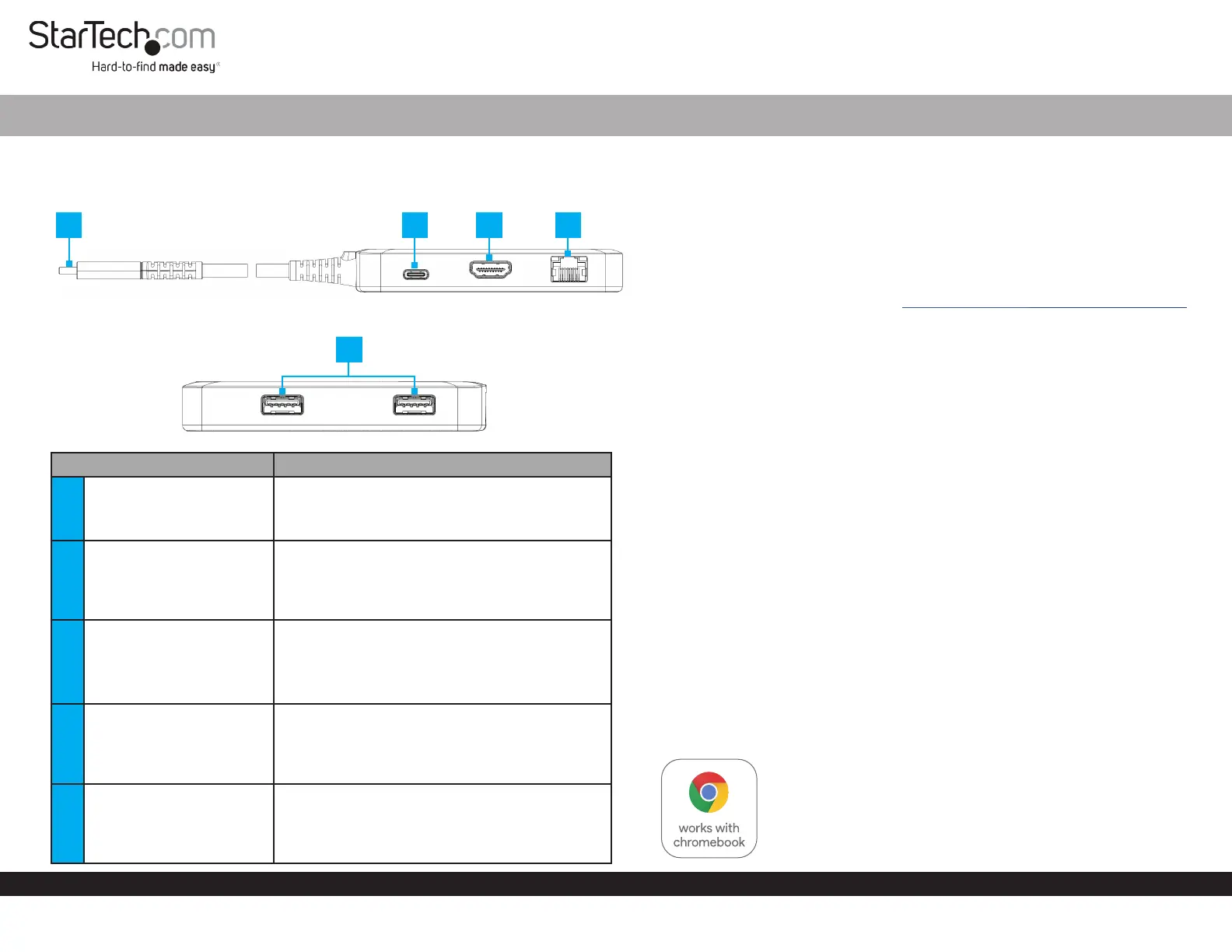
Product Diagram
Component Function
1 Built-in USB-C Host Cable
• Connect to a USB-C Port on a Host Computer
• USB 3.2 Gen 1 (5 Gbps)
• Power Delivery 3.0 Specication
2
USB-C 100W Power
Delivery Port
• Connect a USB-C power adapter
• USB Power Delivery 3.0 (up to 100W, with up to
86W available for charging)
3 HDMI Output Port
• Connect to an HDMI Display Device
• HDMI 2.0
• Up to 4K (4096x2160) 60Hz
• Via DisplayPort 1.4 DP Alt Mode
4 Gigabit Ethernet Port
• Connect the Multiport Adapter to a Network
Device, using a Network Cable
• 10/100/1000 Mbps
5 2x USB-A Data Ports
• Connect USB-A Peripherals
• USB 3.2 Gen 1 (5 Gbps)
• Supports up to 5 V/0.9 A (4.5 W) of Power
USB-C Multiport Adapter - Works With Chromebook - HDMI 4K 60Hz HBR3 - 2 x USB-A (5Gbps) - GbE - 100W PD - Extended Cable
4
1
5
32
(Side A)
(Side B)
Requirements
• Computer
• DP Alt Mode enabled USB-C Port
• Video performance, such as resolution, and refresh rate depends upon your
host computer’s video controller. Please verify the specications of your
computer.
For the latest drivers, manuals, product information, technical specications, and
declarations of conformance, please visit: www.StarTech.com/103B-USBC-MULTIPORT
Package Contents
• USB-C Multiport Adapter x 1
• Quick-Start Guide x 1
Installation
1. Connect the Built-in USB-C Host Cable, located on the Multiport Adapter to a
USB-C port on your host computer. Your computer will automatically detect the
device and install all the required drivers.
2. ( Optional) Connect a USB-C power adapter (up to 100W) from an AC outlet to the
USB-C 100W Power Delivery Port located the Multiport Adapter, to charge the
host computer that’s connected to Built-in USB-C Host Cable.
3. Connect an HDMI Enabled Display Device, to the HDMI Output Port, located on
the Multiport Adapter, using an HDMI cable.
4. Connect an RJ-45 terminated network cable (CAT5e or better) from your Network
Device (e.g. Router, Switch, Modem, etc.) to the Gigabit Ethernet Port on the
Multiport Adapter, to access the network via a wired LAN connection.
5. Connect USB Peripheral Devices to the USB-A Data Ports, located on the
Multiport Adapter.
Note: High powered USB devices, such as bus powered SSD enclosures, are
not recommended for use with the USB-A Data Ports, located on this device.
This product works with devices capable of running the latest version of Chrome
OS and has been certied to meet Google’s compatibility standards. Google is not
responsible for the operation of this product or it’s compliance with safety requirements.
Chromebook and the Works With Chromebook badge are trademarks of Google LLC.
Ce produit est compatible avec les appareils en mesure d’exécuter la dernière
version de Chrome OS et a été certié conforme aux normes de compatibilité de Google.
Chromebook et
le badge Works With Chromebook sont des marques de commerce de Google LLC.
Problemløsning StarTech.com 103B-USBC-MULTIPORT
Hvis du har læst manualen omhyggeligt, men ikke fundet en løsning på dit problem, bed andre brugere om hjælp
Specifikationer
| Bredde: | 48 mm |
| Dybde: | 100 mm |
| Højde: | 16 mm |
| Vægt: | 105 g |
| Produktfarve: | Grå |
| Pakkevægt: | 120 g |
| Pakkedybde: | 180 mm |
| Pakkebredde: | 115 mm |
| Pakkehøjde: | 40 mm |
| HD-type: | 4K Ultra HD |
| Opbevaringstemperatur (T-T): | -26 - 65 °C |
| Relativ luftfugtighed ved drift (H-H): | 0 - 95 % |
| Antal HDMI-porte: | 1 |
| Ethernet LAN-porte (RJ-45): | 1 |
| Antal USB 3.2 Gen 1 (3.1 Gen 1) type-A-porte: | 2 |
| Ethernet LAN: | Ja |
| Strømforbrug (typisk): | 14 W |
| Driftstemperatur (T-T): | 0 - 35 °C |
| Ethernet LAN-datahastigheder: | 10,100,1000 Mbit/s |
| Hurtig start guide: | Ja |
| Forbindelsesteknologi: | Ledningsført |
| Strømkilde type: | USB |
| Indbygget kortlæser: | Ingen |
| Understøttede mobile operativsystemer: | Android |
| Bæredygtighedscertifikater: | RoHS |
| Mikrofonindgang: | Ingen |
| Understøttede Windows-operativsystemer: | Windows 10, Windows 10 Education, Windows 10 Education x64, Windows 10 Enterprise, Windows 10 Enterprise x64, Windows 10 Home, Windows 10 Home x64, Windows 10 IOT Core, Windows 10 IoT Enterprise, Windows 10 Pro, Windows 10 Pro x64, Windows 10 x64, Windows 11, Windows 11 x64 |
| Understøttede Mac-operativsystemer: | Mac OS X 10.15 Catalina, Mac OS X 10.15.3 Catalina, Mac OS X 11.0 Big Sur, Mac OS X 12.0 Monterey, Mac OS X 13.0 Ventura |
| Understøttede Linux-operativsystemer: | Ubuntu 18.04 LTS, Ubuntu 20.04 LTS |
| Andre understøttede operativsystemer: | ChromeOS |
| Hovedkassen højde (udvendigt): | 230 mm |
| Hovedkassens længde (udvendigt): | 368 mm |
| Hovedkassens bredde (udvendigt): | 230 mm |
| Værtsgrænseflade: | USB 3.2 Gen 2 (3.1 Gen 2) Type-C |
| HDMI-version: | 2.0b |
| Produkter pr. hovedkasse (udvendigt): | 20 stk |
| Fuld duplex: | Ja |
| Overholdelse af bæredygtighed: | Ja |
| Antal USB 3.2 Gen 1 (3.1 Gen 1) type-C-porte: | 1 |
| Maksimal digital opløsning: | 4096 x 2160 pixel |
| Dataoverførselshastighed: | 5 Gbit/sek. |
| USB strømforsyning revision: | 3.0 |
| USB-kabellængde: | 0.3 m |
| USB strømforsyning: | Ja |
| USB strømforsyning op til: | 100 W |
| Understøtter UASP: | Ja |
| Chipsæt: | Realtek - RTL8153B, Analogix - ANX7327, Analogix - ANX7518, VIA - VL817-Q7 |