StarTech.com
Andet computertilbehør
101N-USBC-DOCK
StarTech.com 101N-USBC-DOCK Brugsanvisning
Her er StarTech.com 101N-USBC-DOCK (Andet computertilbehør) brugervejledning. 2 sider på sprog med en vægt på 446,963.0 Mb. Hvis du ikke kan finde svar på dit problem Spørg vores community.
Side 1/2
Quick-Start Guide
To view manuals, FAQs, videos, drivers, downloads, technical drawings, and more, visit www.startech.com/support.
Manual Revision: July 6, 2023
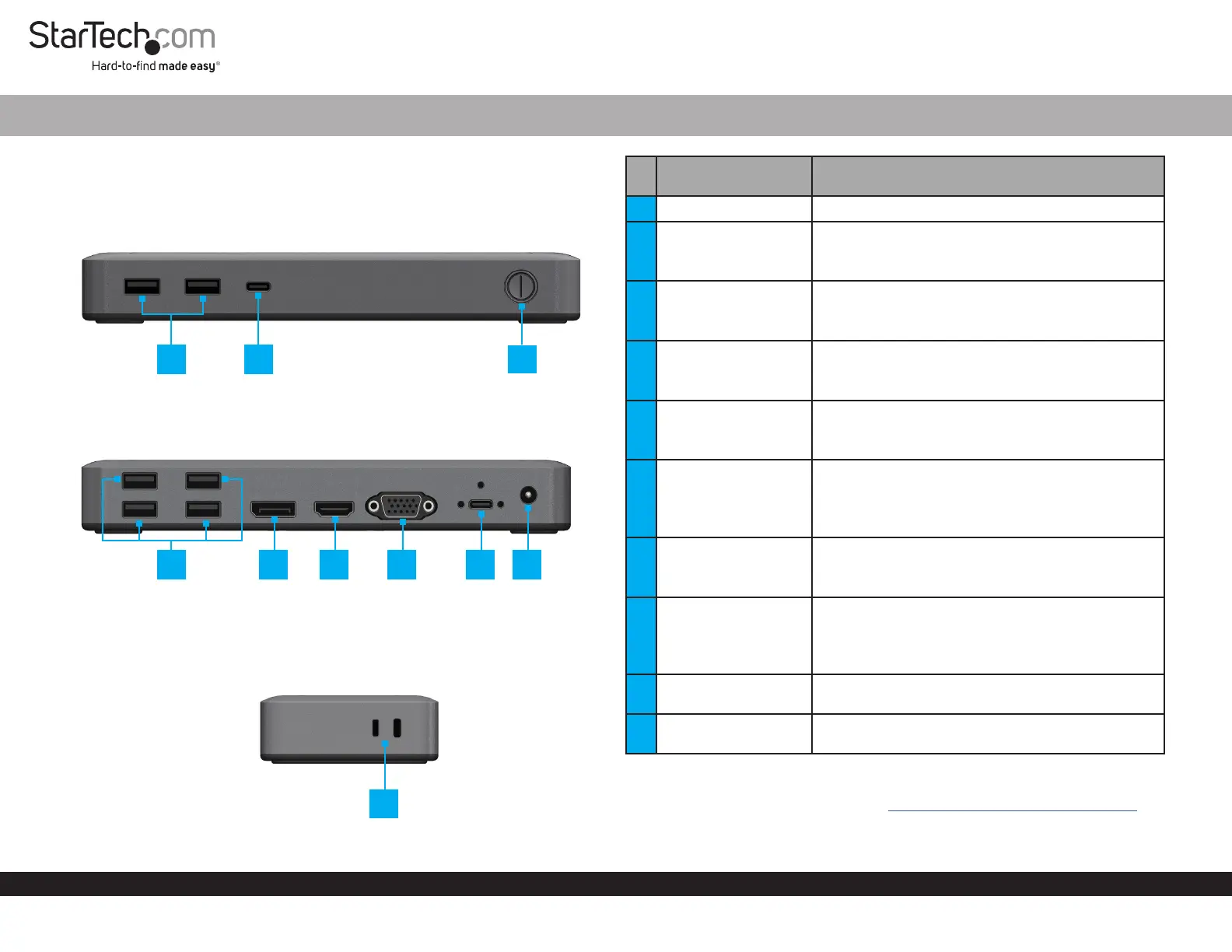
Product Diagrams (101N-USBC-DOCK)
Diagram 1
Diagram 2
Diagram 3
USB-C Dual Monitor Dock - DP & HDMI or VGA - 6x USB-A / 1 x USB-C - 85W PD
Port/LED/Connector Function
1 Power Button • Press Power Button to Power the Dock On and O
2 USB-C Data Port
• Connect USB-C Peripherals
• USB 3.2 Gen 1 (5Gbps)
• Supports up to 10W (5V / 2A) of power
3 USB-A Data Ports
• Connect USB-A Peripherals
• USB 3.2 Gen 1 (5Gbps)
• Supports up to 4.5W (5V / 0.9A) of power
4 USB-A Data Ports
• Connect USB-A Peripherals
• USB 2.0 (480Mbps)
• Supports up to 2.5W (5V / 0.5A) of power
5
DisplayPort Output
Port
• Connect a DisplayPort Display Device
• Up to 4K (4096x2160) 60Hz
• Via DisplayPort 1.4 DP Alt Mode
6 HDMI Output Port
• Connect an HDMI Display Device
• HDMI 2.0b HDR
• Up to 4K (4096x2160) 60Hz
• Via DisplayPort 1.4 DP Alt Mode
7 VGA Output Port
• Connect a VGA Display Device
• Up to 1080p (1920x1200/1920x1080) 60Hz
• Via DisplayPort 1.4 DP Alt Mode
8
USB-C Host Port
(Screw Locking)
• Connect to a USB-C Port on a Host Computer
• USB 3.2 Gen 1 (5Gbps)
• DP Alt Mode Enabled
• Power Delivery 3.0 Specication
9 DC 20V Port
• Connect the Dock to a Power Source, using the
Universal Power Adapter
10
Lock Slots
(Standard & Nano)
• Connect a K-Slot Style Locking Device to deter the
theft of the Docking Station
Requirements
For the latest requirements, please visit www.StarTech.com/101N-USBC-DOCK
• Host Computer with DP Alt Mode Enabled USB-C Port
1
10
5
23
4
6
7
8 9
Problemløsning StarTech.com 101N-USBC-DOCK
Hvis du har læst manualen omhyggeligt, men ikke fundet en løsning på dit problem, bed andre brugere om hjælp
Specifikationer
| Vekselstrømsindgangsspænding: | 100 - 240 V |
| Bredde: | 185 mm |
| Dybde: | 80 mm |
| Højde: | 31 mm |
| Vægt: | 275 g |
| Produktfarve: | Grå |
| Pakkevægt: | 1000 g |
| Pakkedybde: | 222 mm |
| Pakkebredde: | 107 mm |
| Pakkehøjde: | 130 mm |
| HD-type: | 4K Ultra HD |
| Opbevaringstemperatur (T-T): | -20 - 70 °C |
| Relativ luftfugtighed ved drift (H-H): | 0 - 95 % |
| Antal HDMI-porte: | 1 |
| Antal USB 2.0-porte: | 4 |
| Antal USB 3.2 Gen 1 (3.1 Gen 1) type-A-porte: | 2 |
| Ethernet LAN: | Ingen |
| Driftstemperatur (T-T): | 0 - 40 °C |
| Husmateriale: | Plast |
| Hurtig start guide: | Ja |
| Kabler inkluderet: | USB Type-C |
| Forbindelsesteknologi: | Ledningsført |
| Strømforbrug (maks.): | 135 W |
| DC-in-stik: | Ja |
| LED-indikatorer: | Strøm |
| Strømkilde type: | DC |
| Udgangsspænding: | 20 V |
| Udgangsstrøm: | 6.75 A |
| AC-adapter inkluderet: | Ja |
| Indbygget kortlæser: | Ingen |
| Bæredygtighedscertifikater: | CE, RoHS, Trade Agreements Act (TAA) |
| Slot til kabellås: | Ja |
| Andre understøttede operativsystemer: | ChromeOS |
| Hovedkassen højde (udvendigt): | 282 mm |
| Hovedkassens længde (udvendigt): | 455 mm |
| Hovedkassens bredde (udvendigt): | 345 mm |
| Værtsgrænseflade: | USB 3.2 Gen 1 (3.1 Gen 1) Type-C |
| Indgangsstrøm: | 2.37 A |
| Maksimal opdateringshastighed: | 60 Hz |
| HDMI-version: | 2.0b |
| DisplayPort-version: | 1.4 |
| Antal DisplayPorts: | 1 |
| Antal VGA-porte (D-sub): | 1 |
| Kabellåseslids type: | Kensington |
| Produkter pr. hovedkasse (udvendigt): | 12 stk |
| Overholdelse af bæredygtighed: | Ja |
| Antal USB 3.2 Gen 1 (3.1 Gen 1) type-C-porte: | 1 |
| Maksimal digital opløsning: | 3840 x 2160 pixel |
| Dataoverførselshastighed: | 5 Gbit/sek. |
| USB strømforsyning revision: | 3.0 |
| USB strømforsyning: | Ja |
| Kompatible strømplug typer: | US |
| USB type-C DisplayPort alternativ tilstand: | Ja |
| USB strømforsyning op til: | 85 W |
| Understøtter UASP: | Ja |
| Chipsæt: | Realtek - RTD2142, Realtek - RTS5450M, Realtek - RTS5451, Realtek - RTS5411S, Terminus - FE1.1s |