CRUX RVCMB-78V Brugsanvisning
Her er CRUX RVCMB-78V (Bakkamera) brugervejledning. 1 sider på sprog med en vægt på 384,657.0 Mb. Hvis du ikke kan finde svar på dit problem Spørg vores community.
Side 1/1
MERCEDES BENZ
2016 Metris
2014 – Up Sprinter (W906)
- Acvates the Rear View Camera funcon of the Audio15 radio.
- Mercedes Benz Audio15 Navigaon radio with or without Map Pilot
-78V OBD Coder MB
FAK-RCAF
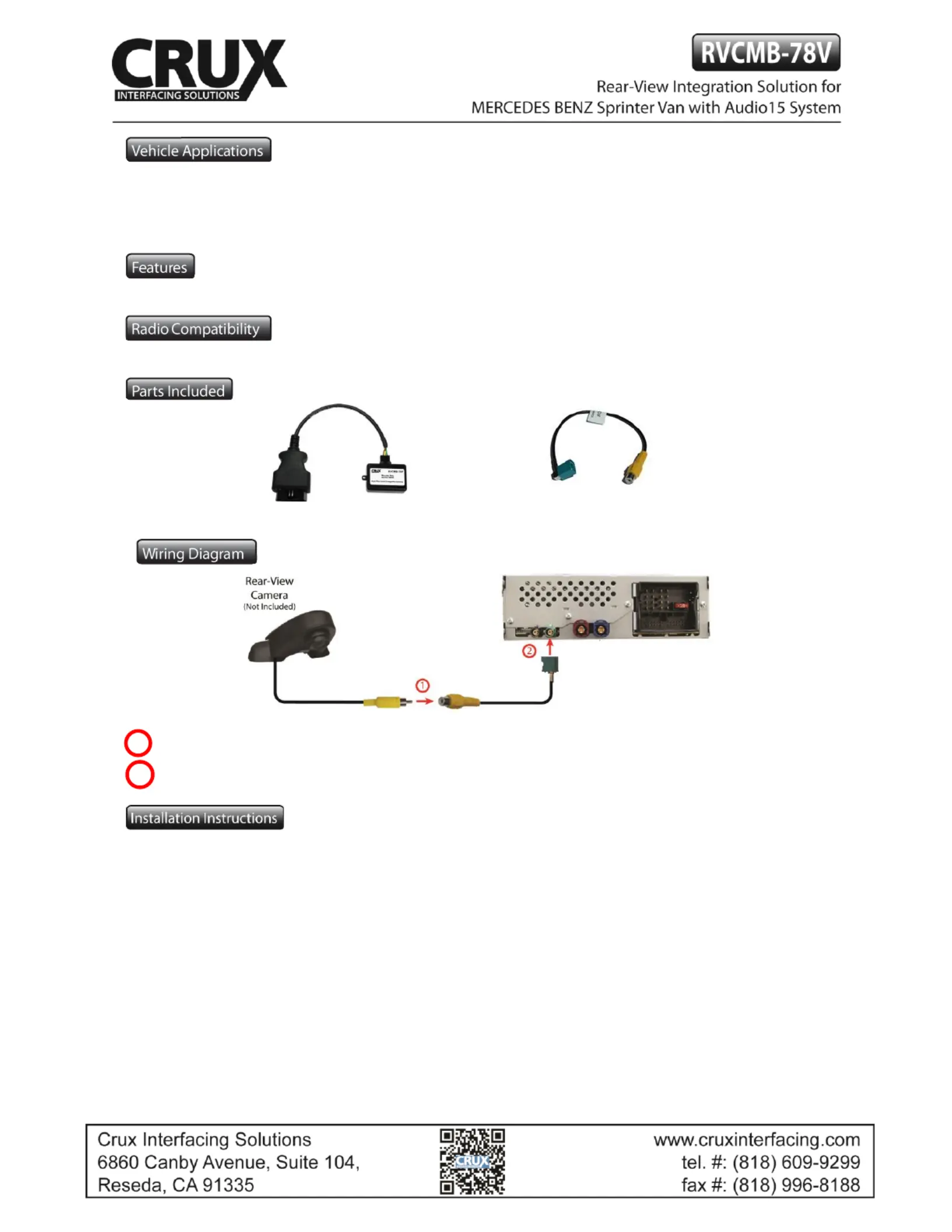
Connect the video RCA of the aermarket rear-view camera to the female RCA connector of the FAK-RCAF cable.
Connect the Fakra plug of the FAK-RCAF cable the green Fakra socket of the Audio15 radio. to
1. Locate OBD-port and remove cover (commonly located under the dashboard on the driver side).
2. Turn ignion switch to ACC.
3. Turn on radio and wait unl the navigaon has booted.
4. Plug coder into OBD-port.
5. Leave the MB-78V coder plugged in the OBD port for about 30 seconds.
6. When the navigaon startup-screen shows, remove coder from OBD-port.
NOTE: If the radio does not power up aer 2 minutes, turn the key OFF, remove the key, open door and close
and wait another 2 minutes or unl the car has powered down. Insert the key and turn to the ON posion, the
radio and RVC should now work. Disconnect the OBDII coder and have the customer keep it in a safe place.
7. Your radio’s rear view camera feature is now enabled.
To remove the Rear- -6. Aer the rst use on a View camera feature from the navigaon’s menu repeat steps 1
vehicle, the RVCMB-78V coder is personalized to this vehicle. On this vehicle the enabling and removing of the
Rear-View camera feature can be repeated without limit.
1
2
FAK-RCAF
1
rev.050417
Problemløsning CRUX RVCMB-78V
Hvis du har læst manualen omhyggeligt, men ikke fundet en løsning på dit problem, bed andre brugere om hjælp
Specifikationer
| Mærke: | CRUX |
| Kategori: | Bakkamera |
| Model: | RVCMB-78V |