CRUX
Ikke kategoriseret
RVCCH-75C
CRUX RVCCH-75C Brugsanvisning
Her er CRUX RVCCH-75C (Ikke kategoriseret) brugervejledning. 3 sider på sprog med en vægt på 1,185,732.0 Mb. Hvis du ikke kan finde svar på dit problem Spørg vores community.
Side 1/3
RVCCH-75C
Rear View Integration Interface with VIM
for CHRYSLER, DODGE & JEEP
R
INTERFACING SOLUTIONS
Sightline
Multi View Integration
Crux Interfacing Solutions • Chatsworth, California
phone: (818) 609-9299 • fax: (818) 996-8188 • www.cruxinterfacing.com
rev.020520
1 of 3
• Acvates Uconnect Touchscreen Radio for enabling Video features
• Aermarket Rear-view Camera included
• Automacally switches to Rear-view when car is in Reverse mode
• Forced reverse camera view feature
• VIM funcon
• Plug & Play Installaon
PRODUCT FEATURES:
PARTS INCLUDED:
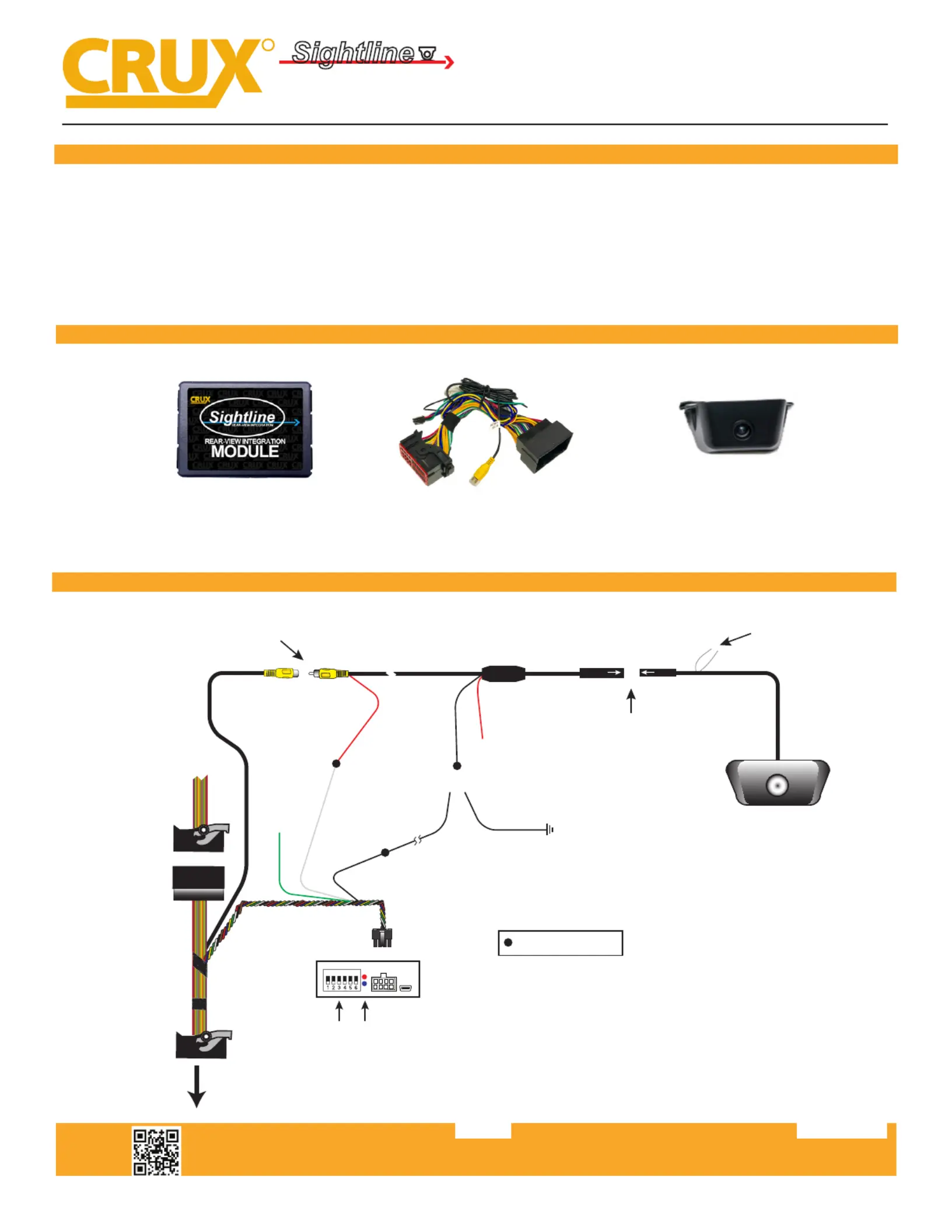
RVCCH-75C Module RVCCH-75C Harness CCH-01G Camera
INSTALLATION DIAGRAM:
WHITE Wire
Parking Guideline
To Radio
OEM Radio
Harness
DP
ON
DIP
SWITCH
LED*
*LED RED = Power ON Status
LED BLUE = Data Bus ON Status
RVC Video
Signal Input
RED Wire
Push in Connectors
all the way
Line up Arrows
Regulator
20 Ft. Coax Cable
RED Wire
Tape O
(Not Used)
BLACK
Wire
BLACK
(Ground)
8-Pin Molex
Represents Solder Joint
Connect RCAs and secure
with tape all around
WHITE Wire
(Camera Power Output
+12V 250mA)
OR*
*Connect BLACK (ground) wire to a source ground and not
chassis ground (i.e. ground wire on reverse light)
If video noise is present, we recommend connecting the
ground wire to the BLACK ground wire on the RVCCH-75C harness.
Source Ground
GREEN Wire
For Non Permanent
VIM function
Problemløsning CRUX RVCCH-75C
Hvis du har læst manualen omhyggeligt, men ikke fundet en løsning på dit problem, bed andre brugere om hjælp
Specifikationer
| Mærke: | CRUX |
| Kategori: | Ikke kategoriseret |
| Model: | RVCCH-75C |