StarTech.com
Netværkskort/adapter
USB31000S2H
StarTech.com USB31000S2H Brugsanvisning
Her er StarTech.com USB31000S2H (Netværkskort/adapter) brugervejledning. 2 sider på sprog med en vægt på 360,096.0 Mb. Hvis du ikke kan finde svar på dit problem Spørg vores community.
Side 1/2
Instruction manual
DE: Bedienungsanleitung - de.startech.com
FR: Guide de l'utilisateur - fr.startech.com
ES: Guía del usuario - es.startech.com
IT: Guida per l'uso - it.startech.com
NL: Gebruiksaanwijzing - nl.startech.com
PT: Guia do usuário - pt.startech.com
Manual Revision: 06/11/2015
For the latest information, technical specications, and support for
this product, please visit www.startech.com/USB31000S2H.
Packaging contents
• 1 x USB 3.0 to Gigabit network adapter
• 1 x instruction manual
System requirements
• USB-enabled computer with an available USB 3.0 port
• Any of the following operating systems:
• Windows® 7 (32-bit or 64-bit)
• Windows 8 (32-bit or 64-bit)
• Windows 8.1 (32-bit or 64-bit)
• Windows Server® 2003
• Windows Server 2008
• Windows Server 2012
• Windows XP
• Windows Vista®
• Mac OS 10.7 and later (tested up to Mac OS 10.10)
• Linux® kernel 3.x
Operating system requirements are subject to change. For the latest
requirements, please visit www.startech.com/USB31000S2H.
USB31000S2H
USB 3.0 to Gigabit network adapter with built-in 2-port USB hub
*actual product may vary from photos
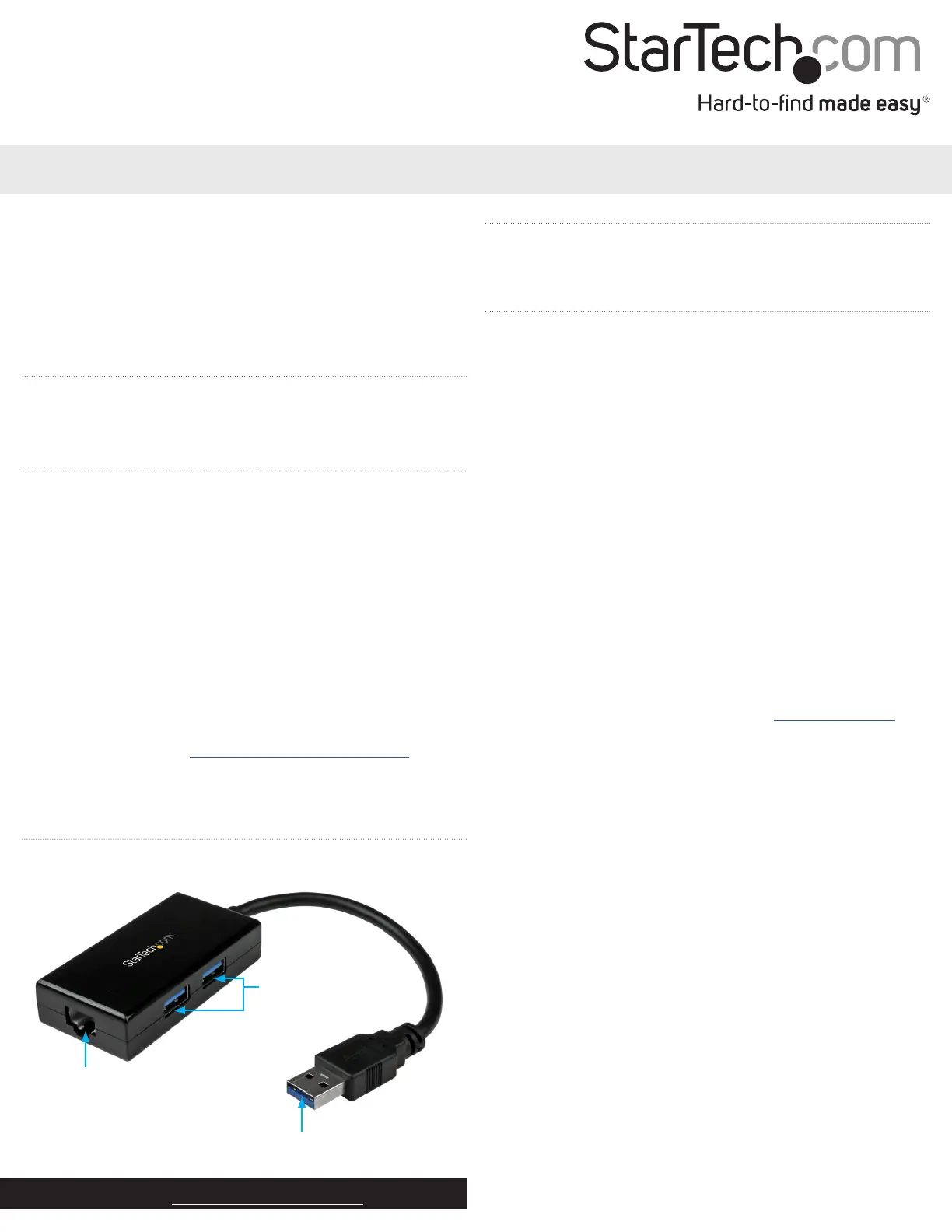
Product diagram
RJ-45 Ethernet port
USB Type-A
USB 3.0 ports
About USB 3.0 and USB 3.1 Gen 1
USB 3.0 is also known as USB 3.1 Gen 1. This connectivity standard
oers speeds up to 5 Gbps.
Installation
Install the network adapter
1. Turn on the computer that you’re connecting the network adapter
to.
2. Use an RJ-45 Ethernet cable to connect the network adapter to
your computer.
3. Connect the network adapter to an available USB port.
Note: If you connect to a USB 2.0 port, performance may be limited.
Install the driver on a computer running Windows
1. If the Found New Hardware dialog box appears on your screen,
close the dialog box or click Cancel.
2. An executable le will load, which you can use to install the driver.
Follow the on-screen instructions to complete the installation.
Note: If the driver for the network adapter doesn’t install
automatically, you need to manually install the driver. For more
information, see the instructions below.
Manually install the driver
1. To download the latest driver, navigate to www.startech.com and
enter USB31000S2H in the search eld.
2. Click the Support tab.
3. Download the driver.
4. When the download is complete, extract the contents of the
compressed le that you downloaded.
5. Double-click the appropriate driver for the version of the OS that
you’re running and follow the on-screen instructions to complete
the installation.
Problemløsning StarTech.com USB31000S2H
Hvis du har læst manualen omhyggeligt, men ikke fundet en løsning på dit problem, bed andre brugere om hjælp
Specifikationer
| Bredde: | 37 mm |
| Dybde: | 255 mm |
| Højde: | 17 mm |
| Vægt: | 25.9 g |
| Brugervejledning: | Ja |
| Produktfarve: | Sort |
| Pakkevægt: | 106 g |
| Pakkedybde: | 220 mm |
| Pakkebredde: | 128 mm |
| Pakkehøjde: | 30 mm |
| Opbevaringstemperatur (T-T): | -10 - 55 °C |
| Relativ luftfugtighed ved drift (H-H): | 40 - 50 % |
| Ethernet LAN-porte (RJ-45): | 1 |
| Ethernet LAN: | Ja |
| Driftstemperatur (T-T): | 0 - 70 °C |
| Ethernet LAN-datahastigheder: | 10,100,1000 Mbit/s |
| Husmateriale: | Plast |
| Forbindelsesteknologi: | Ledningsført |
| Kabelteknologi: | 10/100/1000BaseT(X) |
| Netværksstandarder: | IEEE 802.1Q, IEEE 802.3, IEEE 802.3ab, IEEE 802.3az, IEEE 802.3u, IEEE 802.3x |
| Harmoniseret systemkode (HS): | 85176990 |
| Bæredygtighedscertifikater: | CE, RoHS |
| Understøttede Mac-operativsystemer: | Mac OS X 10.10 Yosemite, Mac OS X 10.11 El Capitan, Mac OS X 10.12 Sierra, Mac OS X 10.13 High Sierra, Mac OS X 10.14 Mojave, Mac OS X 10.15 Catalina, Mac OS X 10.15.3 Catalina, Mac OS X 10.7 Lion, Mac OS X 10.8 Mountain Lion, Mac OS X 10.9 Mavericks, Mac OS X 11.0 Big Sur, Mac OS X 13.0 Ventura |
| Understøttede Linux-operativsystemer: | Ja |
| Andre understøttede operativsystemer: | ChromeOS |
| Hovedkassen højde (udvendigt): | 270 mm |
| Hovedkassens længde (udvendigt): | 455 mm |
| Hovedkassens bredde (udvendigt): | 355 mm |
| Værtsgrænseflade: | USB |
| Grænseflade: | Ethernet |
| Intern: | Ingen |
| Maksimal dataoverførselshastighed: | 5000 Mbit/s |
| USB-drevet: | Ja |
| Strømforbrug: | 1092 mA |
| Produkter pr. hovedkasse (udvendigt): | 200 stk |
| Fuld duplex: | Ja |
| Gennemsnitstid mellem fejl (MTBF): | 637901 t |
| Understøttede operativsystemer til servere: | Windows Server 2003, Windows Server 2008 R2, Windows Server 2012, Windows Server 2016, Windows Server 2019 |
| Flowkontrol support: | Ja |
| Jumbo Frames support: | Ja |
| Jumbo rammer: | 9000 |
| Auto MDIX IEEE: | Ja |
| Wake-on-LAN klar: | Ja |
| Antal USB 3.2 Gen 1 (3.1 Gen 1) Type-A hub porte: | 2 |
| VLAN mærkning: | Ja |
| Chipsæt: | Realtek RTL8153 |