StarTech.com
slot
UNIVC4D-LAPTOP-LOCK
StarTech.com UNIVC4D-LAPTOP-LOCK Brugsanvisning
Her er StarTech.com UNIVC4D-LAPTOP-LOCK (slot) brugervejledning. 2 sider på sprog Engelsk med en vægt på 483,742.0 Mb. Hvis du ikke kan finde svar på dit problem Spørg vores community.
Side 1/2
Quick-Start Guide
To view manuals, FAQs, videos, drivers, downloads, technical drawings, and more, visit www.startech.com/support
Manual Revision: June 1, 2023
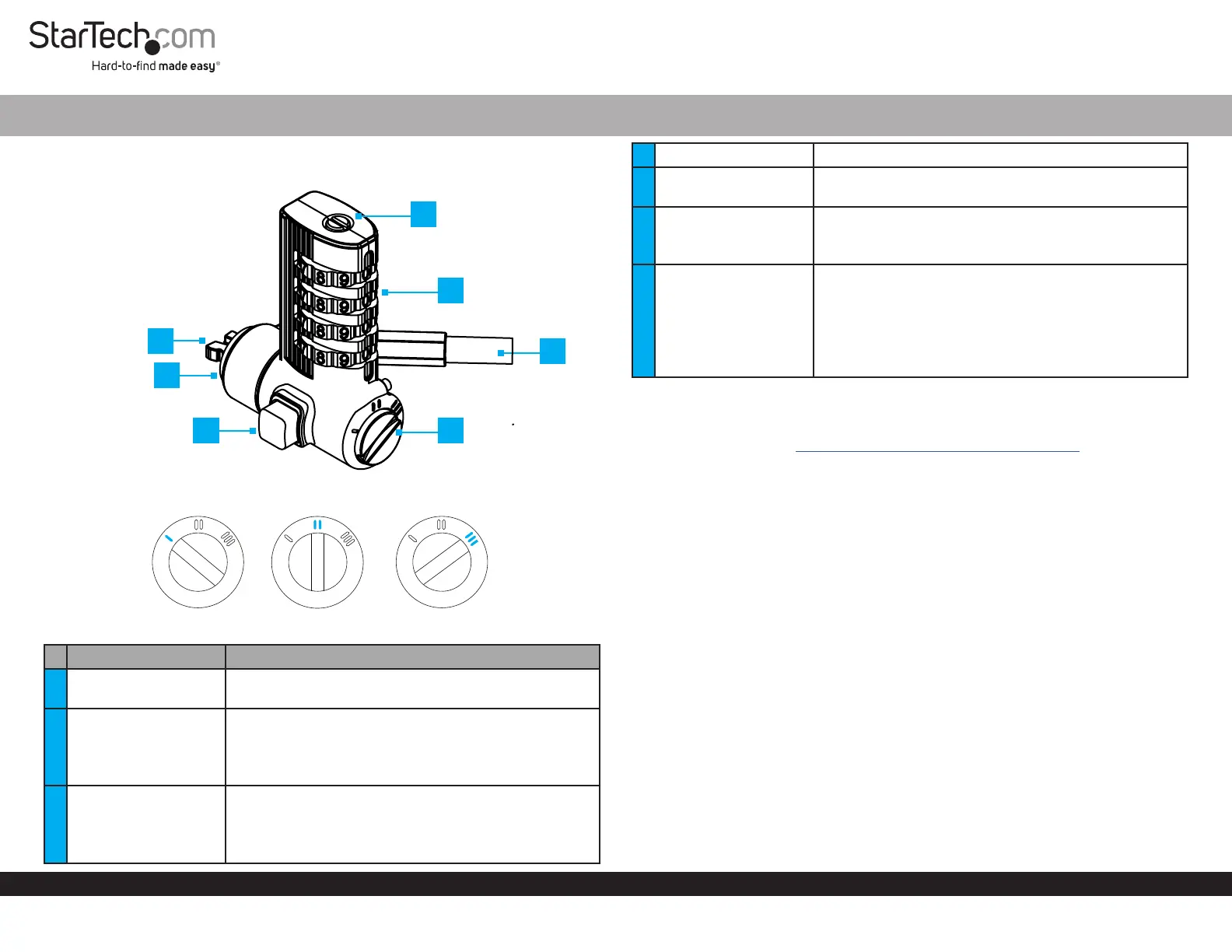
Product Diagram
UNIVC4D-LAPTOP-LOCK
Lock Selection Dial
Components Function
1 Lock Tip
• Used to connect the Laptop Lock to a compatible
Security Slot
2 Bumper Spacer
• Prevents the Lock Head from scratching the secured
Device
Note: Attach one of the three Bumpers Spacers
based on the Security Slot requirements
3 Release Button
• Press and Hold to insert or remove from a Security
Slot
Note: The locking mechanism must be disengaged
before pressing the button
3-in-1 Combination Universal Laptop Cable Lock - 6.6ft (2m)
4 Reset Button • Used to set or reset the Combination Code
5 Combination Dial
• Rotate each row of numbers until the desired
number is aligned at the middle
6 Security Cable
• Used to secure a Device to a stationary object
• Pivots 90° and allows to rotate the Lock Head 360°
around the ball-joint
7 Lock Selection Dial
• Use to change the shape of the Lock Tip for dierent
Security Slots
Note: The appropriate Lock Tip must be selected
before inserting the Lock Tip into a Security Slot
• Use a Flat-Head Screwdriver or a similar object to
rotate the Lock Selection Dial
Requirements
For the latest manuals, product information, technical specications, and declarations of
conformance, please visit: www.startech.com/UNIVC4D-LAPTOP-LOCK
• Compatible device with Noble Wedge®, Nano, or K-slot security slots
• Flat-head screwdriver
Package Contents
• Laptop Security Lock x 1
• Bumper Spacers x 3
• Hook-and-Loop Strap x 1
• Quick-Start Guide x 1
Set a Combination Code
1. Set the code on the Combination Dial to the default code from factory, 0 - 0 - 0 - 0.
2. Insert a Flathead Screwdriver into the Reset Button and press it Down while
turning it Clockwise 90°. Figure 1.
*Product may vary from image
Noble Wedge® Slot Nano Slot K-Slot
1
2
6
3 7
4
5
Problemløsning StarTech.com UNIVC4D-LAPTOP-LOCK
Hvis du har læst manualen omhyggeligt, men ikke fundet en løsning på dit problem, bed andre brugere om hjælp
Specifikationer
| Bredde: | 46 mm |
| Højde: | 14 mm |
| Vægt: | 100 g |
| Antal pr. pakke: | 1 stk |
| Brugervejledning: | Ja |
| Produktfarve: | Sort, sølv |
| Pakkedybde: | 150 mm |
| Pakkebredde: | 180 mm |
| Pakkehøjde: | 22 mm |
| Materiale: | Kulstofstål |
| Kabellængde: | 2 m |
| Hovedkassen højde (udvendigt): | 236 mm |
| Hovedkassens længde (udvendigt): | 273 mm |
| Hovedkassens bredde (udvendigt): | 348 mm |
| Kabellåseslids type: | Kensington |
| Produkter pr. hovedkasse (udvendigt): | 50 stk |
| Låsetype: | Kombinationslås |
| Bedste anvendelsesmuligheder: | Laptop |
| Brudsikker: | 91.6 kg |
| Antal kombinationer: | 10000 |
| Velcro kabelrem: | Ja |
| Ankertype for sikkerhedsstik: | Nano, Standard, Wedge-shaped |