StarTech.com
slot
SNANOC4D-LAPTOP-LOCK
StarTech.com SNANOC4D-LAPTOP-LOCK Brugsanvisning
Her er StarTech.com SNANOC4D-LAPTOP-LOCK (slot) brugervejledning. 2 sider på sprog med en vægt på 646,925.0 Mb. Hvis du ikke kan finde svar på dit problem Spørg vores community.
Side 1/2
Quick-Start Guide
To view manuals, FAQs, videos, drivers, downloads, technical drawings, and more, visit www.startech.com/support
Manual Revision: May 8, 2024
Product ID
SNANOC4D-LAPTOP-LOCK / SNBLC4D-LAPTOP-LOCK / SSTDC4D-LAPTOP-LOCK
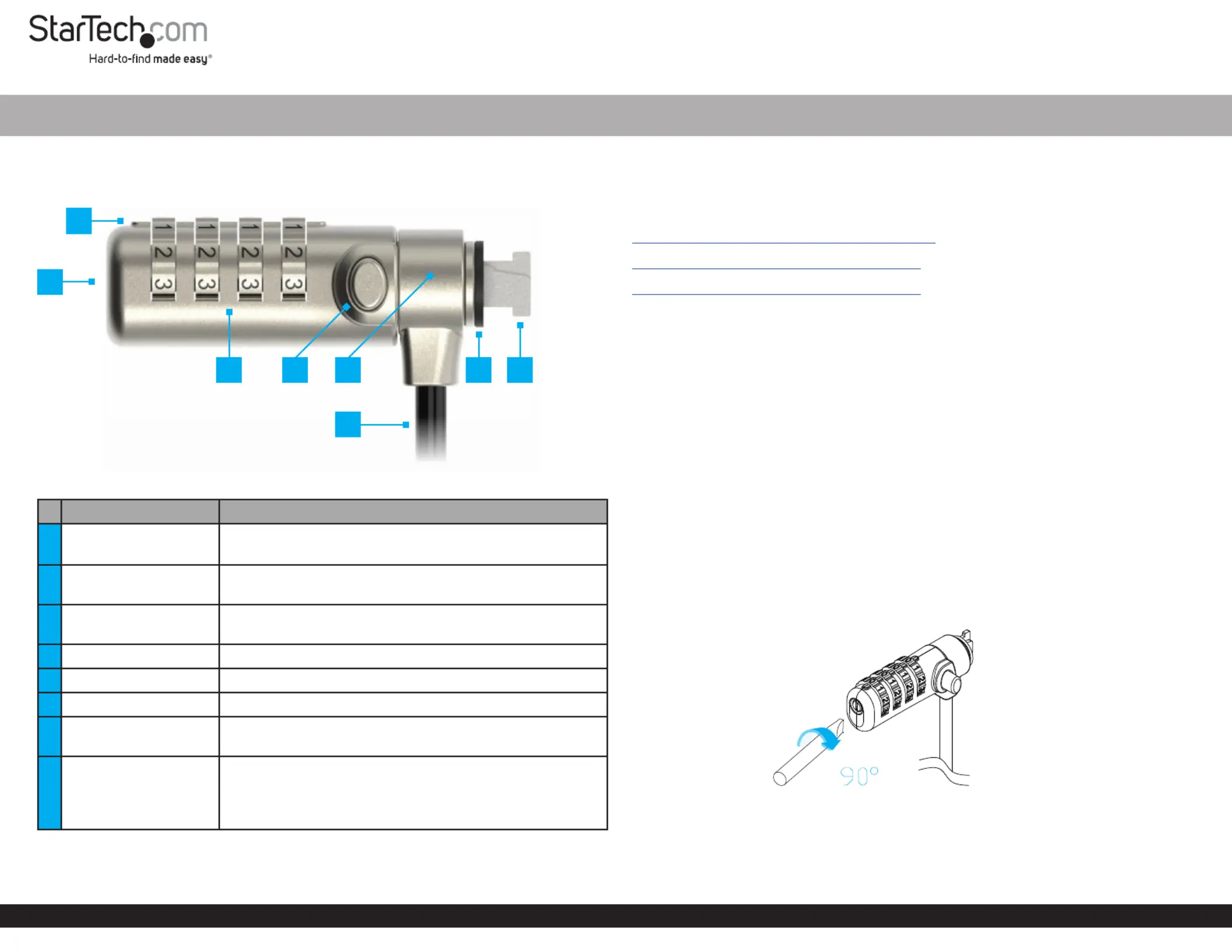
Components Function
1
Reset Button
(Not shown)
• Used to set or reset the Combination Code
• Use a to rotateFlat-head Screwdriver
2Guide Line
• Align the digits on the with the Combination Dial
Guide Line
3Combination Dial
• Rotate each row of numbers until the desired
combination is aligned with the Guide Line
4Release Button • to or thePress and Hold Unlock Lock Lock Tip
5Lock Head • Enables 360° rotation
6Security Cable • Used to secure a to a stationary objectDevice
7Lock Spacer
• Prevents the from scratching the Lock Head Secured
Device Security Slotand improves the tting on the
8Lock Tip
• Secures the to a compatible Laptop Cable Lock
Security Slot
• K-Slot (T-Bar), Nano, or Noble Wedge® compatible
depending on the model Laptop Lock
Slim Combination Laptop Lock - 6.6ft (2m)
Requirements
For the latest manuals, product information, technical specications, and declarations
of conformance, please visit:
www.StarTech.com/SNANOC4D-LAPTOP-LOCK
www.StarTech.com/SNBLC4D-LAPTOP-LOCK
www.StarTech.com/SSTDC4D-LAPTOP-LOCK
• Device compatible with a matching security slot
• Flat-head screwdriver
Package Contents
• Laptop Security Lock x 1
• Hook-and-Loop Strap x 1
• Quick-Start Guide x 1
Operation
Change the Combination Code
1. If this is the rst time setting the , dial the default code Combination Code
0 0 0 0 Combination Dial Guide Line- - - by aligning the numbers on the with the .
Note: If the Combination Code has been changed from the default code, dial the
current Combination Code.
2. Insert a into the and while turning it Flathead Screwdriver Reset Button Push
Clockwise. (Figure 1)
Figure 1
3. Rotate the to the desired . Combination Dial New Combination
4. Insert a into the and it while turning it to Flathead Screwdriver Reset Button Push
Counterclockwise.
1
73 8
*Product may vary from image
2
6
4 5
Problemløsning StarTech.com SNANOC4D-LAPTOP-LOCK
Hvis du har læst manualen omhyggeligt, men ikke fundet en løsning på dit problem, bed andre brugere om hjælp
Specifikationer
| Mærke: | StarTech.com |
| Kategori: | slot |
| Model: | SNANOC4D-LAPTOP-LOCK |