StarTech.com
USB HUB
ST1030USBM
StarTech.com ST1030USBM Brugsanvisning
Her er StarTech.com ST1030USBM (USB HUB) brugervejledning. 4 sider på sprog Engelsk med en vægt på 0.2 Mb. Hvis du ikke kan finde svar på dit problem Spørg vores community.
Side 1/4
Quick-Start Guide
To view manuals, FAQs, videos, drivers, downloads, technical drawings, and more, visit www.startech.com/support.
Manual Revision: September 10, 2024 6:17 PM
Product ID: HB30A10AME, ST1030USBM
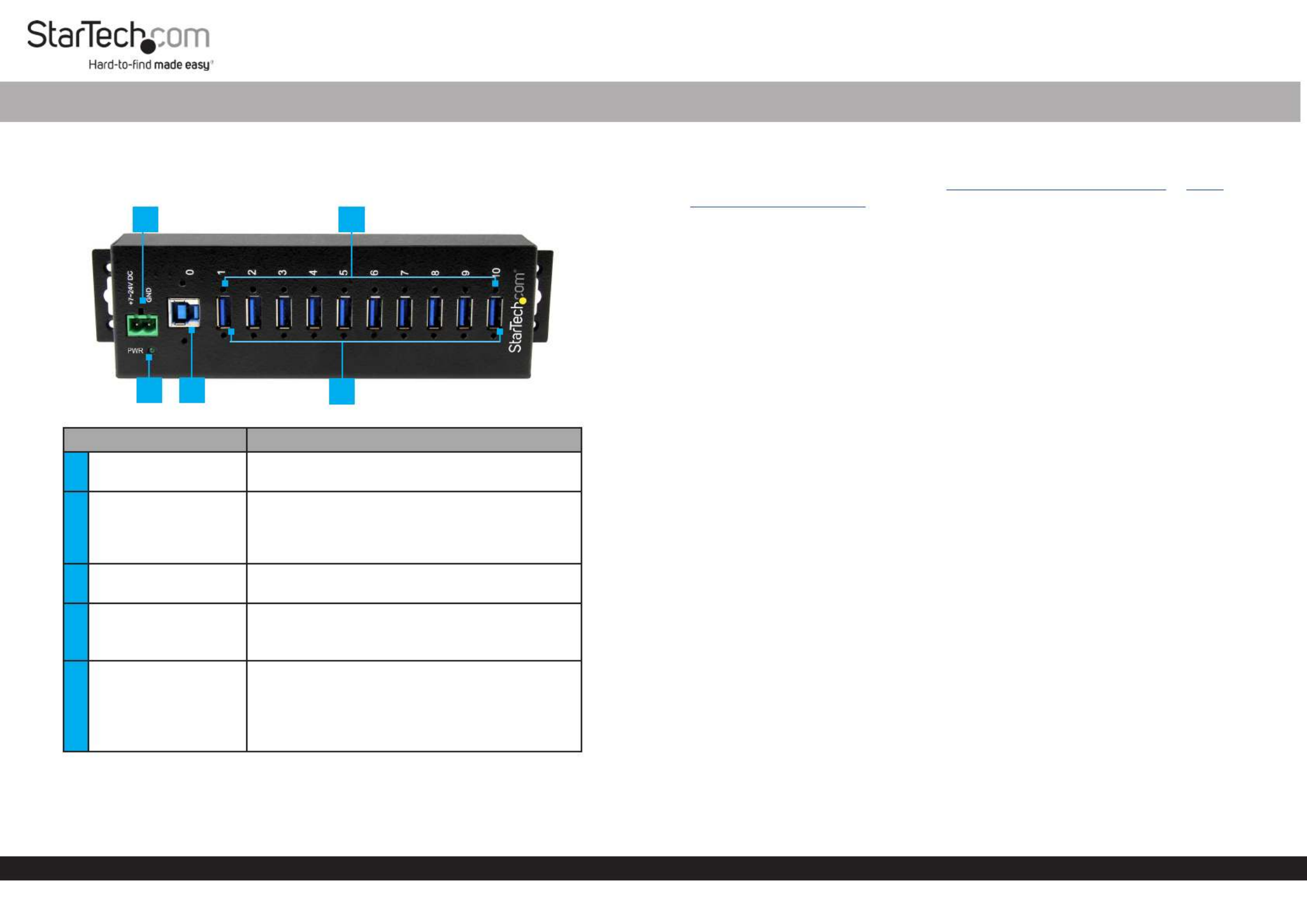
Component Function
12-Wire Terminal Block • Used to connect an external DC Power Source
(7~24V DC Input) to the .Hub
2Screw Locks (x 10)
• Used to securely lock a to the USB Device
USB-A Port Hub on the .
• Center to center 19 Screw Lock Dimensions:
mm, thread size 4 - 40.
3Power LED • : Indicates that the Hub is receiving Green
power.
4USB-B Host Port
• Used to connect a to the .Host Computer Hub
• Center to center 24 Screw Lock Dimensions:
mm, thread size 4 - 40.
5USB-A Ports (x 10)
• Used to connect ( x 10) to the USB Devices
Hub.
• Used to charge connected .USB-A Devices
• USB-A Ports support surge and 15KV ESD
(Electrostatic Discharge) Protection.
10-Port Industrial USB 3.0 (5 Gbps) Hub | USB 3.2 Gen 1 to 10x USB-A | ESD & Surge Protection
3
Requirements
For the latest requirements, please visit or
www.startech.com/HB30A10AME www.
startech.com/ST1030USBM
• Phillips Head Screwdriver
• Writing Utensil
• Level
• Mounting Screws (x 2)
Installation
Notes: It is recommended to use an external (+7 - 24V DC)DC Power Source
connected to the to ensure sucient power/current is 2-Wire Terminal Block
delivered to each on the . USB-A Port Hub
Powering the Hub Using the Universal Power Adapter
1. Connect the to the and to a Universal Power Adapter Terminal Block AC
Electrical Outlet.
Note: HB30A10AME ST1030USBMUniversal power adapter included with ; does not
include power adapter ( ).sold separately
2. Connect a (the end will depend on USB Port you are USB-B to USB Cable
connecting to) to the and to a USB port on the .USB-B Host Port Host Computer
3. The should detect the and Host Computer’s Operating System Hub
automatically install it.
4. Connect your to the (x 10) on the . USB Devices USB-A Ports Hub
Powering the Hub Using the 2-Wire Terminal Block
1. Remove the from the .Terminal Block Connector Housing Hub’s Casing
2. Using a small screwdriver (Phillips or Flat Head), loosen the screws on the Terminal
Block Connectors.
3. Connect the and from your (+7 - 24V DC) Power Ground Wires DC Power Source
to the proper , the terminals are marked on theTerminal Block Connectors Hub’s
Casing.
4 5
2
1
* Actual product may vary from photos
Problemløsning StarTech.com ST1030USBM
Hvis du har læst manualen omhyggeligt, men ikke fundet en løsning på dit problem, bed andre brugere om hjælp
Specifikationer
| Bredde: | 56 mm |
| Dybde: | 198 mm |
| Højde: | 31 mm |
| Vægt: | 357 g |
| Brugervejledning: | Ja |
| Produktfarve: | Sort |
| Pakkevægt: | 600 g |
| Pakkedybde: | 246 mm |
| Pakkebredde: | 169 mm |
| Pakkehøjde: | 57 mm |
| Opbevaringstemperatur (T-T): | -20 - 85 °C |
| Relativ luftfugtighed ved drift (H-H): | 5 - 95 % |
| Antal USB 3.2 Gen 1 (3.1 Gen 1) type-A-porte: | 10 |
| Driftstemperatur (T-T): | 0 - 70 °C |
| Husmateriale: | Stål |
| Kabler inkluderet: | USB |
| Certificering: | RoHS, CE, FCC, TAA, REACH |
| LED-indikatorer: | Strøm |
| Kabellængde: | 2.032 m |
| Harmoniseret systemkode (HS): | 84719000 |
| Indgangsspænding: | 7 - 24 V |
| Hovedkassen højde (udvendigt): | 338 mm |
| Hovedkassens længde (udvendigt): | 526 mm |
| Hovedkassens bredde (udvendigt): | 444 mm |
| Værtsgrænseflade: | USB 3.2 Gen 1 (3.1 Gen 1) Type-B |
| Produkter pr. hovedkasse (udvendigt): | 25 stk |
| Gennemsnitstid mellem fejl (MTBF): | 119388 t |
| Dataoverførselshastighed: | 5000 Mbit/s |
| Klemrække port: | Ja |
| Klemrække inkluderet: | Ja |
| Porte, antal: | 10 |
| Beskyttelse ved overspænding: | Ja |
| Hub-grænseflader: | USB 3.2 Gen 1 (3.1 Gen 1) Type-A |
| Chipsæt: | Genesys Logic - GL3520 |
| DIN skinnesæt inkluderet: | Ja |