StarTech.com
Ikke kategoriseret
ICUSB234854I
StarTech.com ICUSB234854I Brugsanvisning
Her er StarTech.com ICUSB234854I (Ikke kategoriseret) brugervejledning. 2 sider på sprog Engelsk med en vægt på 0.1 Mb. Hvis du ikke kan finde svar på dit problem Spørg vores community.
Side 1/2
Instruction manual
FR: Guide de l’utilisateur - fr.startech.com
DE: Bedienungsanleitung - de.startech.com
ES: Guía del usuario - es.startech.com
NL: Gebruiksaanwijzing - nl.startech.com
PT: Guia do usuário - pt.startech.com
IT: Guida per l’uso - it.startech.com
Manual Revision: 03/22/2018
For the latest information, technical specications, and support for
this product, please visit www.StarTech.com/ICUSB234854I.
Package contents
• 1 x USB serial hub
• 1 x USB-B with screw lock to USB-A cable
• 1 x DIN rail kit
• 1 x instruction manual
Requirements
• USB-enabled computer with an available USB 2.0 port
• Any of the following operating systems:
• Microsoft Windows® 10, 8/8.1, 7
• Microsoft Windows Server® 2012, 2008, 2003
• macOS High Sierra (10.13), Sierra (10.12) El Capitan (10.11),
Yosemite (10.10), Mavericks (10.9)
• Linux® kernel 3.5 to 4.11.x, LTS versions only
• Phillips type screwdriver
Operating system requirements are subject to change. For the latest
requirements, please visit www.StarTech.com/ICUSB234854I.
ICUSB234854I
4-Port Industrial USB to Serial Adapter Hub - RS-232/RS-422/RS-485
DIN Rail and Wall Mountable
*actual product may vary from photos
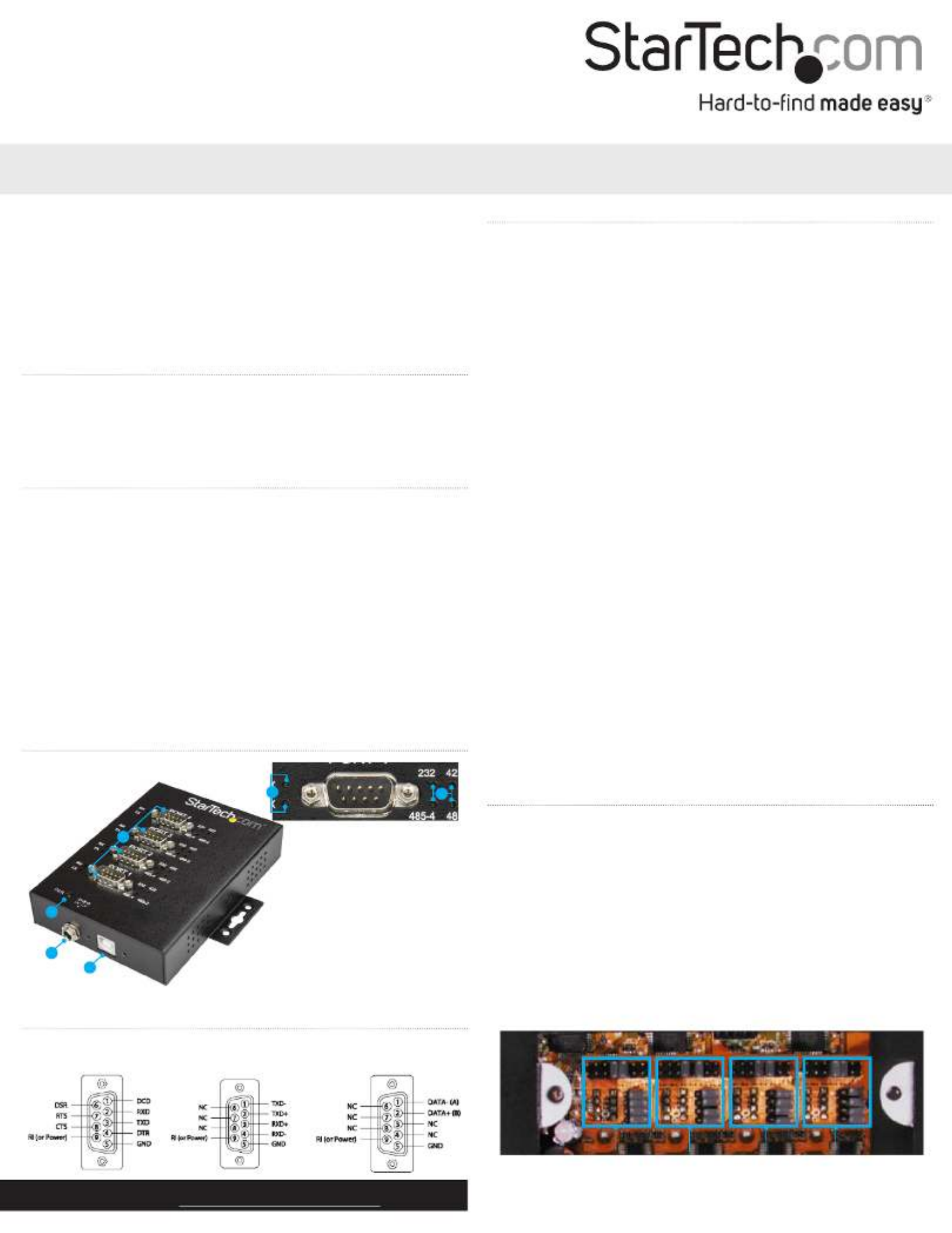
Product diagram
1
3
4
1. RS-232/422/485 ports
2. Power LED
3. Power adapter port
4. USB 2.0 host port
5. Port send/receive LED
6. Port mode LED
2
6
5
Pinouts
RS-232 mode RS-485 2-wire
mode
RS-422/RS-485
4-wire mode
Congure port settings
The serial adapter hub supports four dierent modes (RS-232, RS-
422, RS-485 2-wire, and RS-485 4-wire) with dierent power and
termination options. You can set the mode and settings for each
individual port by adjusting the jumpers inside the serial adapter
hub’s housing. To access the jumpers, open the access panel on the
back of the housing using a Phillips type screwdriver to remove the
two screws.
Jumper groups for each port
Each port has its own set of jumpers that enable you to assign the
settings for each individual port.
Port 1 Port 2 Port 3 Port 4
Installation
Notes:
• You may need to restart your computer during the software
installation process. Be sure to save any unsaved material before
you install the software.
• Congure your port settings before installing the USB serial hub.
1. Download the latest software from the StarTech.com website:
www.StarTech.com/ICUSB234854I.
2. The software that corresponds with your operating system will be
compressed in a .zip folder. Download and extract the contents
of that folder to a location on your computer that’s easy to access,
such as your or folder. Desktop Downloads
3. Open the folder that corresponds with your specic operating
system and launch the installer le.
4. Follow the on-screen prompts to complete the installation, and if
instructed to do so, restart your computer.
5. Connect each of your serial devices to the port you’ve congured
for their connection.
6. Connect the USB-A to USB-B cable to the USB 2.0 port on the USB
serial hub and to a USB port on your computer.
7. (Optional) If you require AUX power (fully loaded) connect your
power adapter to an AC outlet, then connect the Power adapter
port to the USB serial hub.
Problemløsning StarTech.com ICUSB234854I
Hvis du har læst manualen omhyggeligt, men ikke fundet en løsning på dit problem, bed andre brugere om hjælp
Specifikationer
| Bredde: | 116 mm |
| Dybde: | 128 mm |
| Højde: | 25 mm |
| Vægt: | 382 g |
| Brugervejledning: | Ja |
| Produktfarve: | Sort |
| Pakkevægt: | 598 g |
| Pakkedybde: | 240 mm |
| Pakkebredde: | 165 mm |
| Pakkehøjde: | 55 mm |
| Opbevaringstemperatur (T-T): | -20 - 85 °C |
| Relativ luftfugtighed ved drift (H-H): | 5 - 95 % |
| Driftstemperatur (T-T): | 0 - 55 °C |
| Husmateriale: | Stål |
| Kabler inkluderet: | USB |
| LED-indikatorer: | Strøm |
| Udgangsspænding: | 12 V |
| Udgangsstrøm: | 1 A |
| Harmoniseret systemkode (HS): | 84719000 |
| Bæredygtighedscertifikater: | CE, RoHS |
| Understøttede Mac-operativsystemer: | Mac OS X 10.10 Yosemite, Mac OS X 10.11 El Capitan, Mac OS X 10.12 Sierra, Mac OS X 10.13 High Sierra, Mac OS X 10.14 Mojave, Mac OS X 10.15 Catalina, Mac OS X 10.9 Mavericks, Mac OS X 11.0 Big Sur, Mac OS X 12.0 Monterey, Mac OS X 13.0 Ventura |
| Understøttede Linux-operativsystemer: | Ja |
| Hovedkassen højde (udvendigt): | 280 mm |
| Hovedkassens længde (udvendigt): | 420 mm |
| Hovedkassens bredde (udvendigt): | 410 mm |
| Værtsgrænseflade: | USB 2.0 Type-B |
| Plug and play: | Ja |
| Produkter pr. hovedkasse (udvendigt): | 15 stk |
| Overholdelse af bæredygtighed: | Ja |
| Strømstiktype: | Type N |
| Understøttede operativsystemer til servere: | Windows Server 2008 R2, Windows Server 2012, Windows Server 2012 R2, Windows Server 2016, Windows Server 2019 |
| RS-232-porte: | 4 |
| Baud hastighed: | 921.6 Kbit/s |
| Data-bits: | 7, 8 |
| Stop bits: | 1, 2 |
| Dataoverførselshastighed: | - Mbit/s |
| Porte, antal: | 4 |
| Beskyttelse ved overspænding: | Ja |
| Hub-grænseflader: | Seriel |
| Chipsæt: | FTDI - FT4232H |
| Paritetsbit: | Even, Mark, N,Odd, Space |
| DIN skinnesæt inkluderet: | Ja |