StarTech.com HD202A Brugsanvisning
Her er StarTech.com HD202A (Audio/video konverter) brugervejledning. 2 sider på sprog Engelsk med en vægt på 458,510.0 Mb. Hvis du ikke kan finde svar på dit problem Spørg vores community.
Side 1/2
Quick-Start Guide
To view manuals, FAQs, videos, drivers, downloads, technical drawings, and more, visit www.startech.com/support.
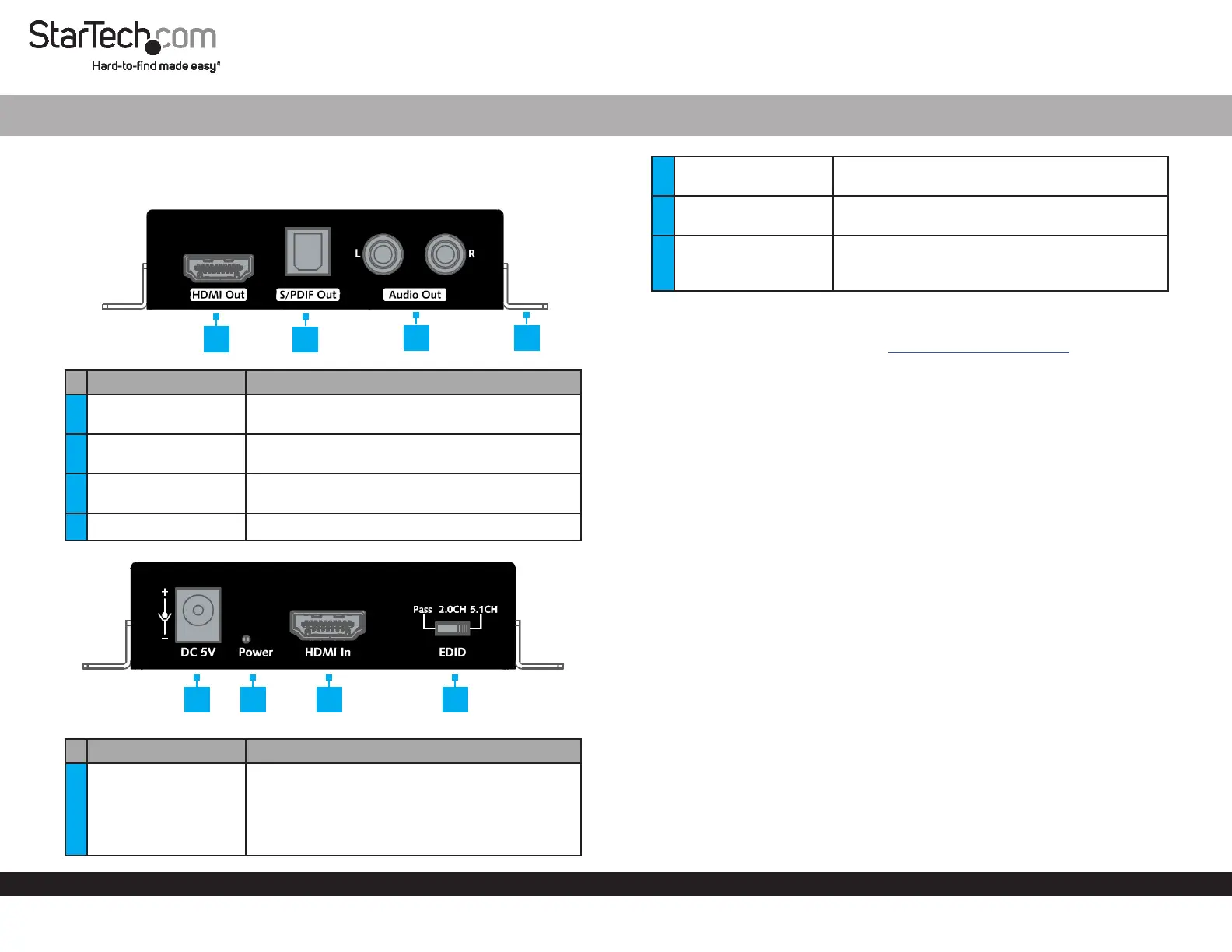
Product Diagram (HD202A)
Port Function
1 HDMI OUT
• Used to connect a Display Device to the
Extractor.
2 S/PDIF OUT
• Used to connect an Audio Device to the
Extractor.
3 AUDIO OUT L/R
• Used to connect an Audio Device to the
Extractor.
4 Mounting Brackets (2) • Used to mount the Extractor.
Port/LED Function
5 DC 5V
• Used with the Universal Power Adapter to
power the Extractor.
Note: Universal Power Adapter has
components compatible for NA/JP, EU, UK, ANZ,
installation.
HDMI® Audio Extractor | HDR | 4K 60Hz
1
6 POWER LED
• Solid Red: Indicates that the Extractor is
properly connected and is receiving power.
7 HDMI IN
• Used to connect a Video Source Device to the
Extractor.
8 EDID Switch
• Used to toggle between the Extended Display
Identication Data (EDID) modes (PASS, 2.0CH,
and 5.1CH).
Requirements
For the latest requirements, please visit www.startech.com/HD202A.
Installation
1. Connect an HDMI Cable (sold separately) to the HDMI IN Port on the Extractor and
connect the other end of the HDMI Cable to the HDMI port on the Video Source
Device.
2. Connect an HDMI Cable to the HDMI OUT Port on the Extractor and connect the
other end of the HDMI Cable to the HDMI port on the Display Device.
3. (Optional): Connect RCA Audio Cables (sold separately) to the AUDIO OUT
L/R Ports on the Extractor and the other end of the RCA Audio Cables to the
Speakers/Audio Receiver.
4. (Optional): Connect an Optical Audio Cable to the S/PDIF OUT Port and connect
the other end of the Optical Audio Cable to an audio out port on the Audio Device
(speakers, amplifer, etc.).
Note: The port used to connect the Audio Device will depend on your audio setup.
5. Connect the Universal Power Adapter to the DC 5V Port on the Extractor and
other end to an AC Electrical Outlet.
6. Power on the Video Display Device and the HDMI Video Source.
7. Slide the EDID Switch to adjust the EDID mode to one of the following:
• PASS (Default): EDID settings from the Display Device connected to the HDMI
OUT Port are passed through to the Video Source Device.
• 2.0CH: 2.0CH EDID settings are passed through the Video Source Device
connected to the HDMI IN Port and to the Display Device (video and 2.0CH
audio).
2
4
3
5 6 7 8
Problemløsning StarTech.com HD202A
Hvis du har læst manualen omhyggeligt, men ikke fundet en løsning på dit problem, bed andre brugere om hjælp
Specifikationer
| Bredde: | 80 mm |
| Dybde: | 90 mm |
| Højde: | 22 mm |
| Vægt: | 320 g |
| Produktfarve: | Sort |
| Pakkevægt: | 470 g |
| Pakkedybde: | 192 mm |
| Pakkebredde: | 152 mm |
| Pakkehøjde: | 50 mm |
| Opbevaringstemperatur (T-T): | -20 - 70 °C |
| Relativ luftfugtighed ved drift (H-H): | 10 - 90 % |
| Driftstemperatur (T-T): | 0 - 45 °C |
| Lyd-output kanaler: | 5.1 kanaler |
| AC-adapter inkluderet: | Ja |
| Harmoniseret systemkode (HS): | 85176990 |
| Indgangsspænding: | 100 - 240 V |
| Maksimal videoopløsning: | 4096 x 2160 pixel |
| Videoopløsninger: | 1280 x 720,1920 x 1080,1920 x 1200,3840 x 2160,4096 x 2160 pixel |
| Værtsgrænseflade: | HDMI |
| Indgangsstrøm: | 0.4 A |
| Driftsspænding: | 5 V |
| Maksimal opdateringshastighed: | 60 Hz |
| Ekstern strømadapter: | Ja |
| Strømstiktype: | Type M |
| Monteringsbeslag inkluderet: | Ja |
| Videoudgang: | HDMI |
| Lydudgang: | RCA + Toslink |
| Skruer inkluderet: | Ja |
| Video indgang: | HDMI |
| Antal skruer: | 2 |
| Inkluderede strømstik typer: | ANZ, EU, NA, UK |
| Driftsstrøm: | 1 A |