StarTech.com
Andet computertilbehør
DKT31CHVL
StarTech.com DKT31CHVL Brugsanvisning
Her er StarTech.com DKT31CHVL (Andet computertilbehør) brugervejledning. 2 sider på sprog med en vægt på 585,009.0 Mb. Hvis du ikke kan finde svar på dit problem Spørg vores community.
Side 1/2
Quick-Start Guide
To view manuals, FAQs, videos, drivers, downloads, technical drawings, and more, visit www.startech.com/support.
Manual Revision: January 14, 2020 10:02 AM
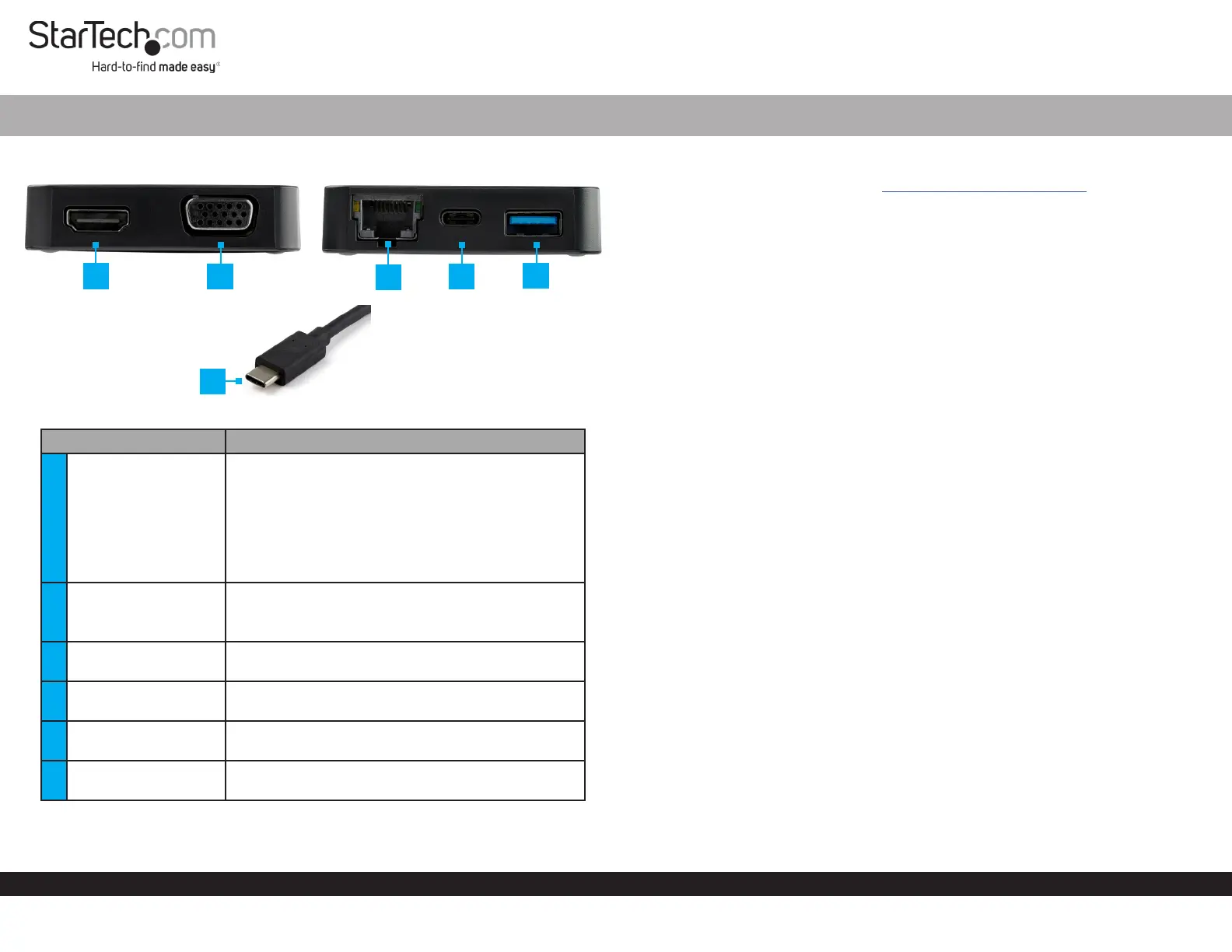
Product Diagram (DKT31CHVL)
Component Function
1 HDMI Port
• Connect a HDMI Display Device to the Multiport
Adapter.
• Maximum Video Resolution = 3840 x 2160 /30Hz
(4k UltraHD)
Note: Only one video output port can be used at a
time (HDMI or VGA). If two displays are connected,
the HDMI port takes priority and VGA is disabled.
2 VGA Port
• Connect a Display Device to the Multiport
Adapter.
• Maximum Video Resolution = 1920 x 1080 /60Hz
3 RJ45 Port
• Connect the Multiport Adapter to a Network
Device.
4 USB-C Port
• Connect a USB Peripheral to the Multiport
Adapter (ash drive, keyboard, etc.).
5 USB-A Port
• Connect a USB Peripheral to the Multiport
Adapter (mouse, keyboard, etc.).
6 USB-C Connector
• Connects the Multiport Adapter to a USB-C Port
on a Host Computer.
USB-C™ 10Gbps Multiport Adapter | 4K HDMI or VGA | USB-C and USB-A | Extended Cable
Requirements
For the latest requirements, please visit www.startech.com/DKT31CHVL
Host
• Host Computer that is DP Alt Mode compatible
Cables
• CAT5e/6 Cable
• HDMI Cable
• VGA Cable
Display
• Display Device that is HDMI or VGA compatible
Connecting the Multiport Adapter
1. Connect an HDMI Cable (sold separately) to the HDMI Port on the Multiport
Adapter and the other end to an HDMI port on a Display Device.
- or -
2. Connect a VGA Cable (sold separately) to the VGA Port on the Multiport Adapter
and the other end to a VGA port on a Display Device.
Notes: Only one video output port can be used at a time (HDMI or VGA). If two displays
are connected, the HDMI port takes priority.
The Host Computer must support DP Alt Mode in order to connect a Display Device
to the Multiport Adapter.
3. Connect a Peripheral Device to the USB-C Port on the Multiport Adapter (e.g.
keyboard, ash drive, etc.).
4. Connect a Cat5e/6 Cable (sold separately) to the RJ45 Port on the Multiport
Adapter and the other end to a Network Device.
5. Connect the Multiport Adapter’s built-in USB-C Cable to a USB-C port on a Host
Computer.
Powering the Multiport Adapter
The Multiport Adapter is bus-powered (powered by the Host Computer’s USB-C
port) and does not require or support a separate power adapter.
1
2
3
4
5
6
Problemløsning StarTech.com DKT31CHVL
Hvis du har læst manualen omhyggeligt, men ikke fundet en løsning på dit problem, bed andre brugere om hjælp
Specifikationer
| Bredde: | 61 mm |
| Dybde: | 360 mm |
| Højde: | 15 mm |
| Vægt: | 54 g |
| Antal pr. pakke: | 1 stk |
| Produktfarve: | Sort, sølv |
| Pakkevægt: | 164 g |
| Pakkedybde: | 142 mm |
| Pakkebredde: | 210 mm |
| Pakkehøjde: | 38 mm |
| Opbevaringstemperatur (T-T): | -20 - 60 °C |
| Relativ luftfugtighed ved drift (H-H): | 0 - 90 % |
| Antal HDMI-porte: | 1 |
| Ethernet LAN-porte (RJ-45): | 1 |
| Antal USB 3.2 Gen 1 (3.1 Gen 1) type-A-porte: | 1 |
| Ethernet LAN: | Ja |
| Driftstemperatur (T-T): | 0 - 60 °C |
| Ethernet LAN-datahastigheder: | 10,100,1000 Mbit/s |
| Husmateriale: | Aluminium, Plastic |
| Hurtig start guide: | Ja |
| Forbindelsesteknologi: | Ledningsført |
| Kabellængde: | 0.25 m |
| Harmoniseret systemkode (HS): | 84733020 |
| Understøttede mobile operativsystemer: | Android |
| Bæredygtighedscertifikater: | CE, RoHS |
| Mikrofonindgang: | Ingen |
| Understøttede Windows-operativsystemer: | Windows 10, Windows 10 Education, Windows 10 Education x64, Windows 10 Enterprise, Windows 10 Enterprise x64, Windows 10 Home, Windows 10 Home x64, Windows 10 IOT Core, Windows 10 IoT Enterprise, Windows 10 Pro, Windows 10 Pro x64, Windows 10 x64, Windows 11, Windows 11 x64 |
| Understøttede Mac-operativsystemer: | Mac OS X 10.10 Yosemite, Mac OS X 10.11 El Capitan, Mac OS X 10.12 Sierra, Mac OS X 10.13 High Sierra, Mac OS X 10.14 Mojave, Mac OS X 10.15 Catalina, Mac OS X 10.15.3 Catalina, Mac OS X 11.0 Big Sur, Mac OS X 12.0 Monterey, Mac OS X 13.0 Ventura |
| Andre understøttede operativsystemer: | ChromeOS |
| Hovedkassen højde (udvendigt): | 318 mm |
| Hovedkassens længde (udvendigt): | 235 mm |
| Hovedkassens bredde (udvendigt): | 415 mm |
| Værtsgrænseflade: | USB 3.2 Gen 2 (3.1 Gen 2) Type-C |
| Maksimal opdateringshastighed: | 30 Hz |
| Antal VGA-porte (D-sub): | 1 |
| Produkter pr. hovedkasse (udvendigt): | 20 stk |
| Fuld duplex: | Ja |
| Overholdelse af bæredygtighed: | Ja |
| Maksimal digital opløsning: | 3840 x 2160 pixel |
| Dataoverførselshastighed: | 10 Gbit/sek. |
| Maksimal analog opløsning: | 2048 x 2180 pixel |
| Antal USB 3.2 Gen 2 (3.1 Gen 2) type-C-porte: | 1 |
| Understøtter UASP: | Ja |
| Chipsæt: | Genesys Logic - GL3590, ITE Tech - IT6564FN, Silicon Labs - EFM8UB20F32G |