CRUX
Overvågningskamera
CUL-08
CRUX CUL-08 Brugsanvisning
Her er CRUX CUL-08 (Overvågningskamera) brugervejledning. 1 sider på sprog med en vægt på 103,258.0 Mb. Hvis du ikke kan finde svar på dit problem Spørg vores community.
Side 1/1
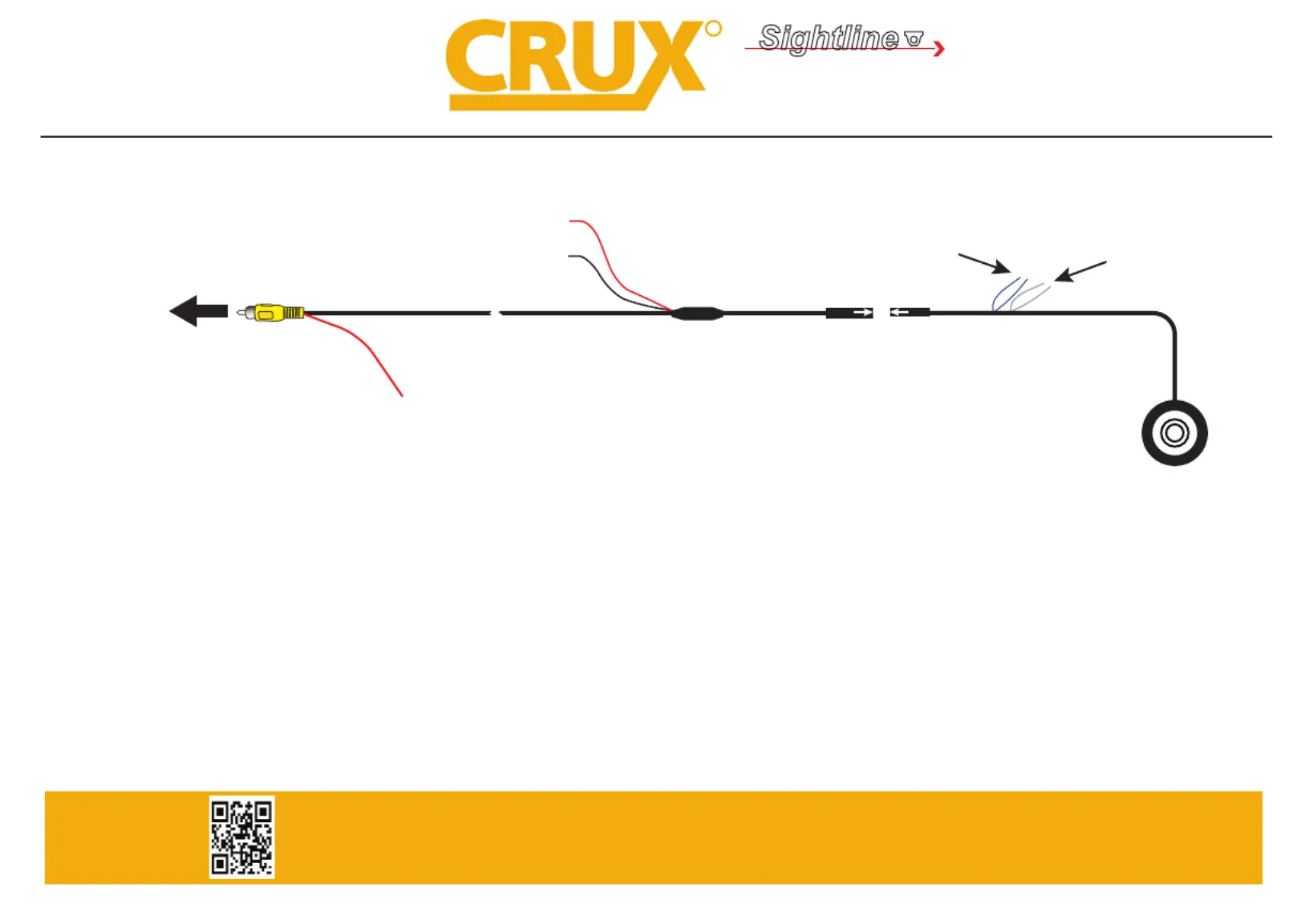
WHITE Wire
Parking Guideline
Regulator
Extension Coax Cable
GROUND
RED Wire (A)*
Camera
RED Wire (B)*
Make sure the arrows
line up and push in
the connectors well.
To Aftermarket Radio
Backup Camera Input
OR
Reverse Camera Interface
Backup Camera Input
BLUE Wire
Flip Image Horizontally
*NOTE: To power the camera, use RED Wire A or B. If tapping power from the radio or RVC Interface, make sure to insulate RED Wire A to avoid it from
shorting. If you will be tapping power from the reverse light +12V, insulate RED Wire B to avoid it from shorting. With either connection
the Black GROUND wire needs to be connected to a solid chassis ground. For vehicles with manual transmission, we recommend tapping
+12V power from the reverse light.
WHITE Wire: Connect to show parking guide line. Disconnect to remove.
BLUE Wire: Connect to ip image horizontally to use as front facing camera. Disconnect to use as reverse camera.
(Not all cameras will have a Parking Guide Line or Flip Image function.)
R
INTERFACING SOLUTIONS
Sightline
CAMERAS
Crux Interfacing Solutions • 6860 Canby Ave., Suite 116, Reseda, CA 91335
phone: (818) 609-9299 • fax: (818) 996-8188 • www.cruxinterfacing.com
Problemløsning CRUX CUL-08
Hvis du har læst manualen omhyggeligt, men ikke fundet en løsning på dit problem, bed andre brugere om hjælp
Specifikationer
| Mærke: | CRUX |
| Kategori: | Overvågningskamera |
| Model: | CUL-08 |