CRUX
Overvågningskamera
CFF-02
CRUX CFF-02 Brugsanvisning
Her er CRUX CFF-02 (Overvågningskamera) brugervejledning. 1 sider på sprog med en vægt på 365,945.0 Mb. Hvis du ikke kan finde svar på dit problem Spørg vores community.
Side 1/1
Crux Interfacing Solutions • Chatsworth, CA 91311
phone: (818) 609-9299 • fax: (818) 996-8188 • www.cruxinterfacing.com
rev.050321
CFF-02
Universal Square Body Front or Rear facing Camera
with Parking Guide Lines
1
- Parking guide lines with on/o function.
- For front or rear view use.
- Buttery mount for a variety of mounting locations.
PRODUCT FEATURES:
PARTS INCLUDED:
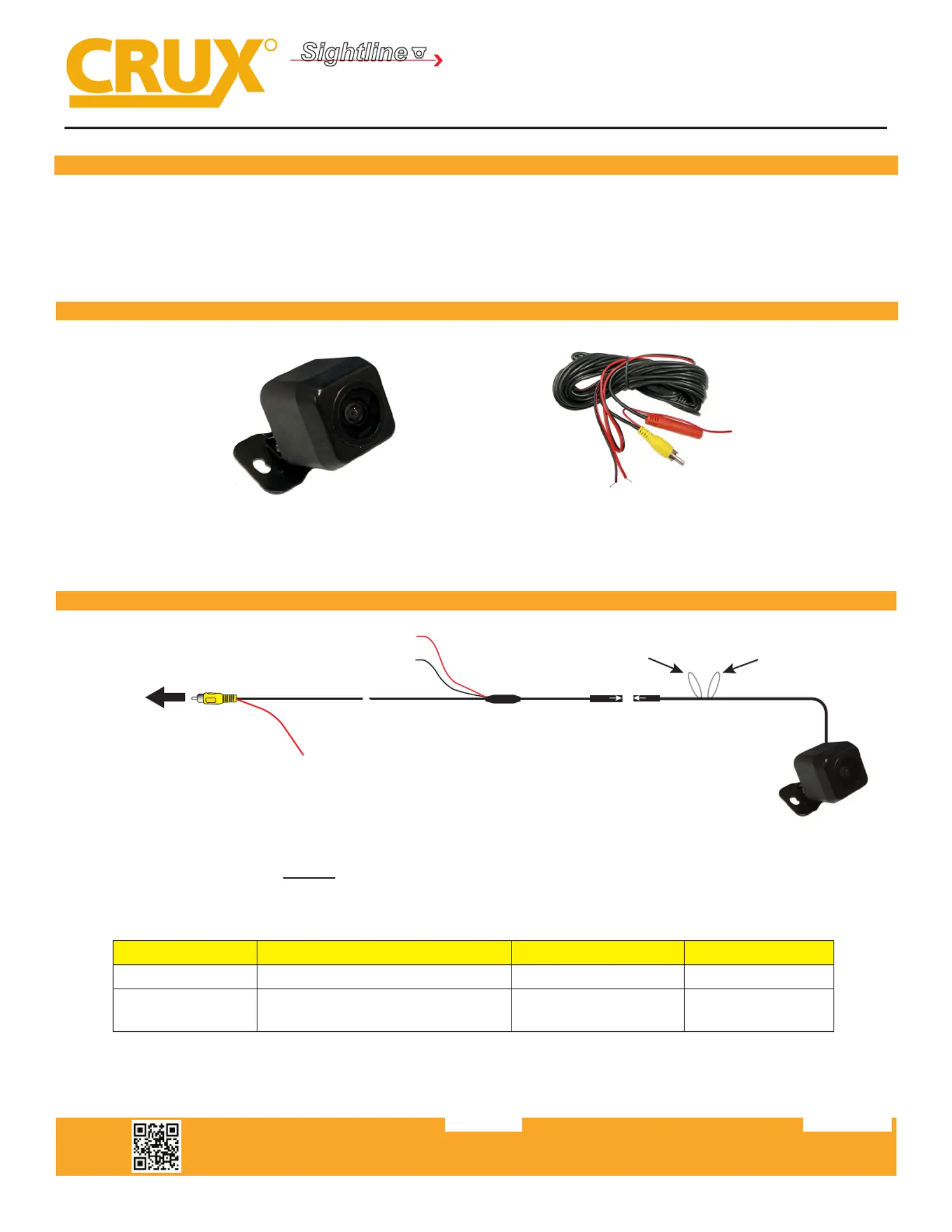
INSTALLATION DIAGRAM:
CFF-02 CAMERA EXTENSION CABLE
WHITE Wire
Parking Guideline
(see below)
Regulator
Extension Coax Cable
Black Wire
(Ground)
RED Wire (A)*
Camera
RED Wire (B)*
Make sure the arrows
line up and push in
the connectors well.
To Aftermarket Radio
Backup Camera Input
OR
Reverse Camera Interface
Backup Camera Input
GREEN Wire
Flip Image
(see below)
R
INTERFACING SOLUTIONS
Sightline
CAMERAS
*NOTE: The camera needs a +12V trigger. Power the camera at the headunit using RED Wire B or from the reverse
light wire using RED Wire A. DO NOT connect both wires to +12V at the same me. Insulate the red wire that is not
being used. Tap the Black wire to an exisng ground lead, or ground Black wire securely to vehicle body metal.
Loop Wire Color Joined CutFuncon
White Parking Lines ON (default) OFF
Green
Flip Image horizontally to use
as a front camera
OFF (default) ON
NOTE: Reset the camera by disconnecng the power wire aer cung or joining the loop wires for the opon to take eect.
Problemløsning CRUX CFF-02
Hvis du har læst manualen omhyggeligt, men ikke fundet en løsning på dit problem, bed andre brugere om hjælp
Specifikationer
| Mærke: | CRUX |
| Kategori: | Overvågningskamera |
| Model: | CFF-02 |