Brother MFC-L8930CDW Brugsanvisning
Her er Brother MFC-L8930CDW (Printer) brugervejledning. 2 sider på sprog med en vægt på 744,792.0 Mb. Hvis du ikke kan finde svar på dit problem Spørg vores community.
Side 1/2
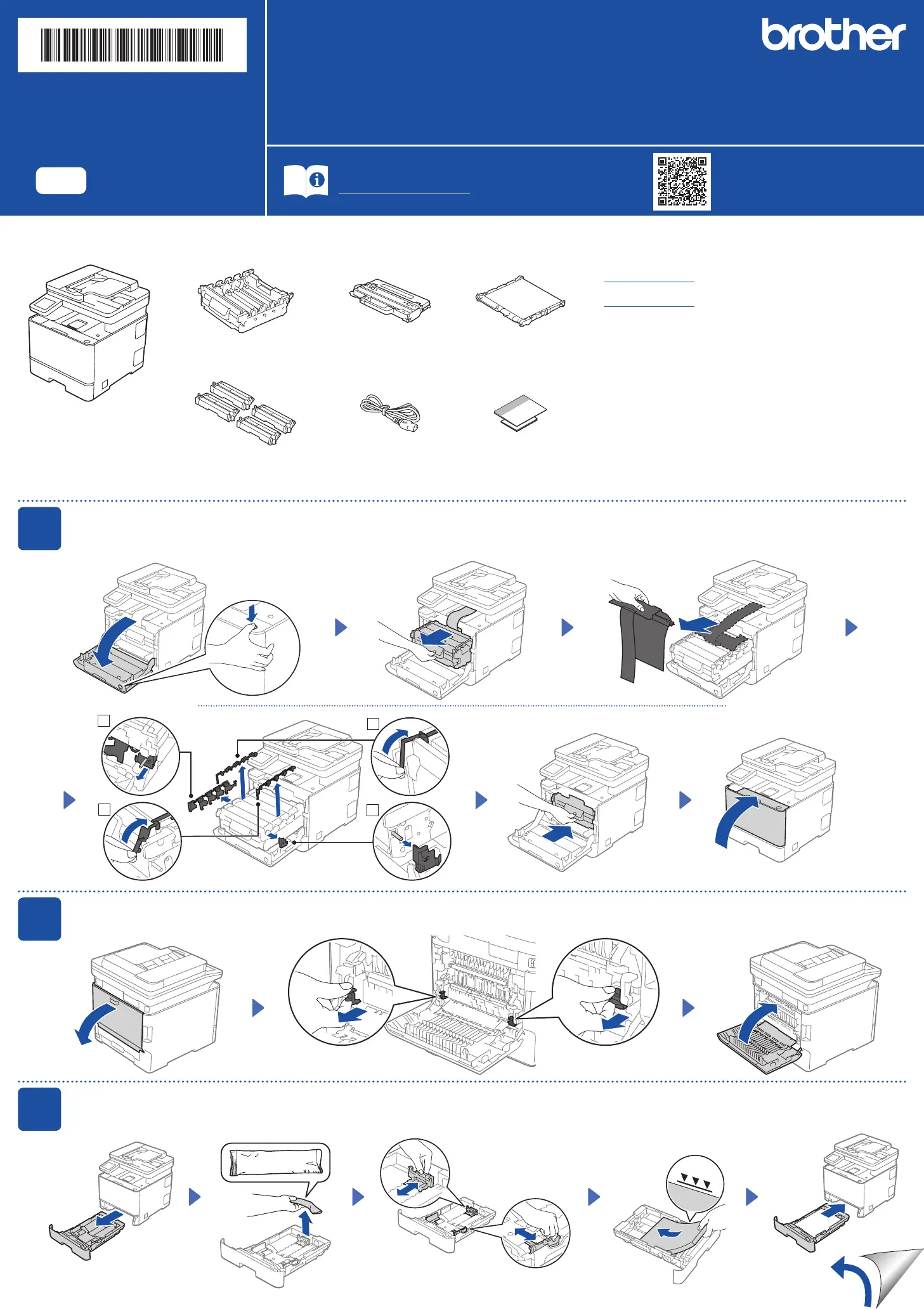
Unpack the machine and check the components
1
Remove packing materials from the toner cartridge and drum unit assembly
3
Load paper in the paper tray
Adjust the paper
guides.
Drum Unit* Waste Toner Box* Belt Unit*
Toner Cartridges*
(Black, Cyan, Magenta,
and Yellow)
AC Power Cord Quick Setup Guide
Product Safety Guide
Do not exceed this mark.
Remove all blue tape and orange parts.
2
Remove packing materials from the fuser unit
* Installed in the machine
2
1
4
3
Back
Remove packing materials.
Read the Product Safety Guide first, then read this Quick Setup Guide for the correct installation procedure.
Not all models are available in all countries.
The latest manuals are available at the Brother support website:
support.brother.com/manuals
EN
Quick Setup Guide
DCP-L8630CDW / MFC-L8730CDW / MFC-L8930CDW / MFC-L8970CDW / MFC-EX575
D035BM001-00
USA/CAN
Version 0
NOTE:
• Manuals in Spanish for this model are available at
support.brother.com.
Manuales en Español para este modelo están disponibles en
support.brother.com.
• The components included in the box may differ depending on your
country.
• The available connection interfaces vary depending on the model.
You must purchase the correct interface cable if you require one.
- USB cable
We recommend using a USB 2.0 cable (Type A/B) that is no
more than 6 feet (2 meters) long.
- Network cable
Use a straight-through Category 5e (or greater) twisted-pair
cable.
• The illustrations in this Quick Setup Guide show the MFC-L8730CDW.
• Save all packing materials and the box in case you need to ship
your machine.
Problemløsning Brother MFC-L8930CDW
Hvis du har læst manualen omhyggeligt, men ikke fundet en løsning på dit problem, bed andre brugere om hjælp
Specifikationer
| Mærke: | Brother |
| Kategori: | Printer |
| Model: | MFC-L8930CDW |