Brother
Faxmaskine
DCP-L5660DN
Brother DCP-L5660DN Brugsanvisning
Her er Brother DCP-L5660DN (Faxmaskine) brugervejledning. 2 sider på sprog med en vægt på 611,570.0 Mb. Hvis du ikke kan finde svar på dit problem Spørg vores community.
Side 1/2
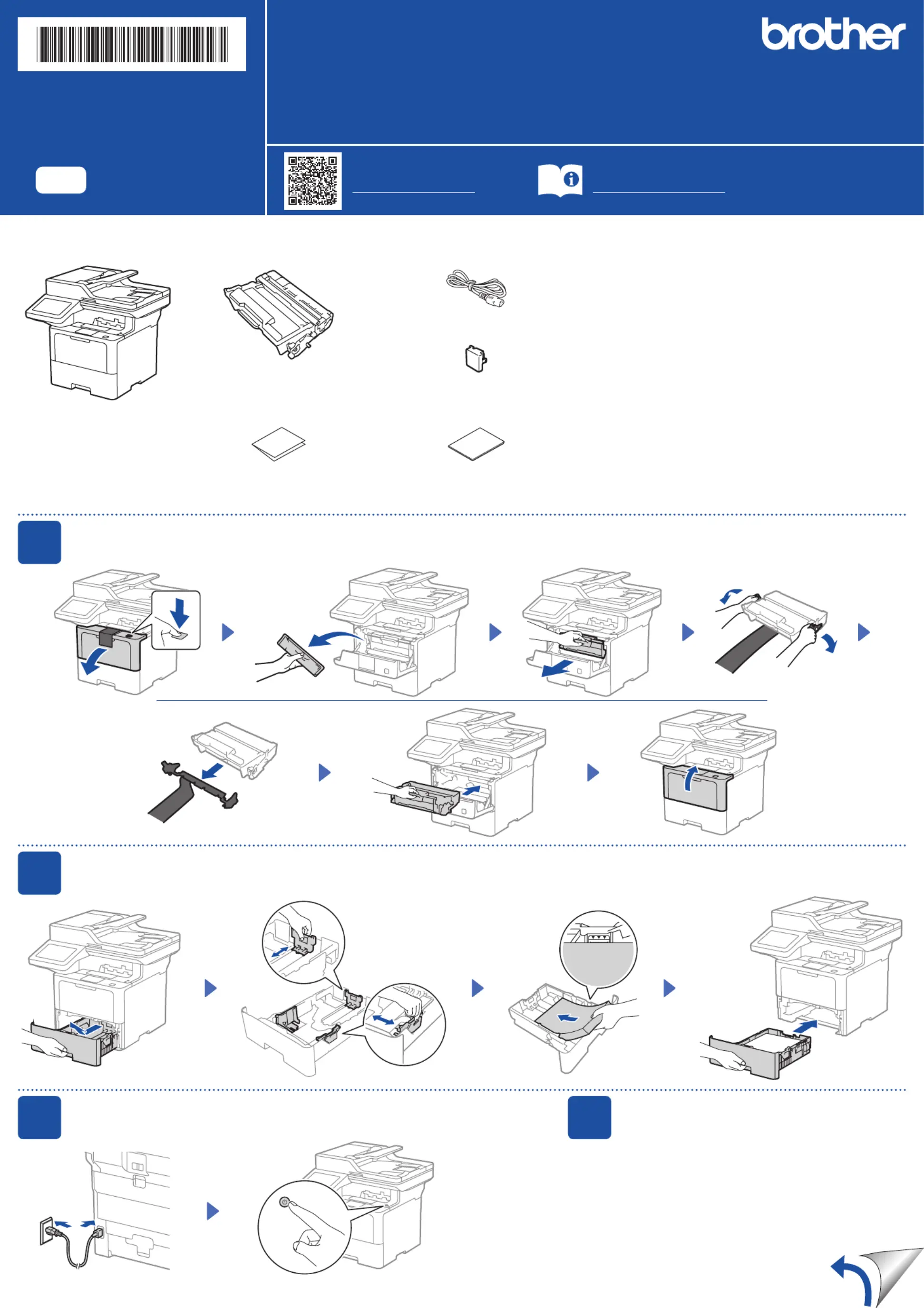
Unpack the machine and check the components
AC Power Cord
USB Port Cover
(Not included in all models)
Toner Cartridge and Drum Unit
Assembly
(Installed in the machine)
Quick Setup Guide Product Safety Guide
1
Remove the packing materials and re-install the toner cartridge and drum unit assembly
Remove the orange part.
2
Load paper in the paper tray
Adjust the paper
guides.
Do not exceed this mark.
Discard the
silica gel pack.
3
Connect the power cord and turn the machine on
Back Front
NOTE:
• The components included in the box may differ depending on your
country.
• The available connection interfaces vary depending on the model.
You must purchase the correct interface cable if you require one.
• USB cable
We recommend using a USB 2.0 cable (Type A/B) that is no more
than 2 metres long.
• Network cable
Use a straight-through Category 5 (or greater) twisted-pair cable.
• The screens and images in this show the Quick Setup Guide
MFC-L6915DW.
4
Select your country/language
(Initial setup only)
After turning the machine on, you may be required
to set your country or language (depending on your
machine).
If required, follow the on-screen instructions.
Quick Setup Guide
Read the for the correct installation procedure.Product Safety Guide Quick Setup Guidefirst,thenreadthis
Not all models are available in all countries.
The latest manuals are available at the Brother support website:
support.brother.com/manuals
Video setup instructions:
support.brother.com/videos
EN
DCP-L5510DN / DCP-L5510DW / DCP-L5660DN / MFC-L5710DN / MFC-L5710DW /
MFC-L5715DW / MFC-L5915DW / MFC-L6710DW / MFC-L6720DW / MFC-L6910DN / MFC-L6915DW
D02EEJ001-00
OCE/ASA/SAF/GLF/TWN
Version 0
Problemløsning Brother DCP-L5660DN
Hvis du har læst manualen omhyggeligt, men ikke fundet en løsning på dit problem, bed andre brugere om hjælp
Specifikationer
| Bredde: | 495 mm |
| Dybde: | 460 mm |
| Højde: | 486 mm |
| Vægt: | 16900 g |
| Produktfarve: | Black, Grey |
| Kontroltype: | Berøring |
| Indbygget skærm: | Ja |
| Skærm diagonal: | 3.5 " |
| USB-port: | Ja |
| Ethernet LAN: | Ja |
| Udskrivningsteknologi: | Laser |
| Maksimal opløsning: | 1200 x 1200 dpi |
| Udskrivningshastighed (sort, normal kvalitet, A4/amerikansk papirformat): | 50 sider pr. minut |
| Udskrivning: | Monoprint |
| Medietyper til papirbakke: | Envelopes, Labels, Letterhead, Recycled paper |
| Maksimal ISO A-serie papirstørrelse: | A4 |
| ISO A-serie, størrelser (A0...A9): | A4, A5, A6 |
| Ikke-ISO udskriftsmedier størrelse: | Executive (184 x 267mm), Legal (media size), Letter (media size) |
| Kuverter størrelser: | 10 |
| Medievægt på papirbakke: | 60 - 163 g/m² |
| Samlet antal inputbakker: | 1 |
| Samlet inputkapacitet: | - ark |
| Samlet outputkapacitet: | - ark |
| Scanner type: | Flatbed & ADF scanner |
| Optisk scanningsopløsning: | 1200 x 1200 dpi |
| Scanning: | Farvescanning |
| Kopiering: | Monokopiering |
| Maksimal kopiopløsning: | 1200 x 600 dpi |
| Ethernet LAN-datahastigheder: | 10, 100 Mbit/s |
| Skærm: | LCD |
| Markedspositionering: | Forretning |
| Strømforbrug (slukket): | 0.04 W |
| Maksimal driftscyklus: | - sider pr. måned |
| Udskrivning af farver: | Sort |
| Fax: | Ingen |
| Intern hukommelse: | - MB |
| Kabler inkluderet: | Vekselstrøm |
| Indbygget kortlæser: | Ja |
| Duplex udskrivning: | Ja |
| Duplex-funktioner: | Copy, Print, Scan |
| Antal printpatroner: | 1 |
| Processorfrekvens: | 1200 MHz |
| Strømforbrug (udskrivning): | 670 W |
| Understøttede Windows-operativsystemer: | Ja |
| Understøttede Mac-operativsystemer: | Ja |
| Understøttede Linux-operativsystemer: | Ja |
| Farveskærm: | Ja |
| Ændre størrelse på kopimaskine: | 25 - 400 % |
| Duplekskopiering: | Ja |
| Duplex scanning: | Ja |
| Strømforbrug (dvale): | 5.8 W |
| Universal-magasin kapacitet: | 100 ark |
| Multifunktionsbakke: | Ja |
| Indbygget processer: | Ja |
| Flerfunktionsmagasin medie vægt: | 60 - 230 g/m² |
| Patron(er) inkluderet: | Ja |
| Scan til: | USB |
| Strømforbrug (klar): | 31 W |
| ID-kort kopi funktion: | Ja |
| Optisk scanningsopløsning (ADF): | 600 x 600 dpi |