Xiaomi Yi Smart Dash Camera Brugsanvisning
Her er Xiaomi Yi Smart Dash Camera (Kamera) brugervejledning. 5 sider på sprog Engelsk med en vægt på 1.4 Mb. Hvis du ikke kan finde svar på dit problem Spørg vores community.
Side 1/5
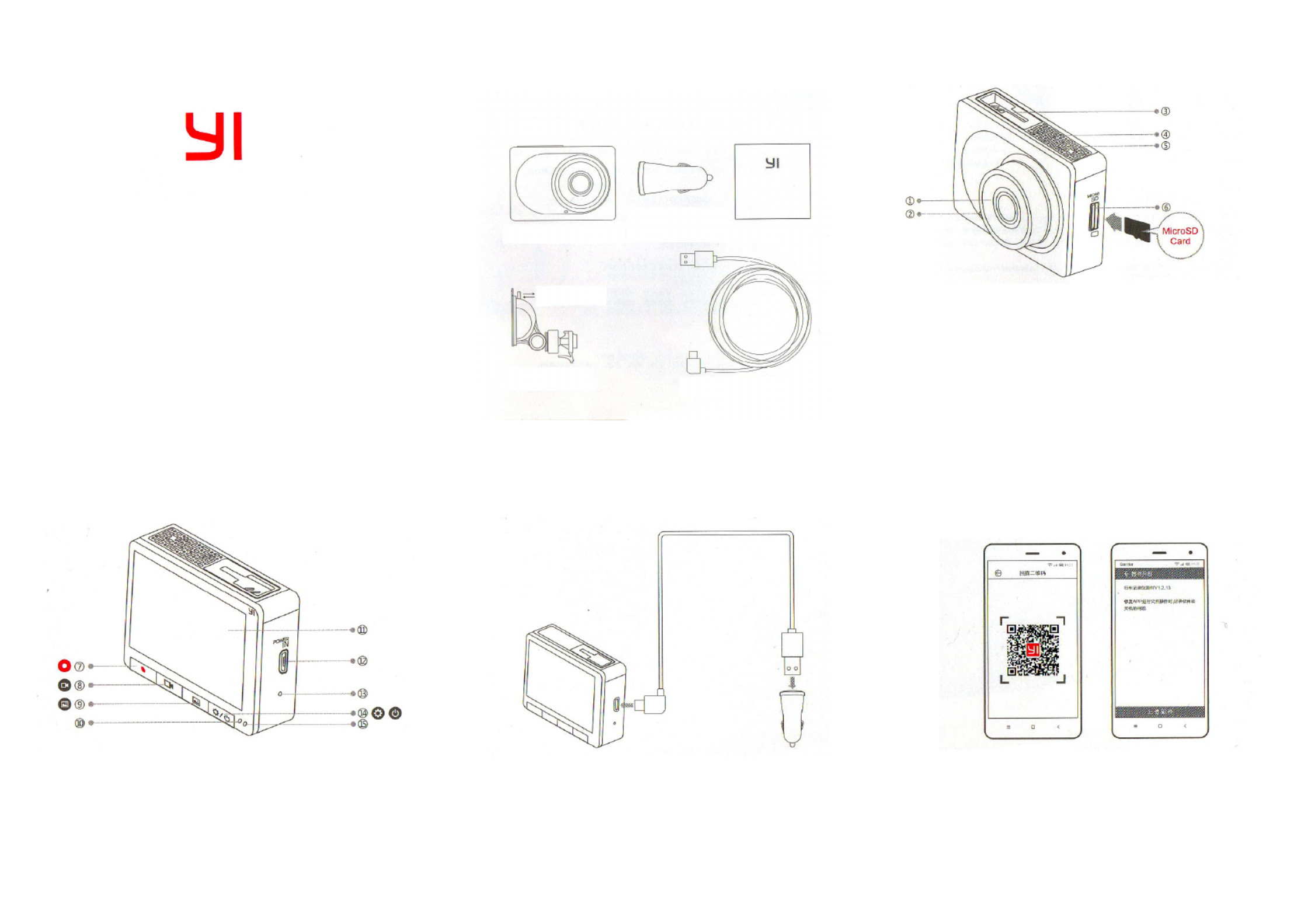
1. Standard equipment
Yi Car DVR
WWW.XIAOMI-MI.COM
Car DVR Yi x1 USB Car Charger х1
(Input voltage:
12-24V, Output
voltage: 5 V 2.1А)
Holder with suction cup for
glass x1
(Not to spoil the glass and
backing)
Micro USB, 3.5 meters
standard charging cable x1
Push down the latch for
reliable installation, pull
the latch to the right to
remove it
Manual х1
2. Accesories
1) Lens
2) Microphone
3) T-shaped slot latch
4) Speaker
5) ventilation grating
6) MicroSD slot
Recommendation: We recommend using genuine
MicroSD card to 8-64GB (Class 10 and higher read speed
of 80 mbps and above), otherwise it can negatively aect
the quality of the video, or may cause interruption of
recording.
3. Accesories
7) Emergency video
shooting
8) Video shooting
9) Play
10) Status indicator
11) Display
12) MicroUSB power port
13) Reset
14) Settings/power button
15) The status of charge indicator
4. Charging
Use the 3.5 meters charging cable, added to the Car
DVR Yi USB Car Charger.
(Charger: Input voltage: 12-24V, output voltage 5 V
2.1a)
5. Connecting Smart Car DVR Yi to
smartphone
Installing Car DVR Yi application
Scan the QR-code, download Car DVR Yi application and
complete the installation by following the instructions.
Recommendation: You can also download the application
by APP Store (supports system Android 4.1 and above or
iOS 7.0 and above).
XIAOMI-MI.COM
Problemløsning Xiaomi Yi Smart Dash Camera
Hvis du har læst manualen omhyggeligt, men ikke fundet en løsning på dit problem, bed andre brugere om hjælp
Specifikationer
| Mærke: | Xiaomi |
| Kategori: | Kamera |
| Model: | Yi Smart Dash Camera |