StarTech.com VGA2HDU Brugsanvisning
Her er StarTech.com VGA2HDU (Kabler til pc'er og periferiudstyr) brugervejledning. 2 sider på sprog med en vægt på 390,887.0 Mb. Hvis du ikke kan finde svar på dit problem Spørg vores community.
Side 1/2
Instruction Manual
DE: Bedienungsanleitung - de.startech.com
FR: Guide de l'utilisateur - fr.startech.com
ES: Guía del usuario - es.startech.com
I T: Guida per l'uso - it.startech.com
NL: Gebruiksaanwijzing - nl.startech.com
P T: Guia do usuário - pt.startech.com
Manual Revision: 02/28/2014
For the most up-to-date information, please visit: www.startech.com
Packaging Contents
• 1x VGA to HDMI adapter w/ USB power & audio
• 1x 2ft USB extension cable
System Requirements
• VGA enabled source device (i.e. Computer)
• HDMI® enabled video display device (i.e. television, projector)
• HDMI Cable (male/male)
• USB power source (i.e. computer, USB power adapter)
VGA2HDU
VGA to HDMI® Converter with USB Power
*actual product may vary from photos
Hardware Installation and Operation
1. Connect the VGA input connector on the VGA2HDU to the VGA
output port on the VGA enabled source device (i.e. Computer)
2. Connect a male-to-male HDMI Cable (not included) from the
HDMI output port on the VGA2HDU to the HDMI input port on
your HDMI-enabled video display device.
3. Connect the USB power/audio connector to the USB port on a
USB power source (i.e. computer, USB power adapter)
Note: Note: While USB power may not be required for video
operation, it is recommended for optimal performance. Failure
to connect USB power may result in video signal loss. It may
also be necessary to use the 2ft USB extension cable in certain
applications where your VGA port and USB port are beyond the
physical reach of the adapter alone.
4. (Optional) The USB port providing power is also capable of
supporting USB audio (i.e. Using a Windows based computer).
5. The VGA-enabled source device output will now appear on the
HDMI video display device.
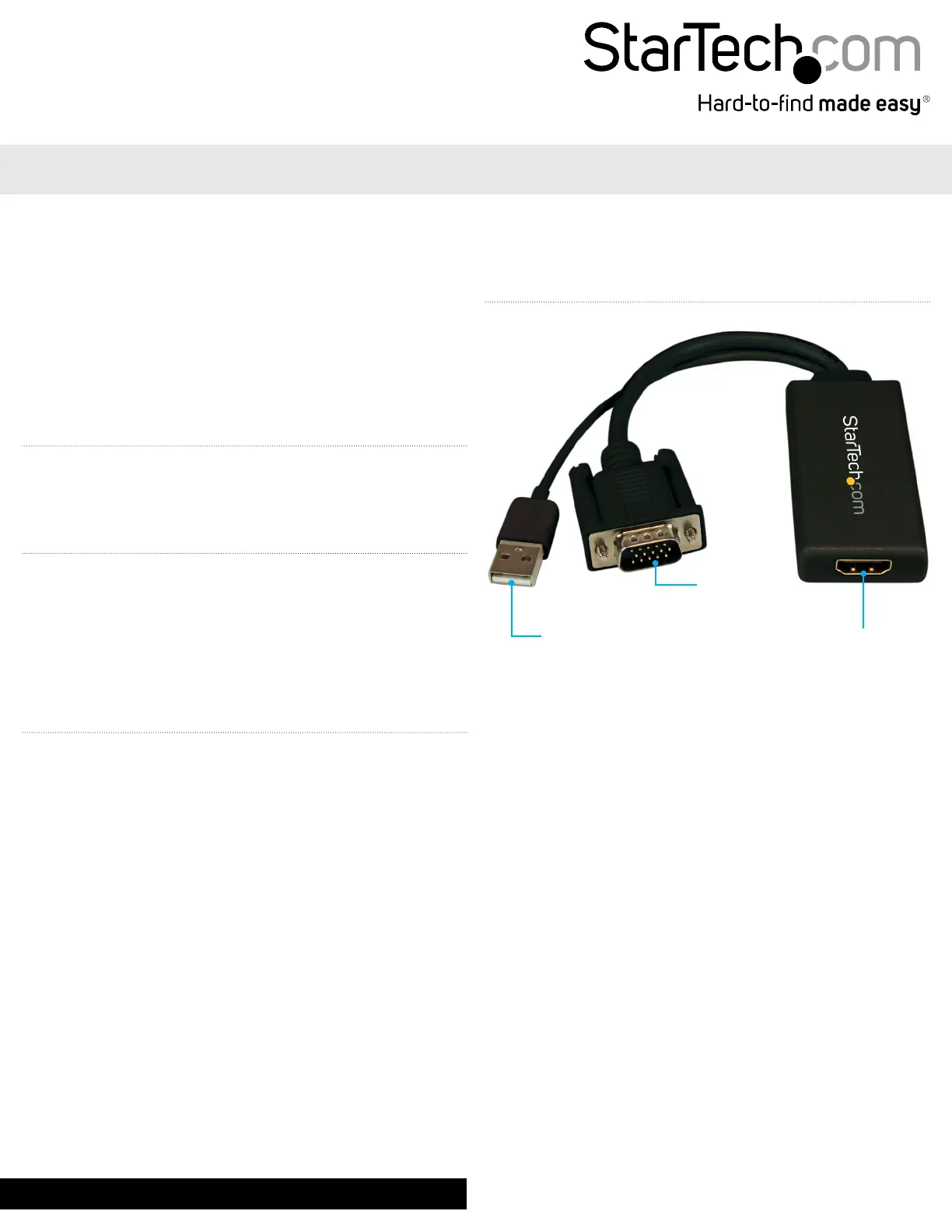
Product Overview
USB power/audio
connector
VGA input
connector
HDMI output port
Problemløsning StarTech.com VGA2HDU
Hvis du har læst manualen omhyggeligt, men ikke fundet en løsning på dit problem, bed andre brugere om hjælp
Specifikationer
| Bredde: | 12 mm |
| Dybde: | 250 mm |
| Højde: | 35 mm |
| Vægt: | 70.7 g |
| Antal pr. pakke: | 1 stk |
| Produktfarve: | Sort |
| Pakkevægt: | 151 g |
| Pakkedybde: | 173 mm |
| Pakkebredde: | 144 mm |
| Pakkehøjde: | 30 mm |
| Opbevaringstemperatur (T-T): | -10 - 70 °C |
| Driftstemperatur (T-T): | 0 - 60 °C |
| Maksimal opløsning: | 1920 x 1080 pixel |
| Husmateriale: | Plast |
| Kabler inkluderet: | USB |
| Harmoniseret systemkode (HS): | 84733080 |
| Maksimal videoopløsning: | 1920 x 1080 pixel |
| Værtsgrænseflade: | VGA (D-Sub) |
| Stik 1: | VGA, USB |
| Stik 2: | HDMI |
| Relativ luftfugtighed: | 40 - 85 % |
| Output-grænseflade: | HDMI |
| Konverter type: | Aktiv videoomformer |
| Chipsæt: | Micro Silicon - MS9282 |