StarTech.com
Skifte
SV211HDUC
StarTech.com SV211HDUC Brugsanvisning
Her er StarTech.com SV211HDUC (Skifte) brugervejledning. 2 sider på sprog Engelsk med en vægt på 0.2 Mb. Hvis du ikke kan finde svar på dit problem Spørg vores community.
Side 1/2
Quick-Start Guide
To view manuals, FAQs, videos, drivers, downloads, technical drawings, and more, visit www.startech.com/support.
Manual Revision: March 1, 2022 1:28 PM
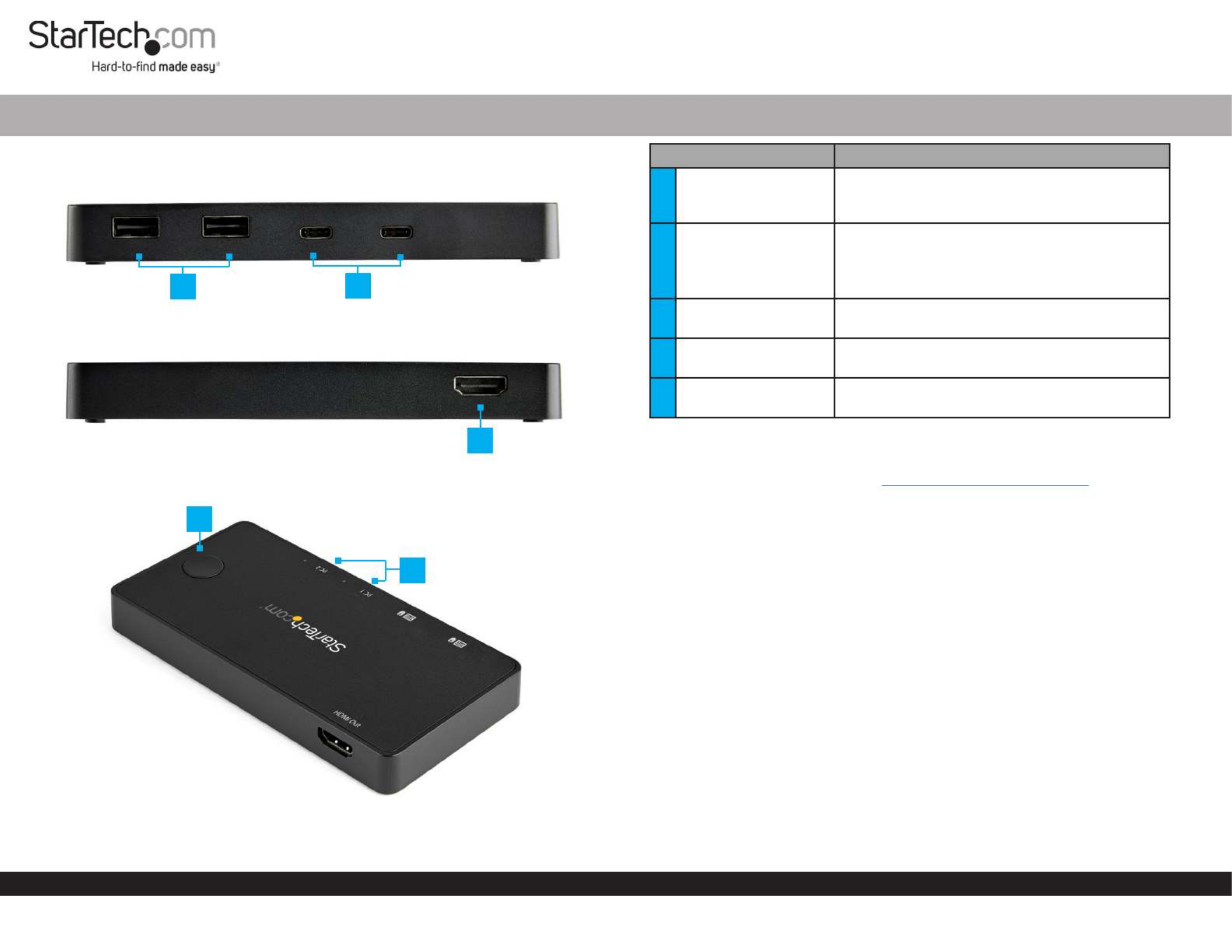
Product Diagram (SV211HDUC)
Front
Back
Top
2 Port USB-C Alt-Mode Compact KVM Switch
Component Function
1USB-A Ports (x 2)
• Used to connect either a and/or Mouse
Keyboard Compact KVM Switch. to the For
use with the connected .Computers
2USB-C Ports (x 2)
• Used to connect up to two to the Computers
Compact KVM Switch.
• Compatible with Thunderbolt™ 3 or USB-C with
DP-Alt Mode.
3HDMI Port • Used to connect a to the Display Device
Compact KVM Switch.
4Input Switch Button • Used to switch between the two connected
Computers.
5LED Indicators (x 2) • Solid Blue: Indicates which connected
computer is currently selected.
Requirements
For the latest requirements, please visit www.startech.com/SV211HDUC
• Keyboard x 1
• Mouse x 1
• Monitor x 1
• Computers (requires compatibility with either Thunderbolt 3 or USB-C with DP-Alt
Mode) x 2
Installation
1. Connect a and/or to the on the Mouse Keyboard USB-A Ports Compact KVM
Switch.
2. Connect an to the on the and HDMI Cable HDMI Output Compact KVM Switch
the other end to the on the .HDMI port Display Device
3. Connect a (included) to the on the USB-C Cable USB-C Port Compact KVM Switch
and to a on one of the .USB-C Port Host Computers
4. Repeat step 3 to connect the second to the .Host Computer Compact KVM Switch
Note: The connected Host Computers Compact KVM Switch will power the .
Input Switch Button
Press the located on the top of the , to Input Switch Button Compact KVM Switch
switch between the two connected . Computers
1 2
3
4
5
Problemløsning StarTech.com SV211HDUC
Hvis du har læst manualen omhyggeligt, men ikke fundet en løsning på dit problem, bed andre brugere om hjælp
Specifikationer
| Bredde: | 140 mm |
| Dybde: | 72 mm |
| Højde: | 16 mm |
| Vægt: | 265 g |
| Produktfarve: | Sort |
| Pakkevægt: | 600 g |
| Pakkedybde: | 120 mm |
| Pakkebredde: | 172 mm |
| Pakkehøjde: | 85 mm |
| HD-type: | 4K Ultra HD |
| Opbevaringstemperatur (T-T): | -20 - 50 °C |
| Relativ luftfugtighed ved drift (H-H): | 20 - 80 % |
| Antal HDMI-porte: | 1 |
| Skærmvisning (OSD): | Ingen |
| Driftstemperatur (T-T): | 5 - 35 °C |
| Maksimal opløsning: | 3840 x 2160 pixel |
| Husmateriale: | Plast |
| Hurtig installationsvejledning: | Ja |
| Kabler inkluderet: | USB Type-C |
| Certificering: | REACH, CE |
| LED-indikatorer: | Ja |
| Harmoniseret systemkode (HS): | 85176200 |
| Bæredygtighedscertifikater: | RoHS |
| Hovedkassen højde (udvendigt): | 280 mm |
| Hovedkassens længde (udvendigt): | 363 mm |
| Hovedkassens bredde (udvendigt): | 450 mm |
| HDMI-version: | 2.0 |
| DisplayPort-version: | 1.2 |
| Produkter pr. hovedkasse (udvendigt): | 20 stk |
| Gennemsnitstid mellem fejl (MTBF): | 50000 t |
| Stativ-montering: | Ingen |
| Antal kontrollerede computere: | 2 |
| Tastatur porttype: | USB |
| Mus porttype: | USB |
| Video porttype: | DisplayPort |
| Genvejstaster: | Ingen |
| Konsol porte: | HDMI, USB A |
| Antal konsol USB porte: | 2 |
| Dataoverførselshastighed (maks.): | 480 Gbit/sek. |
| Chipsæt: | Parade - PS176, VLI - VL170, Terminus - FE1.1S |
| Lyd kanaler: | 7.1 |
| Daisy kæde: | Ingen |
| IP kontrol: | Ingen |