StarTech.com
Splitter
ST124PRO
StarTech.com ST124PRO Brugsanvisning
Her er StarTech.com ST124PRO (Splitter) brugervejledning. 2 sider på sprog med en vægt på 530,118.0 Mb. Hvis du ikke kan finde svar på dit problem Spørg vores community.
Side 1/2
2/4/8-Port High Resolution VGA Video Splitter
ST122PRO / ST122PROGB / ST122PROEU
ST124PRO / ST124PROGB / ST124PROEU
ST128PRO / ST128PROGB / ST128PROEU
DE: Bedienungsanleitung - de.startech.com
FR: Guide de l’utilisateur - fr.startech.com
ES: Guía del usuario - es.startech.com
IT: Guida per l’uso - it.startech.com
NL: Gebruiksaanwijzing - nl.startech.com
PT: Guia do usuário - pt.startech.com
Packaging Contents
• 1 x VGA Video Splitter
• 1 x Power Adapter
• 4 x Rubber Feet
• 1 x Installation Guide
System Requirements
• VGA enabled video source (i.e. computer, PVR/DVR, etc.)
• VGA enabled display device (i.e. monitor, projector, etc.)
• Available AC electrical outlet
Installation
1. With the video source device and display devices powered
o, connect a male/female DE-15 VGA cable from the ‘Input’
connector on the splitter to the VGA video output on the source
device.
2. Using high quality male/male DE-15 VGA cables, connect each
display device to the Video Output connectors on the splitter.
NOTE: Port 1 is the primary output so EDID information will be taken from
there. The capabilities of the display on Port 1 will be applied to all other
ports so be careful not to exceed the capabilities of the other displays.
3. Connect the included power adapter from an AC electrical outlet
to the video splitter. The ‘Power’ LED should light up solid.
4. Power on the connected display devices, followed by the video
source device. Once a valid video signal is sent to the splitter, the
‘Active’ LED should light up.
Cascaded Installation
The VGA video splitter can be cascaded/daisy-chained with
additional VGA video splitters for expanded capabilities, such as
more ports and reaching greater distances.
1. Make sure all displays and the video source device are turned o
before installing.
2. To cascade/daisy-chain multiple video splitters together, use a
male/female DE-15 VGA cable to connect any one of the Video
Out connectors on the primary splitter, to the ‘Input’ connector
on the secondary splitter.
3. A video splitter can be connected to each Video Out connector
on the primary splitter, if required.
4. Up to three (3) levels of cascading is supported, so connecting
another video splitter to the secondary splitter is possible,
allowing for up to 8 (ST122PRO), 64 (ST124PRO), or 512
(ST128PRO) video displays to be connected to a single source.
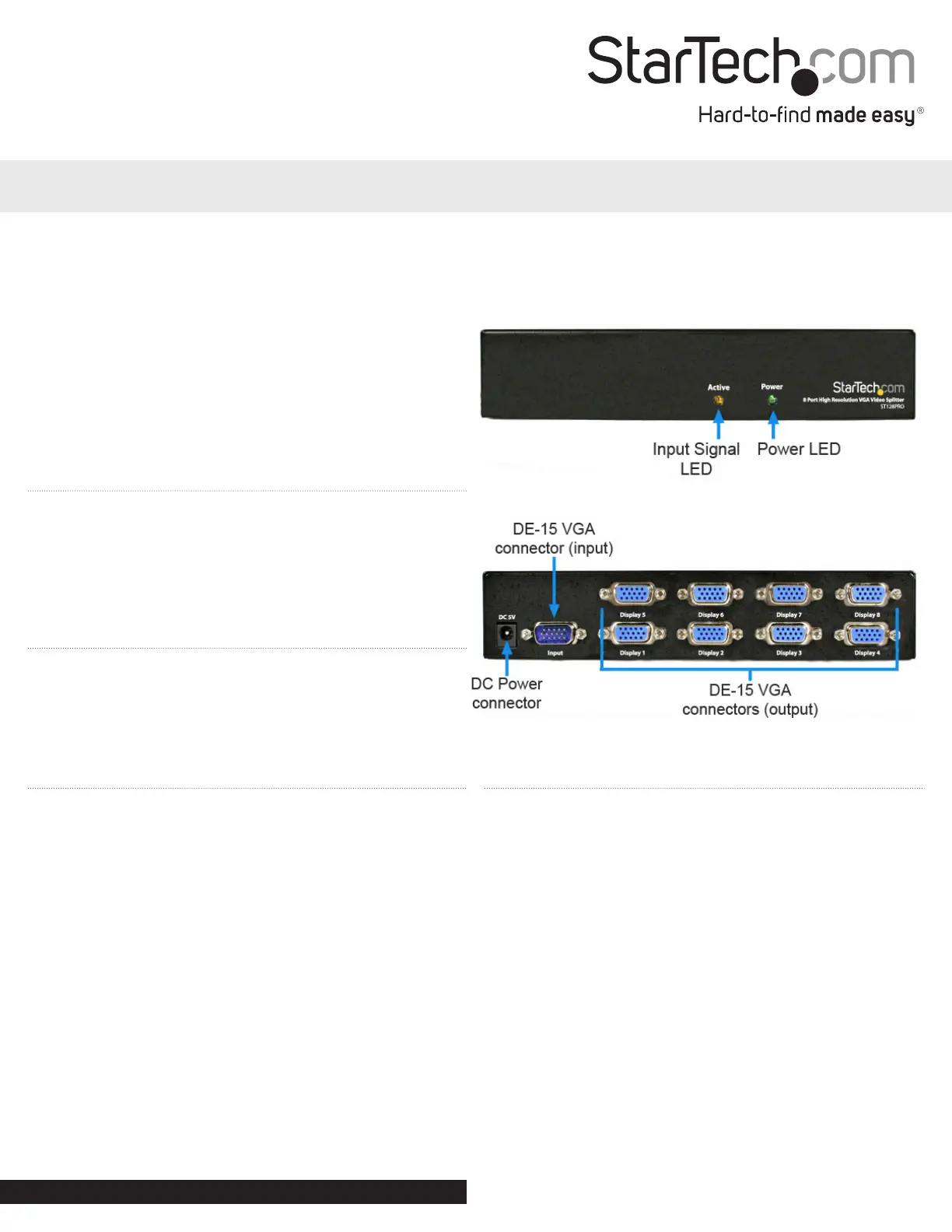
Rear View
Front View
Installation Guide
*8-Port ST128PRO shown
Manual Revision: 02/21/2021
For the most up-to-date information, please visit: www.startech.com
Problemløsning StarTech.com ST124PRO
Hvis du har læst manualen omhyggeligt, men ikke fundet en løsning på dit problem, bed andre brugere om hjælp
Specifikationer
| Vekselstrømsindgangsspænding: | 100 - 240 V |
| Bredde: | 80 mm |
| Dybde: | 182 mm |
| Højde: | 21 mm |
| Vægt: | 392 g |
| Brugervejledning: | Ja |
| Produktfarve: | Sort |
| Pakkevægt: | 692 g |
| Pakkedybde: | 240 mm |
| Pakkebredde: | 185 mm |
| Pakkehøjde: | 93 mm |
| Strømforbrug (typisk): | 3 W |
| Maksimal opløsning: | 2048 x 1536 pixel |
| Certificering: | CE, FCC, TAA, REACH |
| Udgangsspænding: | 5 V |
| Udgangsstrøm: | 0.6 A |
| AC-adapter inkluderet: | Ja |
| Bæredygtighedscertifikater: | RoHS |
| Indgangsstrøm: | 0.2 A |
| Maksimal opdateringshastighed: | 80 Hz |
| Maksimal driftstilstand: | 64 m |
| Videoudgang: | 4x VGA |
| Video porttype: | VGA |
| Antal videoporte: | 4 |
| Båndbredde: | 350 MHz |