StarTech.com
Skærmfilter
PRIVSCNMON24
StarTech.com PRIVSCNMON24 Brugsanvisning
Her er StarTech.com PRIVSCNMON24 (Skærmfilter) brugervejledning. 2 sider på sprog med en vægt på 550,399.0 Mb. Hvis du ikke kan finde svar på dit problem Spørg vores community.
Side 1/2
Quick-Start Guide
To view manuals, FAQs, videos, drivers, downloads, technical drawings, and more, visit www.startech.com/support.
Manual Revision: November 27, 2019 12:13 PM
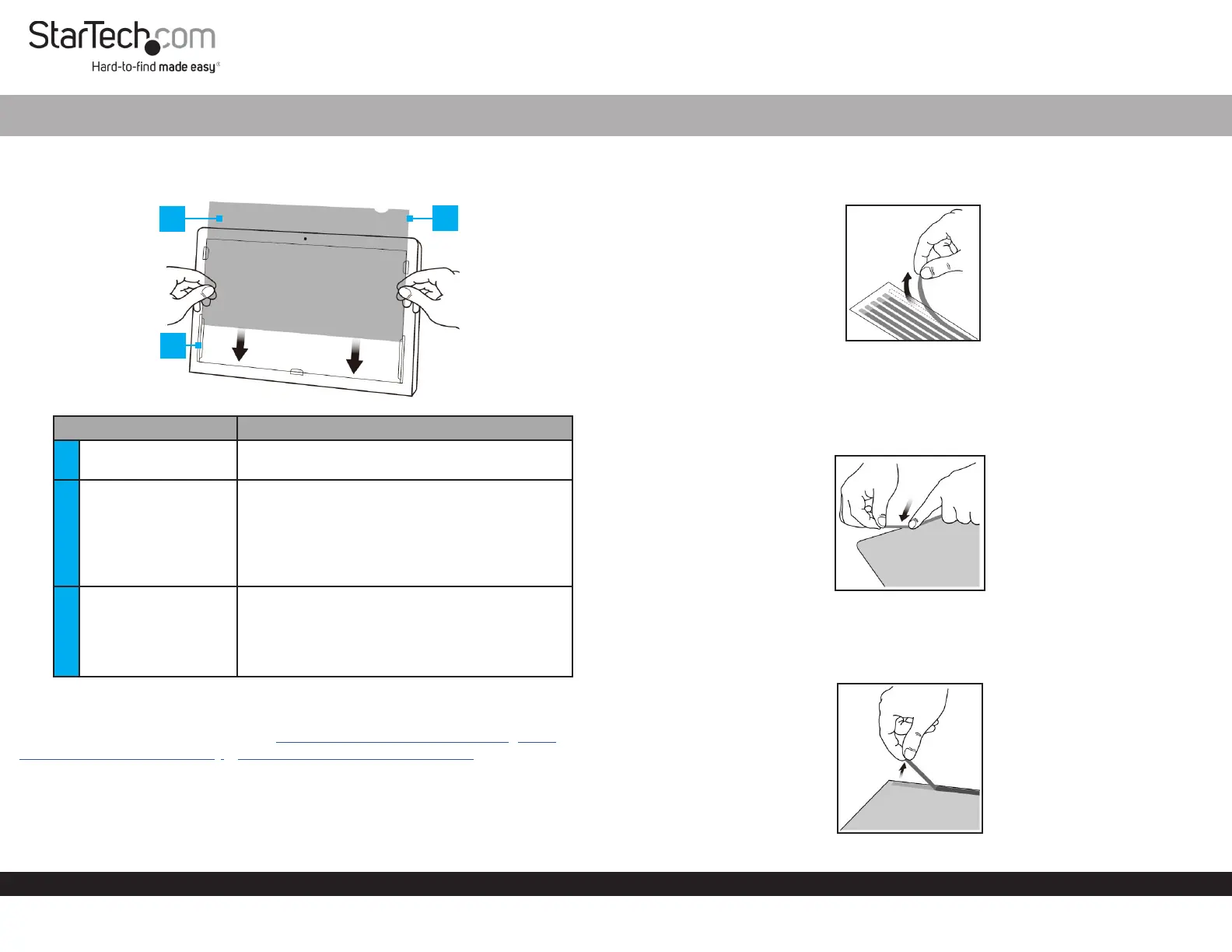
Product Diagram (PRIVSCNMON21, PRIVSCNMON24, or
PRIVSCNMON27)
Component Function
1 Privacy Filter
• Used to restrict visibility of the Monitor when
viewed past a 30 degree angle.
2 Mounting Tabs (x 5)
• Used to secure the Privacy Filter to the
Monitor surface.
• The Adhesive Strips on the Mounting Tabs
can only be removed/reapplied to a surface
a couple of times before they lose their
eectiveness.
3 Adhesive Strips
• Used to secure the Privacy Filter to the
Monitor surface.
• The Adhesive Strips can only be removed/
reapplied to a surface a couple of times before
they lose their eectiveness.
Requirements
For the latest requirements, please visit www.startech.com/PRIVSCNMON21, www.
startech.com/PRIVSCNMON24, or www.startech.com/PRIVSCNMON27
Installing the Privacy Screen Using the Adhesive Strips
It is recommended to use the Adhesive Strips to install the Privacy Screen if you intend
to permanently use the Privacy Screen without removing it from the Monitor. It is also
recommended to use the Adhesive Strips to secure the Privacy Filter to the Screen if
Universal Privacy Filter
the Monitor does not have an outside Frame.
1. Pull Adhesive Strips o of the Transparent Lining.
Removing the Adhesive Strips
2. Select which side of the Privacy Filter you wish to face outward (either matte or
glossy side).
3. Carefully align the Adhesive Strips on all the four edges (top, bottom, left, and
right) of the Privacy Filter.
Applying the Adhesive Strips
4. Firmly apply pressure to the Adhesive Strips as you carefully apply it to the Privacy
Filter.
5. Carefully remove the backing from the Adhesive Strips, exposing the adhesive.
Remove the Backing from the Adhesive Strips
1
2
3
Problemløsning StarTech.com PRIVSCNMON24
Hvis du har læst manualen omhyggeligt, men ikke fundet en løsning på dit problem, bed andre brugere om hjælp
Specifikationer
| Bredde: | 531 mm |
| Dybde: | 2 mm |
| Højde: | 299 mm |
| Vægt: | 98 g |
| Velegnet til: | Monitor |
| Produktfarve: | Transparent |
| Pakkevægt: | 414 g |
| Pakkedybde: | 370 mm |
| Pakkebredde: | 610 mm |
| Pakkehøjde: | 4 mm |
| Beskyttelsesfunktioner: | Modstandsdygtig mod ridser |
| Materiale: | Plast |
| Harmoniseret systemkode (HS): | 85299097 |
| Fingeraftryk resistent: | Ja |
| Bæredygtighedscertifikater: | CE, RoHS |
| Hovedkassen højde (udvendigt): | 140 mm |
| Hovedkassens længde (udvendigt): | 395 mm |
| Hovedkassens bredde (udvendigt): | 640 mm |
| Produkter pr. hovedkasse (udvendigt): | 20 stk |
| Maksimal skærmstørrelse kompatibilitet: | 24 " |
| Ridsefast: | Ja |
| Skærmfilterets funktioner: | Privatliv |
| Understøttede skærmtyper: | LCD |
| Installationstype: | Klæbestrimmel |
| Begrænser betragtningsvinkel: | 30 ° |