StarTech.com
Controller
PEX4M2E1
StarTech.com PEX4M2E1 Brugsanvisning
Her er StarTech.com PEX4M2E1 (Controller) brugervejledning. 2 sider på sprog Engelsk med en vægt på 484,587.0 Mb. Hvis du ikke kan finde svar på dit problem Spørg vores community.
Side 1/2
Quick start guide
FR: Guide de l’utilisateur - fr.startech.com
DE: Bedienungsanleitung - de.startech.com
ES: Guía del usuario - es.startech.com
NL: Gebruiksaanwijzing - nl.startech.com
PT: Guia do usuário - pt.startech.com
IT: Guida per l’uso - it.startech.com
Manual Revision: 09/10/2019
For the latest information, technical specications, and support for
this product, please visit www.startech.com/PEX4M2E1.
Packaging contents
• 1 x PCI Express® adapter card to M.2 NVMe PCIe SSD
• 1 x low-prole bracket
• 1 x full-prole bracket (pre-installed)
• 1 x SSD stando and installation screw
• 1 x quick start guide
System requirements
• PCI Express M.2 NGFF SSD
• Computer system with a p1-x4 or larger slot
• Phillips head screwdriver
• Small set of pliers
The PEX4M2E1 is OS independent and doesn’t require any additional
drivers or software.
Note: Some drives are not compatible with certain operating
systems. Before you install a drive in the adapter, check with the
drive manufacturer to make sure that the drive is compatible with
the OS that your computer system is running.
System requirements are subject to change. For the latest
requirements, please visit www.startech.com/PEX4M2E1.
PEX4M2E1
x4 PCIe Expansion Card to M.2 PCIe SSD Adapter
*actual product may vary from photos
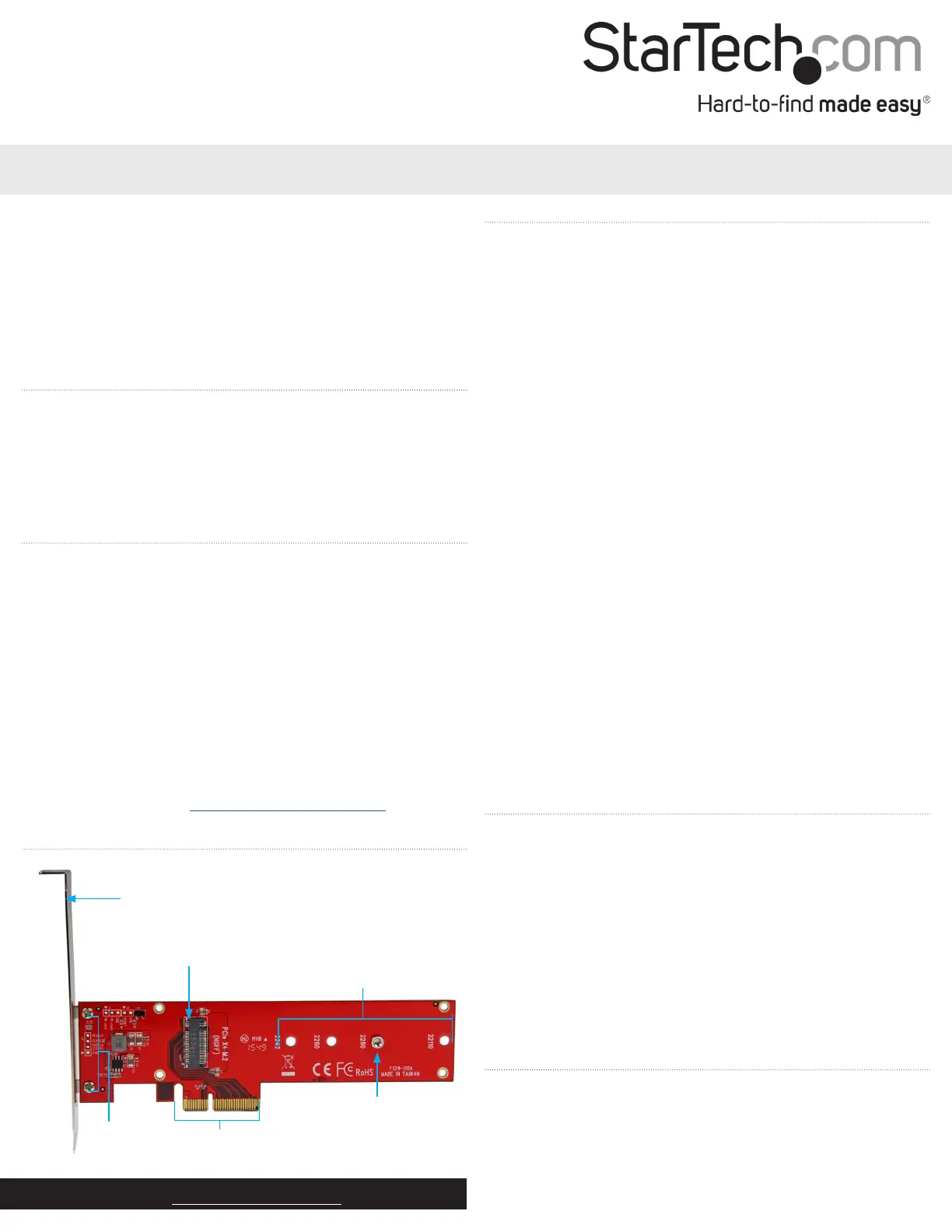
Product diagram
Mounting bracket
(full-prole bracket pictured)
SSD stando and
installation screw
PCIe p1-x4
connector
Drive installation holes
M.2 NGFF connector
Install a drive in the adapter
Warning! Drives and adapters should be handled carefully,
especially when they’re transported. If you’re not careful with your
drives, you may lose data as a result. Always handle storage devices
with caution. Make sure that you’re properly grounded by wearing
an anti-static strap when you install any computer component. If an
anti-static strap isn’t available, touch a large grounded metal surface
for several seconds to discharge any built-up static electricity.
1. Depending on the length of the drive that you want to install, you
may need to move the preinstalled SSD stando and installation
screw. Place your drive next to the adapter and note the drive
installation hole that matches the height of your drive. If the SSD
stando and installation screw are already installed in the correct
position, proceed to step 6.
2. On the back of the PEX4M2E1, use a small set of pliers to remove
the nut that is holding the SSD stando and installation screw in
place.
3. On the front of the adapter, remove the SSD stando and
installation screw.
4. Place the SSD stando in the drive installation hole that matches
the length of your drive.
5. Replace the nut that you removed in step 2 and tighten it in place.
6. Gently slide the M.2 connector on the drive into the
corresponding connector on the adapter and press the drive
down toward the adapter until the drive is in place.
Note: The connector on your drive is keyed so that it only ts in the
adapter one way.
7. Insert the installation screw into the SSD stando and tighten it
into place.
Install the low-prole bracket
The PEX4M2E1 can be mounted in both low-prole and full-prole
computer systems. The full-prole bracket comes preinstalled in the
adapter but you can install the low-prole bracket instead.
1. Use a Phillips head screwdriver to remove the two bracket screws
from the PEX4M2E1.
2. Remove the full-prole bracket from the adapter.
3. Line up the low-prole bracket with the bracket holes on the back
of the adapter.
4. Insert the two bracket screws you removed in step 1 and tighten
them in place.
Bracket
screws
Install the adapter in a computer
1. Turn o the computer that you want to install the PEX4M2E1 into.
2. Remove the case from your computer. For more information
about how to properly do this, consult the documentation that
came with your computer system.
3. Place the adapter into an available expansion slot.
4. Insert a computer case screw (not included) into the case-
Problemløsning StarTech.com PEX4M2E1
Hvis du har læst manualen omhyggeligt, men ikke fundet en løsning på dit problem, bed andre brugere om hjælp
Specifikationer
| Bredde: | 121 mm |
| Dybde: | 179 mm |
| Højde: | 184 mm |
| Vægt: | 47 g |
| Produktfarve: | Rød |
| Pakkevægt: | 151 g |
| Pakkedybde: | 159 mm |
| Pakkebredde: | 219 mm |
| Pakkehøjde: | 46 mm |
| Opbevaringstemperatur (T-T): | -25 - 70 °C |
| Relativ luftfugtighed ved drift (H-H): | 15 - 90 % |
| Driftstemperatur (T-T): | 5 - 50 °C |
| Hurtig installationsvejledning: | Ja |
| LED-indikatorer: | Ja |
| Harmoniseret systemkode (HS): | 84733020 |
| Bæredygtighedscertifikater: | CE, RoHS |
| Understøttede Windows-operativsystemer: | Windows 10, Windows 10 Education, Windows 10 Education x64, Windows 10 Enterprise, Windows 10 Enterprise x64, Windows 10 Home, Windows 10 Home x64, Windows 10 IOT Core, Windows 10 IoT Enterprise, Windows 10 Pro, Windows 10 Pro x64, Windows 10 x64, Windows 8, Windows 8 Enterprise, Windows 8 Enterprise x64, Windows 8 Pro, Windows 8 Pro x64, Windows 8 x64, Windows 8.1, Windows 8.1 Enterprise, Windows 8.1 Enterprise x64, Windows 8.1 Pro, Windows 8.1 Pro x64, Windows 8.1 x64 |
| Understøttede Mac-operativsystemer: | Mac OS X 10.10 Yosemite, Mac OS X 10.11 El Capitan, Mac OS X 10.12 Sierra, Mac OS X 10.13 High Sierra, Mac OS X 10.14 Mojave, Mac OS X 10.15 Catalina |
| Hovedkassen højde (udvendigt): | 310 mm |
| Hovedkassens længde (udvendigt): | 500 mm |
| Hovedkassens bredde (udvendigt): | 380 mm |
| Værtsgrænseflade: | PCIe |
| Intern: | Ja |
| Plug and play: | Ja |
| Produkter pr. hovedkasse (udvendigt): | 60 stk |
| Monteringsbeslag inkluderet: | Ja |
| Output-grænseflade: | M.2 |
| Hot-swap: | Ingen |
| Udvidelseskort standard: | PCI 3.0 |
| Udvidelseskort formfaktor: | Fuld højde/ lav profil |
| Dataoverførselshastighed (maks.): | 8 Gbit/sek. |