StarTech.com
bryter
NOTECONS02-VGA-MDP
StarTech.com NOTECONS02-VGA-MDP Brugsanvisning
Her er StarTech.com NOTECONS02-VGA-MDP (bryter) brugervejledning. 2 sider på sprog med en vægt på 301,341.0 Mb. Hvis du ikke kan finde svar på dit problem Spørg vores community.
Side 1/2
For additional self-service support options and community forums, please visit: www.StarTech.com/support
Revision: May 7, 2025
Quick-Start Guide
Product ID
NOTECONS02-VGA-MDP
NOTECONS02
MDP2VGA2
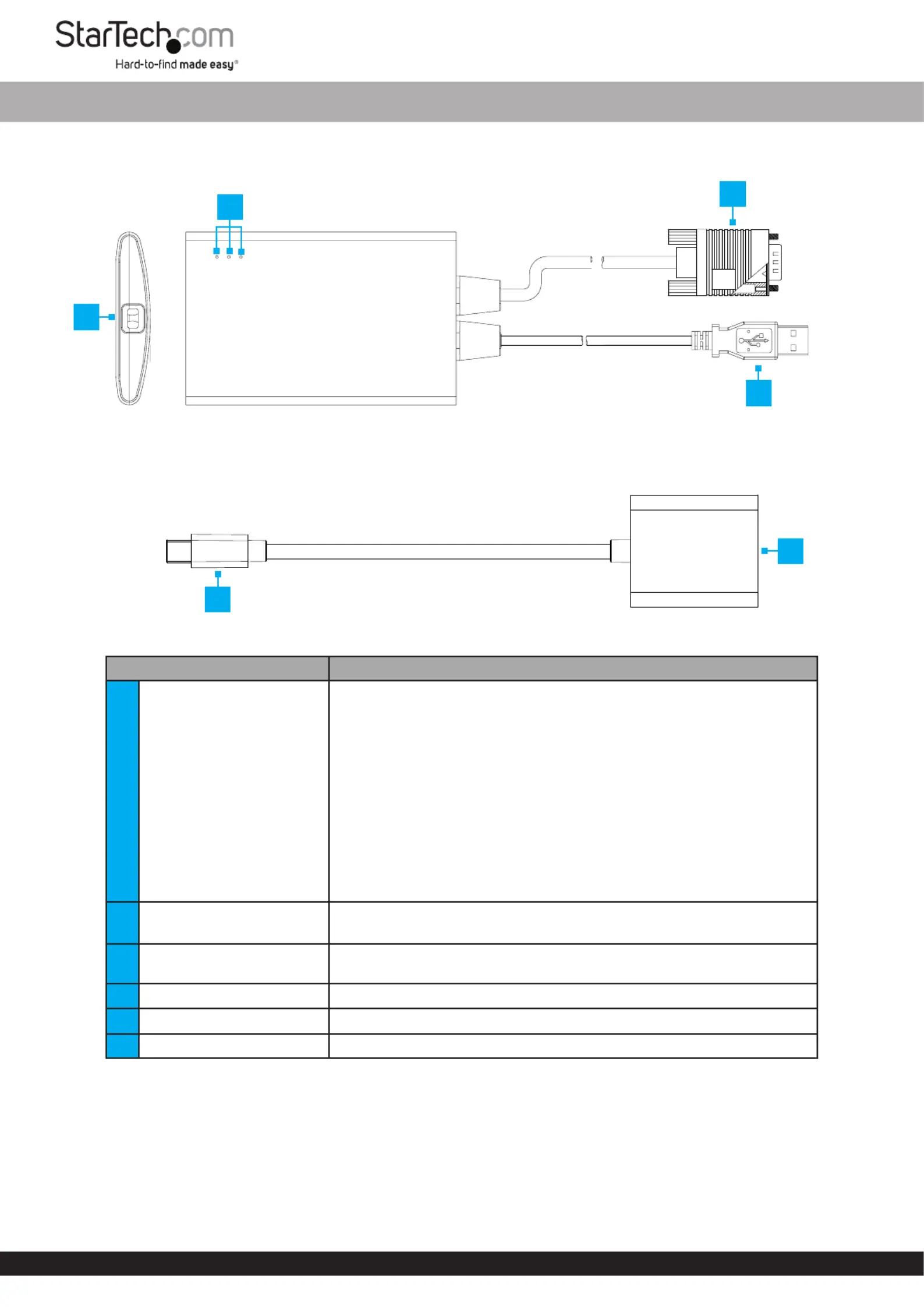
Component Function
1LED Indicators
• Server KB/Mouse:
• Solid: Emulated keyboard/mouse is functioning
• Blinking: Brief ashing indicates activity (i.e., mouse movement), and
constant ashing signals a USB connection issue
• Server VGA:
• Solid: Indicates a valid VGA signal is detected
• O: VGA Input disconnected or unsupported
Note: Only activates after initial software connection
• User Console Link/Activity:
• Solid: Laptop connection is detected
• Blinking: USB is disconnected, and blinks briey during video
transmission
2VGA Input
• Connect directly to a on a or VGA Output Computer Server
• Connect to the on the VGA Output MDP2VGA2
3Host Connection
• Use the included to connect the USB-A to USB Mini-B Cable
NOTECONS02 Laptop to a
4USB Connection • Connect to a on a or USB-A Port Computer Server
5Mini DisplayPort Connector • Connect to a on a or Mini DisplayPort Output Computer Server
6VGA Port • Connect to the on the VGA Input NOTECONS02
Package Contents
• NOTECONS02 x 1
• MDP2VGA2 x 1
• USB-A to USB Mini-B Cable x 1
• Quick-Start Guide x 1
KVM to USB Crash Cart Adapter with Mini DisplayPort to VGA Adapter
*Products may vary from image
2
1
5
4
3
6
Problemløsning StarTech.com NOTECONS02-VGA-MDP
Hvis du har læst manualen omhyggeligt, men ikke fundet en løsning på dit problem, bed andre brugere om hjælp
Specifikationer
| Mærke: | StarTech.com |
| Kategori: | bryter |
| Model: | NOTECONS02-VGA-MDP |