StarTech.com
Ikke kategoriseret
MONPROTECT
StarTech.com MONPROTECT Brugsanvisning
Her er StarTech.com MONPROTECT (Ikke kategoriseret) brugervejledning. 2 sider på sprog med en vægt på 496,234.0 Mb. Hvis du ikke kan finde svar på dit problem Spørg vores community.
Side 1/2
Quick-Start Guide
To view manuals, FAQs, videos, drivers, downloads, technical drawings, and more, visit www.startech.com/support.
Manual Revision: September 11, 2020
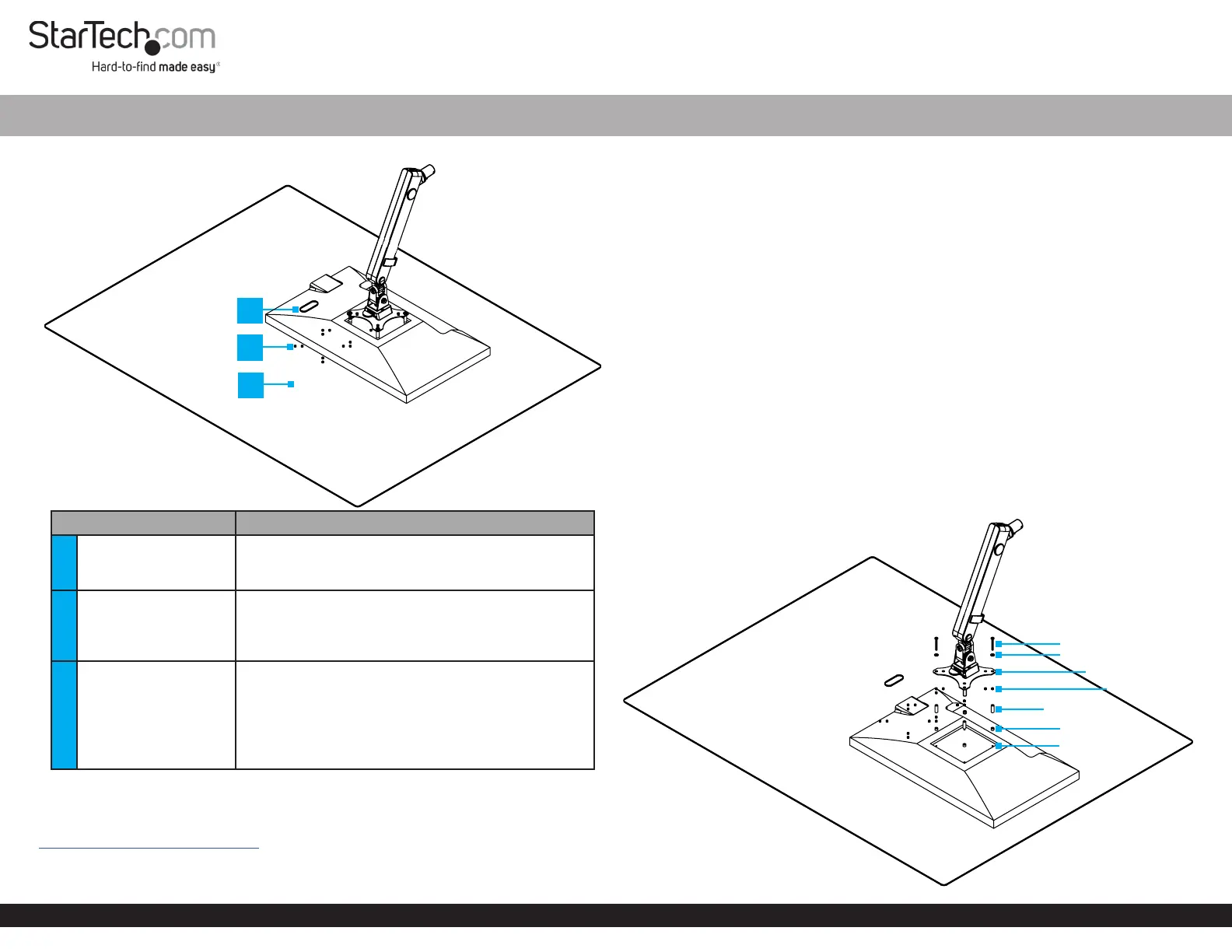
Product Diagram (MONPROTECT)
Rear View
Component Function
1
Cable Management
Hole
• Route the Power and Video Cables for the
Display through this opening in the Transparent
VESA Panel
2 VESA Mounting Holes
• Insert 4 of the appropriately sized Screws through
the Washers, the VESA Mounts, the Transparent
VESA Panel, the appropriate size and number of 5
mm and/or 20 mm Spacers, and into the Display
3
Transparent VESA
Panel
• Clear acrylic sheet
• Weight - 8.3 lb. (3.76 kg)
• Three mounting heights
• Minimum mounting height (from Mounting
Surface to the middle of the VESA Mount) - 9.7 in.
(245 mm)
Requirements
For the latest requirements, please visit:
www.startech.com/MONPROTECT
• Clean, Flat, and Stable Surface for Installation
• Display with 75 x 75 mm or 100 x 100 mm Spaced VESA Mounting Holes
Transparent VESA Panel - Single Display
• Monitor Mount with a Single VESA Mounting Point
Consult the User Manual for the Monitor Mount or contact the Manufacturer of the
Monitor Mount to determine if the Monitor Mount can support the combined weight
of the Transparent VESA Panel and the Display.
• Phillips Head Screwdriver
• Two People for Installation and Adjustments
• (Optional - for cleaning) Microber Cloth
Installation
Warnings: Installing the Transparent VESA Panel is a two person task. Do not
attempt to complete the installation with one person.
The additional weight of the Transparent VESA Panel may overload the Monitor
Mount during installation and/or use. Do not exceed the weight capacity of the
Monitor Mount.
(For a Display Already Attached to a Mount) Detach the Display
• Remove the Display from the Monitor Mount.
Note: Refer to the Monitor Mount Manufacturer’s User Manual for steps on how to
remove the Display from the VESA Mount.
Attach the Transparent VESA Panel
Figure 1
Screw
Washer
VESA Mount
20 mm Spacer
5 mm Spacer
VESA Mounting Holes
Display VESA
Mounting Holes
1
2
3
Problemløsning StarTech.com MONPROTECT
Hvis du har læst manualen omhyggeligt, men ikke fundet en løsning på dit problem, bed andre brugere om hjælp
Specifikationer
| Bredde: | 1100 mm |
| Dybde: | 889 mm |
| Højde: | 3 mm |
| Vægt: | 3700 g |
| Brugervejledning: | Ja |
| Produktfarve: | Transparent |
| Pakkevægt: | 6500 g |
| Pakkedybde: | 968 mm |
| Pakkebredde: | 1223 mm |
| Pakkehøjde: | 52 mm |
| Materiale: | Akryl |
| Bæredygtighedscertifikater: | CE, RoHS |
| Hovedkassen højde (udvendigt): | 52 mm |
| Hovedkassens længde (udvendigt): | 968 mm |
| Hovedkassens bredde (udvendigt): | 1223 mm |
| Produkter pr. hovedkasse (udvendigt): | 1 stk |
| Forbedret kabelstyring: | Ja |
| Hygiejnisk: | Ja |