StarTech.com MDP2DPDVHD Brugsanvisning
Her er StarTech.com MDP2DPDVHD (Kabler til computere og periferiudstyr) brugervejledning. 2 sider på sprog Engelsk med en vægt på 417,169.0 Mb. Hvis du ikke kan finde svar på dit problem Spørg vores community.
Side 1/2
Instruction Manual
DE: Bedienungsanleitung - de.startech.com
FR: Guide de l'utilisateur - fr.startech.com
ES: Guía del usuario - es.startech.com
IT: Guida per l'uso - it.startech.com
NL: Gebruiksaanwijzing - nl.startech.com
PT: Guia do usuário - pt.startech.com
Manual Revision: 05/11/2011
For the most up-to-date information, please visit: www.startech.com
Packaging Contents
• 1 x Mini DP Multifunction Video Adapter
• 1 x Instruction Manual
System Requirements
• DisplayPort enabled computer system with available Mini
DisplayPort connector
• DisplayPort, DVI or HDMI enabled display device (e.g.
monitor) with appropriate cable
MDP2DPDVHD
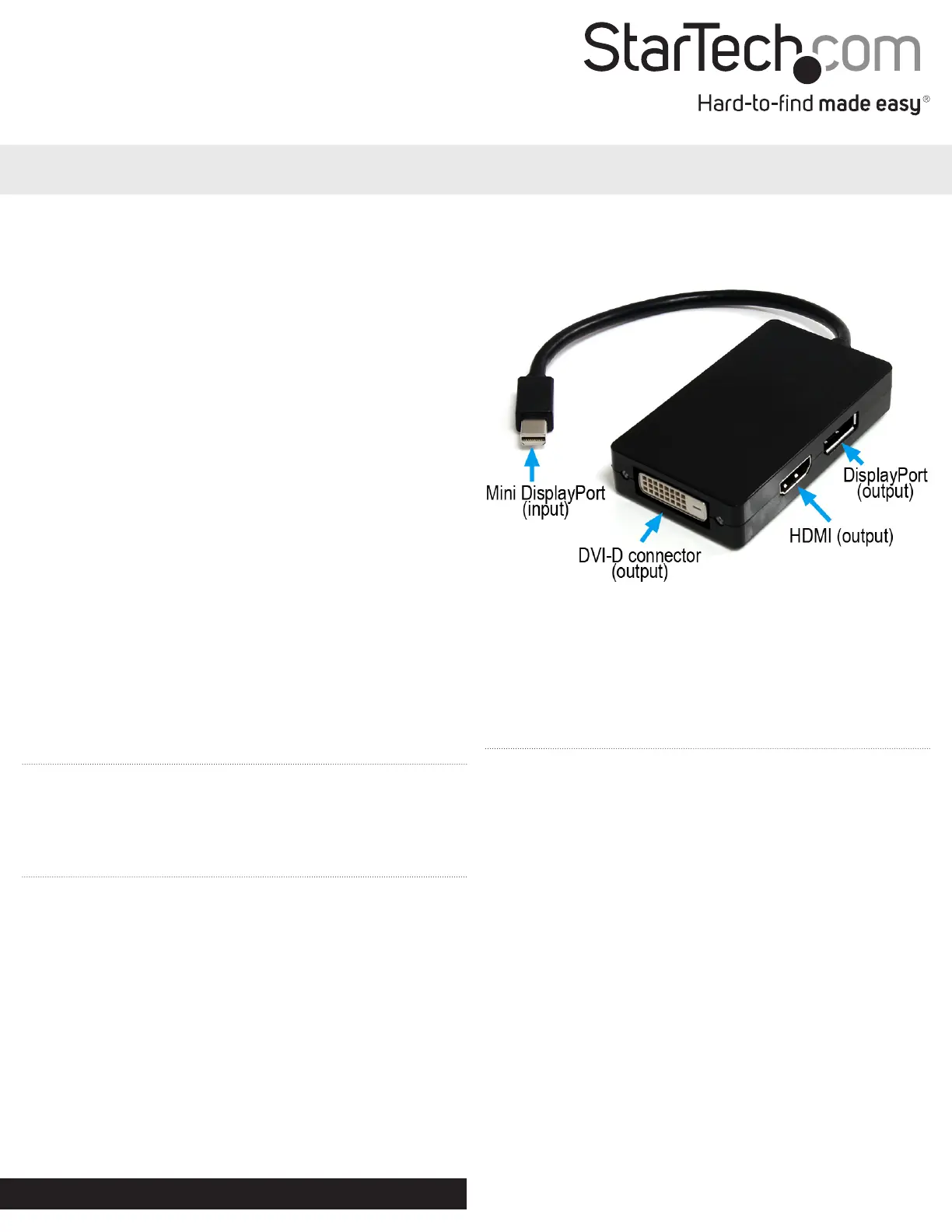
Mini DisplayPort to DisplayPort, DVI or HDMI Multifunction Adapter
*actual product may vary from photos
Installation
1. Connect the Mini DisplayPort connector on the video
adapter to the Mini DisplayPort port on the host computer
system. The computer system can be turned on or o (check
documentation for the computer system for details).
2. Power on the display device.
3. Connect the display device (i.e. monitor) to the video
adapter using the appropriate type of video cable (sold
separately).
NOTE: Only one video output is supported on the video
adapter at a time. If multiple connections are made, only one
of the outputs will function in order of: DisplayPort then HDMI
then DVI.
The MDP2DPDVHD Mini-DisplayPort to DisplayPort, DVI or
HDMI Multifunction Adapter converts Mini DisplayPort (MDP)
input to DisplayPort, DVI or HDMI output signals, all in a single
compact adapter.
This multifunction adapter oers the unique ability to connect
almost any display to your Mini-DisplayPort equipped PC or
Mac, oering a perfect solution for business environments
that have mixed display hardware - saving the expense of
purchasing new displays for compatibility. A plug-and-play
solution requiring no software or drivers, this Mini DisplayPort
adapter oers a quick and simple installation for the utmost
convenience and versatility.
Compatible with Intel® Thunderbolt™, when connected
directly to a supporting DisplayPort over Thunderbolt™ I/O
port.
Problemløsning StarTech.com MDP2DPDVHD
Hvis du har læst manualen omhyggeligt, men ikke fundet en løsning på dit problem, bed andre brugere om hjælp
Specifikationer
| Bredde: | 45 mm |
| Dybde: | 240 mm |
| Højde: | 15 mm |
| Vægt: | 47 g |
| Antal pr. pakke: | 1 stk |
| Produktfarve: | Sort |
| Pakkevægt: | 56 g |
| Pakkedybde: | 220 mm |
| Pakkebredde: | 200 mm |
| Pakkehøjde: | 19 mm |
| Opbevaringstemperatur (T-T): | -10 - 80 °C |
| Relativ luftfugtighed ved drift (H-H): | 10 - 85 % |
| Driftstemperatur (T-T): | 0 - 70 °C |
| Maksimal opløsning: | 2560 x 1600 pixel |
| Understøttede grafikopløsninger: | 1920 x 1080 (HD 1080), 2560 x 1600 (WQXGA) |
| Materiale: | Plast |
| Certificering: | CE, FCC, REACH |
| Kabellængde: | 0.15 m |
| Harmoniseret systemkode (HS): | 84733080 |
| Bæredygtighedscertifikater: | RoHS |
| Plug and play: | Ja |
| DisplayPort-version: | 1.2 |
| Stik 1: | Mini DisplayPort |
| Stik 2: | DisplayPort + DVI-D + HDMI |
| Stik 1 køn: | Hanstik |
| Stik 2 køn: | Hunstik |
| Stik 1 formfaktor: | Lige |
| Stik 2 formfaktor: | Lige |
| DVI dobbelt link: | Ingen |
| Understøttede lydkanaler: | 5.1 |