StarTech.com
USB HUB
ITB20D3250
StarTech.com ITB20D3250 Brugsanvisning
Her er StarTech.com ITB20D3250 (USB HUB) brugervejledning. 2 sider på sprog med en vægt på 378,035.0 Mb. Hvis du ikke kan finde svar på dit problem Spørg vores community.
Side 1/2
Quick-Start Guide
To view manuals, FAQs, videos, drivers, downloads, technical drawings, and more, visit www.startech.com/support.
Manual Revision: July 18, 2019 11:29 AM
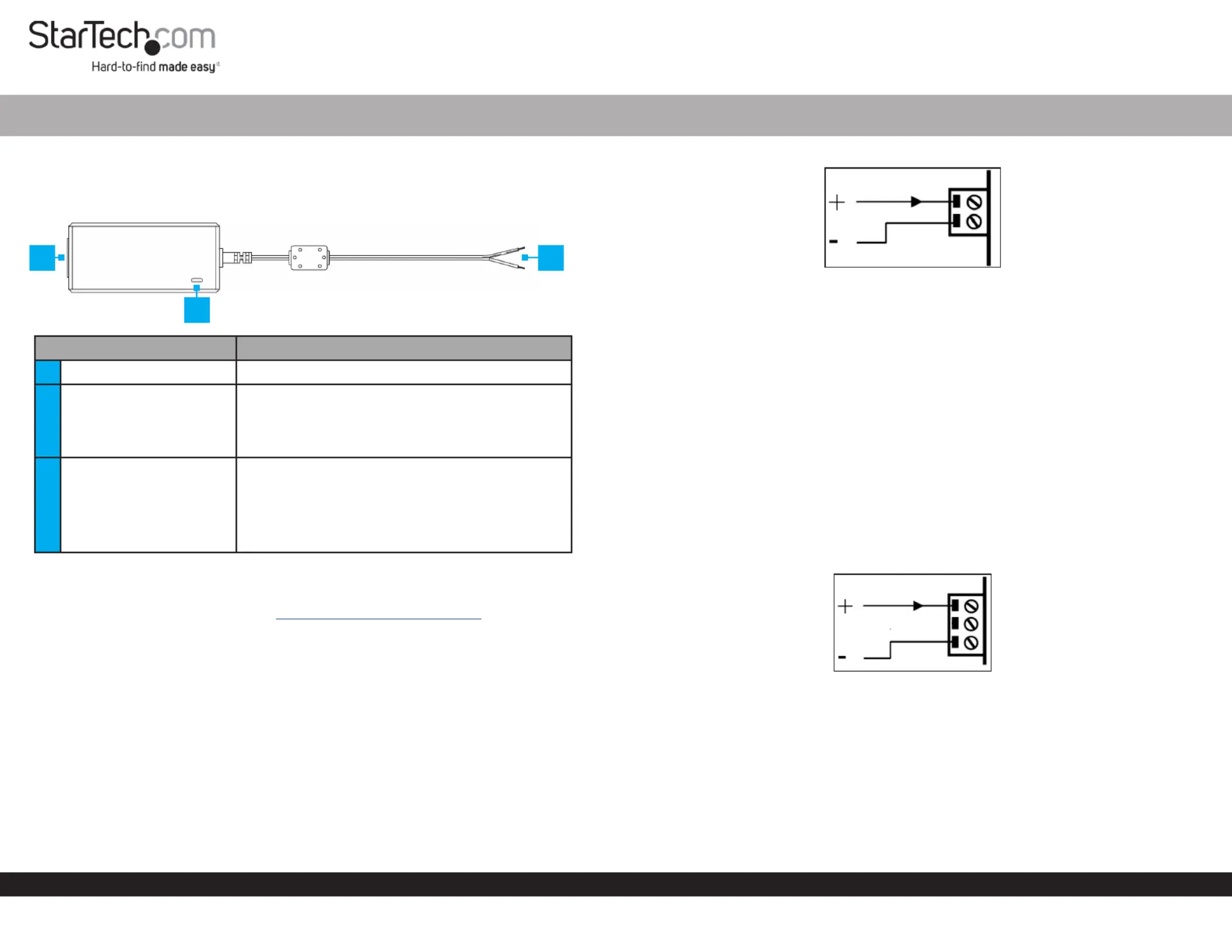
Product Diagram (ITB20D3250)
Component Function
1Power Connector (side) • Used to power the .Adapter
2LED Indicator
• Indicates that the is powered Solid: Adapter
On.
• Indicates that the is not receiving O: Adapter
power.
3Terminal Block Wires
• Used to connect and power a .Device
• = PositiveRed Wire
• = NegativeBlack Wire
• = 20VOutput
• = 3.25A 65WCurrent
Requirements
For the latest requirements, please visit www.startech.com/ITB20D3250
• (Optional) Small Flat Head Screwdriver x 1
• Device with a Two or Three Conductor Terminal Block Connector x 1
Using the Two Conductor Terminal Block Connector
1. Remove the from the , you want Two Conductor Terminal Block Connector Device
to power.
2. Plug the on the into the Two Conductor Terminal Block Connector Adapter
Terminal Connector Device on the .
Note: Ensure the polarity of the input power is correctly matched with the Terminal
Block Pins Device’s to ensure proper functionality. Refer to the vendor manual for
further information on properly wiring the .Device
Universal 65W DC Power Adapter | 20V 3.25A | Industrial
Two Conductor Terminal Block Connector
Using the Three Conductor Terminal Block Connector
1. Using a small screwdriver (Flat Head), loosen the screws on the Two Conductor
Terminal Block Connector Terminal Block Wiresand carefully remove the from
the . Two Conductor Terminal Block Connector
2. Using a small screwdriver, loosen the screws on the Three Conductor Terminal
Block Connector Terminal Block Wires (included) and carefully insert the into the
Three Conductor Terminal Block Connector (Red Wire = Positive and Black Wire =
Negative).
Note: Ensure the polarity of the input power is correctly matched with the Terminal
Block Pins Device’s to ensure proper functionality. Refer to the vendor manual for
further information on properly wiring the .Device
3. Tighten the screws on the , to secure Three Conductor Terminal Block Connector
the into the .Terminal Block Wires Three Conductor Terminal Block Connector
Three Conductor Terminal Block Connector
4. Plug the on the into the Three Conductor Terminal Block Connector Adapter
Terminal Connector Device on the .
Powering the Adapter
• Connect the to the on the and to an Power Cord Power Connector Adapter AC
Electrical Outlet.
1
2
3
Problemløsning StarTech.com ITB20D3250
Hvis du har læst manualen omhyggeligt, men ikke fundet en løsning på dit problem, bed andre brugere om hjælp
Specifikationer
| Bredde: | 53 mm |
| Dybde: | 115 mm |
| Højde: | 35 mm |
| Vægt: | 291 g |
| Antal pr. pakke: | 1 stk |
| Produktfarve: | Sort |
| Pakkevægt: | 843 g |
| Pakkedybde: | 166 mm |
| Pakkebredde: | 242 mm |
| Pakkehøjde: | 55 mm |
| Opbevaringstemperatur (T-T): | -20 - 80 °C |
| Relativ luftfugtighed ved drift (H-H): | 20 - 80 % |
| Driftstemperatur (T-T): | 0 - 40 °C |
| Strømforsyningstype: | Indendørs |
| Hurtig installationsvejledning: | Ja |
| Kabler inkluderet: | Vekselstrøm |
| Udgangseffekt: | 65 W |
| Certificering: | REACH, CE, FCC, UL, PSE |
| Udgangsspænding: | 20 V |
| Udgangsstrøm: | 3.25 A |
| Harmoniseret systemkode (HS): | 85044095 |
| Bæredygtighedscertifikater: | RoHS |
| Indgangsspænding: | 110 - 240 V |
| Formål: | Universel |
| Indgangsstrøm: | 1.4 A |
| Stik: | Terminalblok |
| Mærke kompatibilitet: | StarTech.com |
| Inkluderede strømstik typer: | ANZ, EU, JP, NA, UK |