StarTech.com
Andet computertilbehør
HBS304A24A
StarTech.com HBS304A24A Brugsanvisning
Her er StarTech.com HBS304A24A (Andet computertilbehør) brugervejledning. 2 sider på sprog med en vægt på 375,738.0 Mb. Hvis du ikke kan finde svar på dit problem Spørg vores community.
Side 1/2
Manual Revision: 02/22/2018
Quick-start guide
DE: Bedienungsanleitung - de.startech.com
FR: Guide de l'utilisateur - fr.startech.com
ES: Guía del usuario - es.startech.com
IT: Guida per l'uso - it.startech.com
NL: Gebruiksaanwijzing - nl.startech.com
PT: Guia do usuário - pt.startech.com
JP: 取扱説明書 - jp.startech.com
Package contents
• 1 x peripheral sharing switch
• 1 x remote port selector
• 4 x USB-A to USB-B cable
• 1 x quick-start guide
Requirements
• Up to four USB peripheral devices with cabling
• Up to four computers, each with an available USB port
HBS304A24A
4-Port Peripheral Sharing Switch - USB 3.0 (5Gbps)
Installation
1. Connect each of your USB peripheral devices to a USB peripheral
port on the switch.
2. Connect a USB port from each of your computers to a USB host
port on the switch using the USB-A to USB-B cables.
3. Connect the Remote port selector to the Remote port selector
input on the switch.
Notes:
• The switch does not require an external power source as it draws
power from the computer that it is connected to. If you have a
special application that requires additional power, such as a higher
powered USB peripherals, connect a 5V source to the power
adapter port (USB Micro-B).
• The switch does not require any drivers. However, the peripherals
you’ve connected through the switch may require drivers.
Please ensure that you’ve installed any required drivers for your
peripherals on each computer that’s connected through the
switch.
Operation
To switch between which computer is active:
1. Press the button on the Remote port selector. The Active host LED
illuminates to indicate the active computer.
2. Press the button on the Remote port selector repeatedly, to select
the next computer in succession, until the desired computer is
selected.
About the LED indicators
The switch features Active host LEDs. The following table outlines
the meaning of the LED behavior.
LED behavior Meaning
The LED is illuminated The computer associated with
this LED is selected.
The LED is not illuminated The computer associated with
this LED is not selected.
*actual product may vary from photos
For the latest information, technical specications, and support for
this product, please visit www.StarTech.com/HBS304A24A.
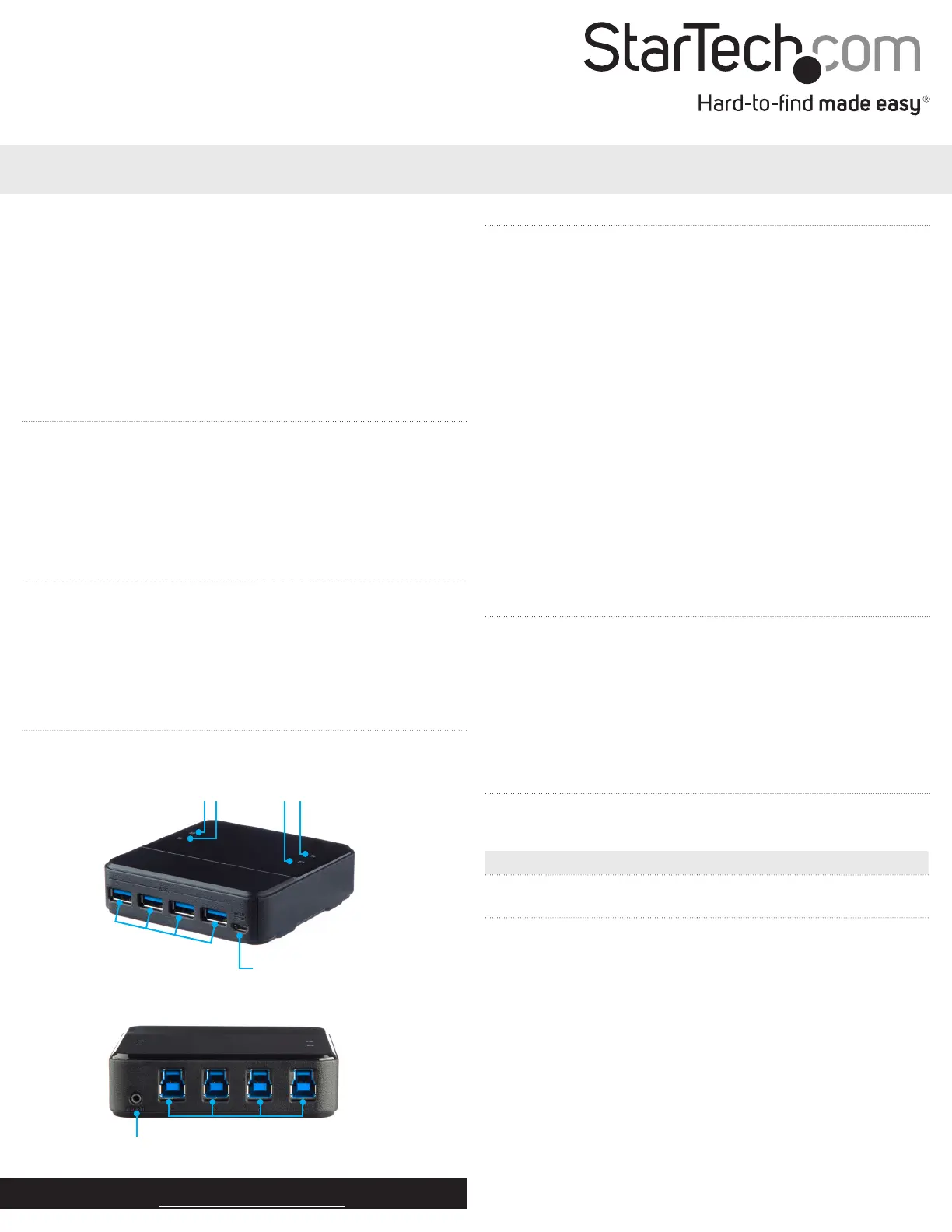
Product diagram
Front
USB peripheral ports
Power adapter
port (optional)
USB host ports
Remote port
selector input
Back
Active host LEDs
Problemløsning StarTech.com HBS304A24A
Hvis du har læst manualen omhyggeligt, men ikke fundet en løsning på dit problem, bed andre brugere om hjælp
Specifikationer
| Bredde: | 94 mm |
| Dybde: | 94 mm |
| Højde: | 26 mm |
| Vægt: | 130 g |
| Produktfarve: | Sort |
| Pakkevægt: | 650 g |
| Pakkedybde: | 239 mm |
| Pakkebredde: | 160 mm |
| Pakkehøjde: | 59 mm |
| Opbevaringstemperatur (T-T): | -20 - 60 °C |
| Relativ luftfugtighed ved drift (H-H): | 0 - 80 % |
| Antal USB 3.2 Gen 1 (3.1 Gen 1) type-A-porte: | 4 |
| Driftstemperatur (T-T): | 0 - 40 °C |
| Husmateriale: | Plast |
| Hurtig installationsvejledning: | Ja |
| Hurtig start guide: | Ja |
| Kabler inkluderet: | USB |
| Fjernbetjening inkluderet: | Ja |
| Certificering: | CE, FCC |
| LED-indikatorer: | Ja |
| Strømkilde type: | USB |
| Udgangsspænding: | 5 V |
| Udgangsstrøm: | 2 A |
| Bæredygtighedscertifikater: | RoHS |
| Hovedkassen højde (udvendigt): | 340 mm |
| Hovedkassens længde (udvendigt): | 485 mm |
| Hovedkassens bredde (udvendigt): | 320 mm |
| Værtsgrænseflade: | USB 2.0 Micro-B |
| Maksimal dataoverførselshastighed: | 5 Gbit/sek. |
| Plug and play: | Ja |
| Produkter pr. hovedkasse (udvendigt): | 20 stk |
| Fjernbetjening funktion: | Ja |
| Understøtter hot-plug: | Ja |
| Fjernindgang: | 1 |
| Dataoverførselshastighed: | 5000 Mbit/s |
| Strømstik: | Micro-USB Type-B |
| Porte, antal: | 8 |
| Hub-grænseflader: | USB 3.2 Gen 1 (3.1 Gen 1) Type-A, USB Type-B |
| Antal USB 3.2 Gen 1 (3.1 Gen 1) Type-B porte: | 4 |
| Beskyttelse, højspænding: | Ja |