StarTech.com BT52A Brugsanvisning
Her er StarTech.com BT52A (Bluetooth modtager) brugervejledning. 2 sider på sprog med en vægt på 454,654.0 Mb. Hvis du ikke kan finde svar på dit problem Spørg vores community.
Side 1/2
Quick-Start Guide
To view manuals, FAQs, videos, drivers, downloads, technical drawings, and more, visit www.startech.com/support.
Manual Revision: November 10, 2020 5:25 PM
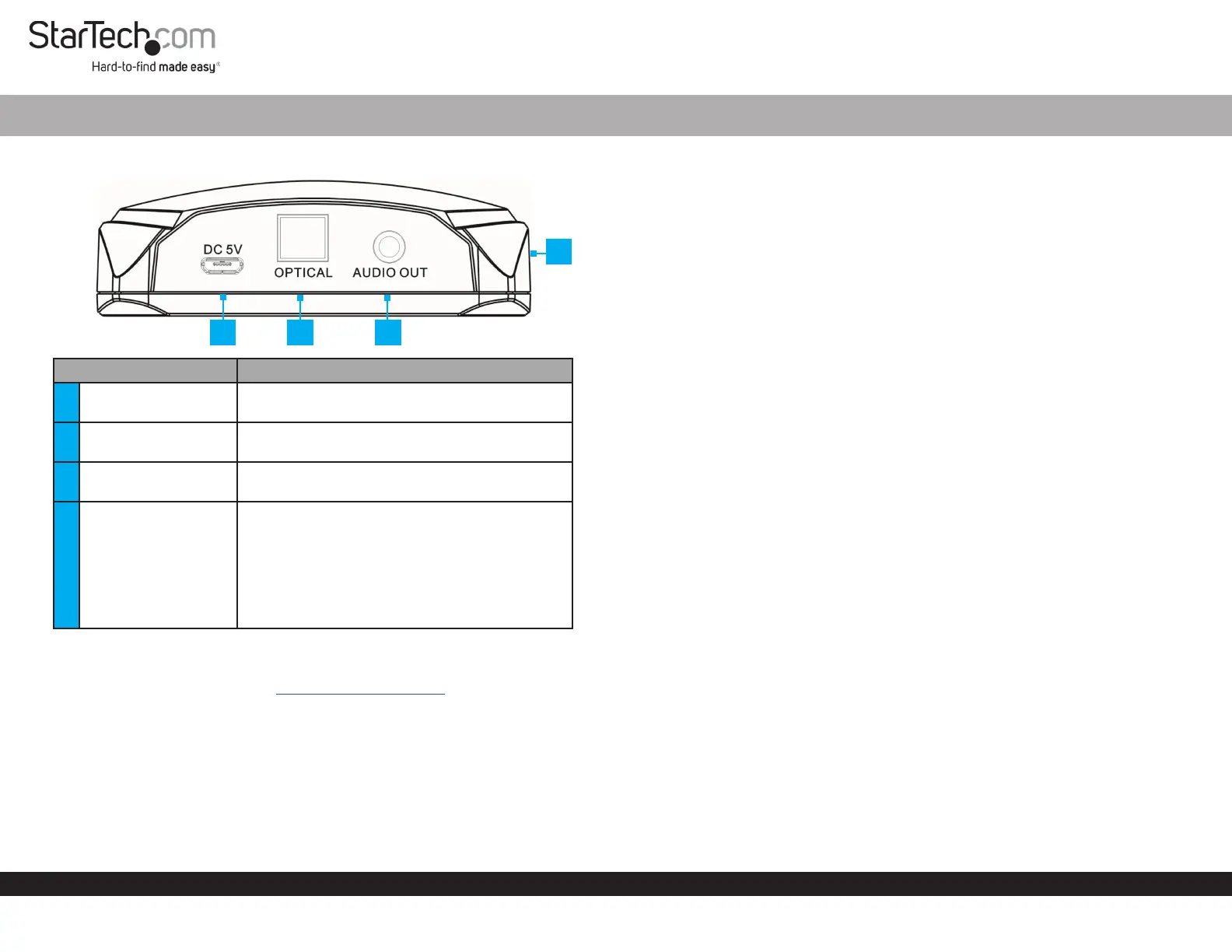
Product Diagram (BT52A)
Component Function
1
DC 5V Port (micro
USB)
• Used to connect the Power Adapter to the
Audio Receiver.
2 Optical Port
• Used to connect an Audio Device via Toslink®
Cable to the Audio Receiver.
3 Audio Out Port
• Used to connect an Audio Device via 3.5 mm
Cable to the Audio Receiver.
4 LED Indicator (front)
• Flash Once: Indicates that the Audio Device is
powered and waiting to pair with a Bluetooth
Device.
• Solid: Indicates that a Bluetooth Device has
been paired with the Audio Receiver.
• Blinking: Indicates that the Bluetooth Device
is disconnected from the Audio Receiver.
Requirements
For the latest requirements, please visit www.startech.com/BT52A
Powering the Audio Receiver
1. Connect the Universal Power Adapter to the DC 5V Port on the Audio Receiver and
the other end to an AC Electrical Outlet.
2. The LED Indicator will ash once, Indicating that the Audio Device is powered and
waiting to pair with a Bluetooth Device.
Bluetooth® 5.0 Audio Receiver
Connecting the Audio Receiver
Analog
• Connect the 3.5 mm Audio Cable (included) to the Audio Out Port on the Audio
Receiver and the other end to an Audio In Port on the Audio Device (audio
receiver, etc.)
- or -
Connect the 3.5 mm Audio Cable (included) to the Audio Out Port on the Audio
Receiver and the other end to the RCA Breakout Cable (included). Then connect
both the left and right connectors on the RCA Breakout Cable to the left and right
Audio In Ports on the Audio Device.
Digital
• Connect the Toslink Cable (sold separately) to the Optical Port on the Audio
Receiver and the other end to an Optical Port on the Audio Device (audio receiver,
etc.)
Pairing with NFC Fast Connection
The Audio Receiver is equipped with a standard NFC tag to allow for NFC pairing.
NFC allows you to connect a Bluetooth Device to the Audio Device by touching the
Bluetooth Device to the Audio Receiver.
The maximum distance the Bluetooth Device can be from the Audio Receiver is 66 ft
(20 meters).
NOTE: Only one Bluetooth Device may be paired to the Audio Device at a time.
1. Ensure NFC is enabled on your Bluetooth Device. Check the device’s manual for
details.
2. Touch a Bluetooth Device to the top of the Audio Receiver for 3 seconds.
NOTE: If this is the rst time your Bluetooth Device has been paired you may receive
a message requesting access.
3. The Bluetooth Device is now paired, the LED Indicator will be solid and audio
from the Bluetooth Device will output through the connected Audio Device.
Disconnecting from your NFC Device
1. Touch the paired Bluetooth Device to the top of the Audio Receiver for 3 seconds.
2. The Bluetooth Device is now disconnected from the Audio Device.
1
2
3
4
Problemløsning StarTech.com BT52A
Hvis du har læst manualen omhyggeligt, men ikke fundet en løsning på dit problem, bed andre brugere om hjælp
Specifikationer
| Vekselstrømsindgangsspænding: | 100 - 240 V |
| Bredde: | 84.5 mm |
| Dybde: | 77 mm |
| Højde: | 26.5 mm |
| Produktfarve: | Sort |
| Pakkedybde: | 242 mm |
| Pakkebredde: | 120 mm |
| Pakkehøjde: | 63 mm |
| Opbevaringstemperatur (T-T): | -20 - 60 °C |
| Driftstemperatur (T-T): | 0 - 40 °C |
| Hurtig start guide: | Ja |
| Kabler inkluderet: | Audio (3.5mm), RCA |
| Bluetooth-version: | 5.0 |
| Strømkilde: | USB |
| Near Field Communication (NFC): | Ja |
| Udgangsspænding: | 5 V |
| Udgangsstrøm: | 1 A |
| Bæredygtighedscertifikater: | CE, RoHS |
| Hovedkassen højde (udvendigt): | 283 mm |
| Hovedkassens længde (udvendigt): | 275 mm |
| Hovedkassens bredde (udvendigt): | 425 mm |
| Værtsgrænseflade: | 3.5 mm + TOSLINK |
| Strømforbrug: | 5 W |
| Ekstern strømadapter: | Ja |
| Produkter pr. hovedkasse (udvendigt): | 12 stk |
| Transmissionsafstand: | 20 m |
| afkodning af aptX-lyd: | Ja |
| Antal parrede enheder husket: | 8 |