StarTech.com
Ikke kategoriseret
2P1FFC-USB-SERIAL
StarTech.com 2P1FFC-USB-SERIAL Brugsanvisning
Her er StarTech.com 2P1FFC-USB-SERIAL (Ikke kategoriseret) brugervejledning. 2 sider på sprog med en vægt på 400,773.0 Mb. Hvis du ikke kan finde svar på dit problem Spørg vores community.
Side 1/2
Quick-Start Guide
To view manuals, FAQs, videos, drivers, downloads, technical drawings, and more, visit www.startech.com/support.
Manual Revision: October 4, 2023
Product ID
2P1FFC-USB-SERIAL
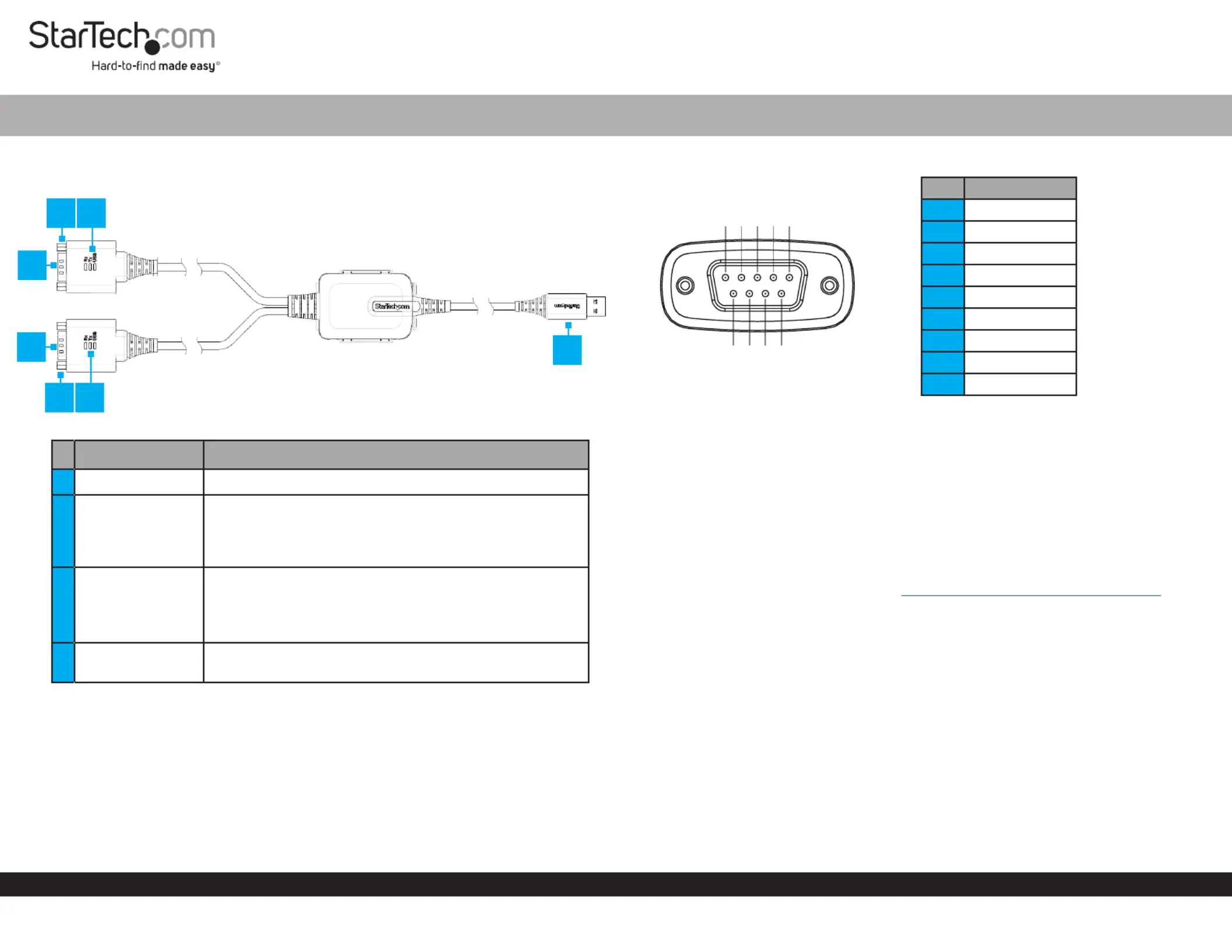
Component Function
1Serial Port DB9 • Connect to a Serial Peripheral Device
2DB9 Nuts
• Used to secure the to the Serial DB9 Port Serial
Peripheral Device
• The included can be installed for DB9 Screws
compatibility with or Serial Peripheral Devices Cables
3LED Indicators
• Data Receive LED: Green Flashes to indicate activity
• Data Transmit LED: Yellow Flashes to indicate activity
• USB LED: BlueSolid to indicate driver has been
installed, and USB connection enumerated
4USB Type A Port
• Connect the to an available USB to Serial Adapter
USB-A Port
1ft (30cm) FTDI USB-A to 2-Port RS232 DB9 Serial Adapter Cable - M/M
Pinout Diagram
Package Contents
• 2-Port USB to Serial Adapter x 1
• Mounting Bracket x 1
• DB9 Screws x 4
• Quick-Start Guide x 1
Requirements
• USB Type-A Enabled Computer x 1
For the latest drivers/software, product information, technical specications, and
declarations of conformance, please visit: www.StarTech.com/2P1FFC-USB-SERIAL
Installation
(Optional) Mount the USB Serial Adapter
Note: Before mounting the make sure that the surface you are USB Serial Adapter
mounting to is strong enough to support the weight of the .USB Serial Adapter
1. Determine the and placement for the .Mounting Surface USB Serial Adapter
2. Mount the included to the desired using the Mounting Bracket Mounting Surface
appropriate (e.g., wood screws) through the two Mounting Hardware Mounting
Bracket Holes.
Note: The Mounting Bracket is designed to t M4 Flat Head Screws
3. Press the rmly into the until it clicks into USB Serial Adapter Mounting Bracket
place.
4
3
1
Pin RS-232
1DCD
2RXD
3TXD
4DTR
5GND
6DSR
7RTS
8CTS
9RI
2
2
54321
9876
1
3
Problemløsning StarTech.com 2P1FFC-USB-SERIAL
Hvis du har læst manualen omhyggeligt, men ikke fundet en løsning på dit problem, bed andre brugere om hjælp
Specifikationer
| Bredde: | 45 mm |
| Dybde: | 610 mm |
| Højde: | 20 mm |
| Vægt: | 110 g |
| Brugervejledning: | Ja |
| Produktfarve: | Black, Grey |
| Pakkevægt: | 160 g |
| Pakkedybde: | 155 mm |
| Pakkebredde: | 225 mm |
| Pakkehøjde: | 55 mm |
| Opbevaringstemperatur (T-T): | -40 - 80 °C |
| Driftstemperatur (T-T): | -40 - 80 °C |
| LED-indikatorer: | Ja |
| Kabellængde: | 0.6 m |
| USB version: | 2.0 |
| Bæredygtighedscertifikater: | RoHS |
| Kompatible operativsystemer: | Windows 7, 8/8.1, 10, 11\nWindows Server 2008 R2, 2012, 2012 R2, 2016, 2019, 2022\nmacOS 10.9 to 10.15, 11.0, 12.0, 13.0, 14.0\nLinux 4.15.x+- LTS Versions\nChrome OS |
| Hovedkassen højde (udvendigt): | 250 mm |
| Hovedkassens længde (udvendigt): | 330 mm |
| Hovedkassens bredde (udvendigt): | 585 mm |
| Produkter pr. hovedkasse (udvendigt): | 20 stk |
| Overholdelse af bæredygtighed: | Ja |
| Stik 1: | USB-A |
| Stik 2: | 2 x DB-9 RS-232 |
| Stik 1 køn: | Hanstik |
| Stik 2 køn: | Hanstik |
| Baud hastighed: | 921.6 Kbit/s |
| Data-bits: | 7, 8 |
| Stop bits: | 1, 2 |
| Dataoverførselshastighed: | 0.48 Gbit/sek. |
| Relativ luftfugtighed: | 0 - 95 % |
| Stik 1 formfaktor: | Lige |
| Stik 2 formfaktor: | Lige |
| Chipsæt: | FTDI - FT2232H |
| Kabel kappemateriale: | Termoplastisk elastomer (TPE) |
| FIFO (først ind, først ud): | 4048 B |
| Paritetsbit: | Even, Mark, N,Odd, Space |