Panasonic CQ-HX1083W Brugsanvisning
Her er Panasonic CQ-HX1083W (Bilradio) brugervejledning. 13 sider på sprog med en vægt på 3,303,855.0 Mb. Hvis du ikke kan finde svar på dit problem Spørg vores community.
Side 1/13
E
N
G
L
I
S
H
22
CQ-HX1083/1003W
41
CQ-HX1083/1003W
40
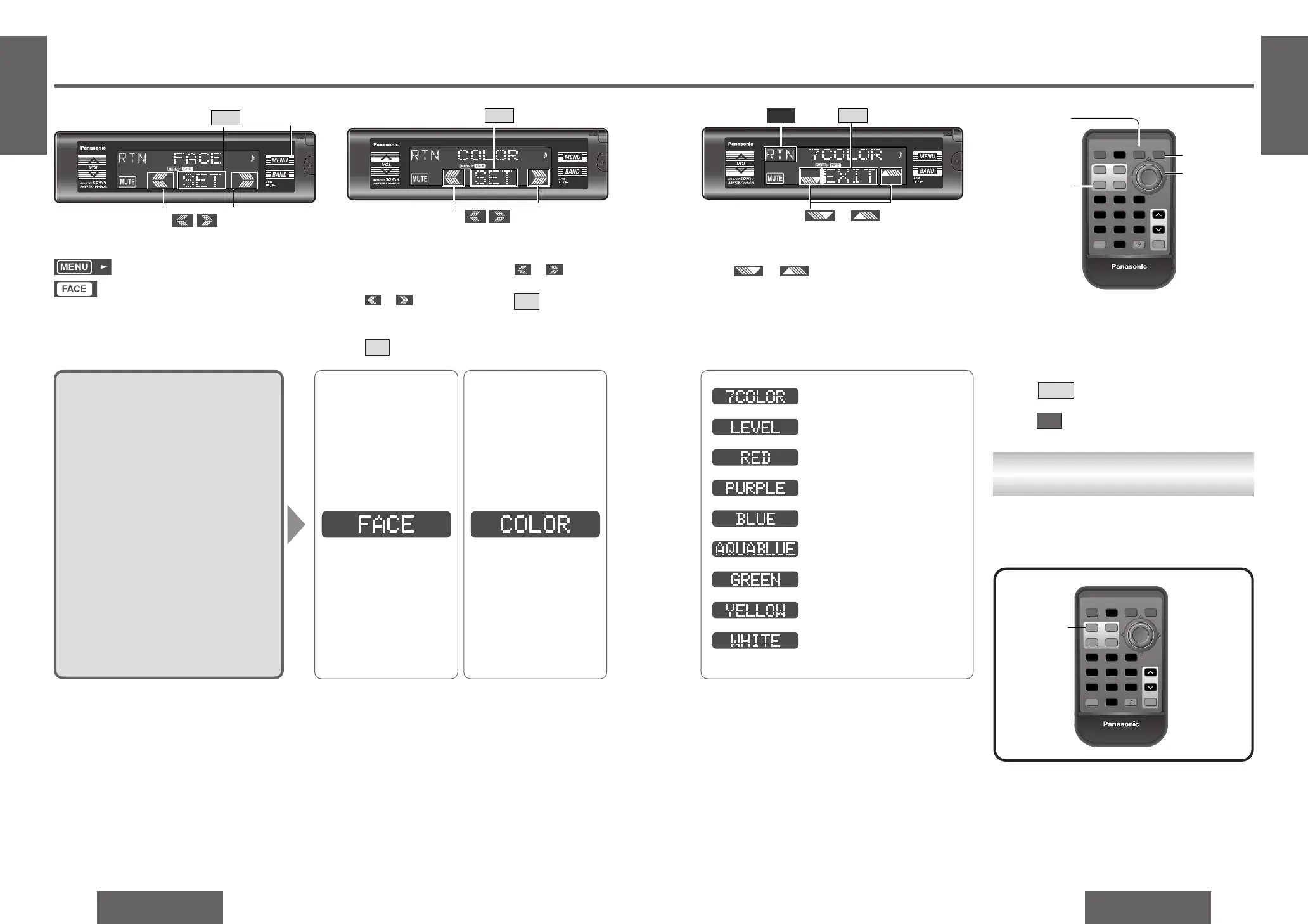
Front Panel Setting [FACE]
E
N
G
L
I
S
H
21
Color Change
You can change the color of the display.
Default: 7COLOR
Variety: 7COLOR, LEVEL, RED, PURPLE,
BLUE, AQUABLUE, GREEN,
YELLOW, WHITE
2
Submenu
1 Press /
[%] or [$].
2 Press /[SET].
SET
Press /[#] or ["].
3
Set
Lights during menu play setting.
Lights during FACE mode.
1
Menu
1 Press [MENU].
2 Press /
[%] or [$] to select
“FACE”.
3 Press /[SET].
SET
or
or
Note:
≥ Press /[MENU]/[DISP] (display) to return
to the regular mode.
≥ Press /[RET] (RETURN) to return to the pre-
vious display.
RTN
EXIT
7 color (below)
Changes according to the volume level.
Red
Purple
Blue
Aqua blue
Green
Yellow
White
3
SET
1
[MENU]
2
1
SET
2
or
RTN
EXIT
Select Select
or
S
E
T
S
E
T
PWRPWR BANDBANDBAND
FACEFACE SS
•
AS
•
A
DISPDISP DIMDIMDIM
MENUMENU
RETRET
11222333
44555666
77888
00
99
##
MUTEMUTE
SCANSCAN
DIMMERDIMMER
RANDOMRANDOM
NUMBERNUMBER
REPEATREPEAT
RETURNRETURNSOURCESOURCE
VOLVOL
Car AudioCar Audio
[MENU]
[#] ["]
(set)
[%] [$]
(submenu)
[SET]
[DISP] (display)
[RET] (RETURN)
Direct Operation
S
E
T
S
E
T
PWRPWR BANDBANDBAND
FACEFACE SS
•
AS
•
A
DISPDISP DIMDIMDIM
MENUMENU
RETRET
11222333
44555666
77888
00
99
##
MUTEMUTE
SCANSCAN
DIMMERDIMMER
RANDOMRANDOM
NUMBERNUMBER
REPEATREPEAT
RETURNRETURNSOURCESOURCE
VOLVOL
Car AudioCar Audio
[FACE]
In the case of remote control, as an alternative to
performing operations from the menu, the opera-
tions can be performed directly using the buttons
shown below.
Problemløsning Panasonic CQ-HX1083W
Hvis du har læst manualen omhyggeligt, men ikke fundet en løsning på dit problem, bed andre brugere om hjælp
Specifikationer
| Mærke: | Panasonic |
| Kategori: | Bilradio |
| Model: | CQ-HX1083W |