Gigabyte
Computer køling komponent
G-Power II
Gigabyte G-Power II Brugsanvisning
Her er Gigabyte G-Power II (Computer køling komponent) brugervejledning. 1 sider på sprog Engelsk med en vægt på 0.4 Mb. Hvis du ikke kan finde svar på dit problem Spørg vores community.
Side 1/1
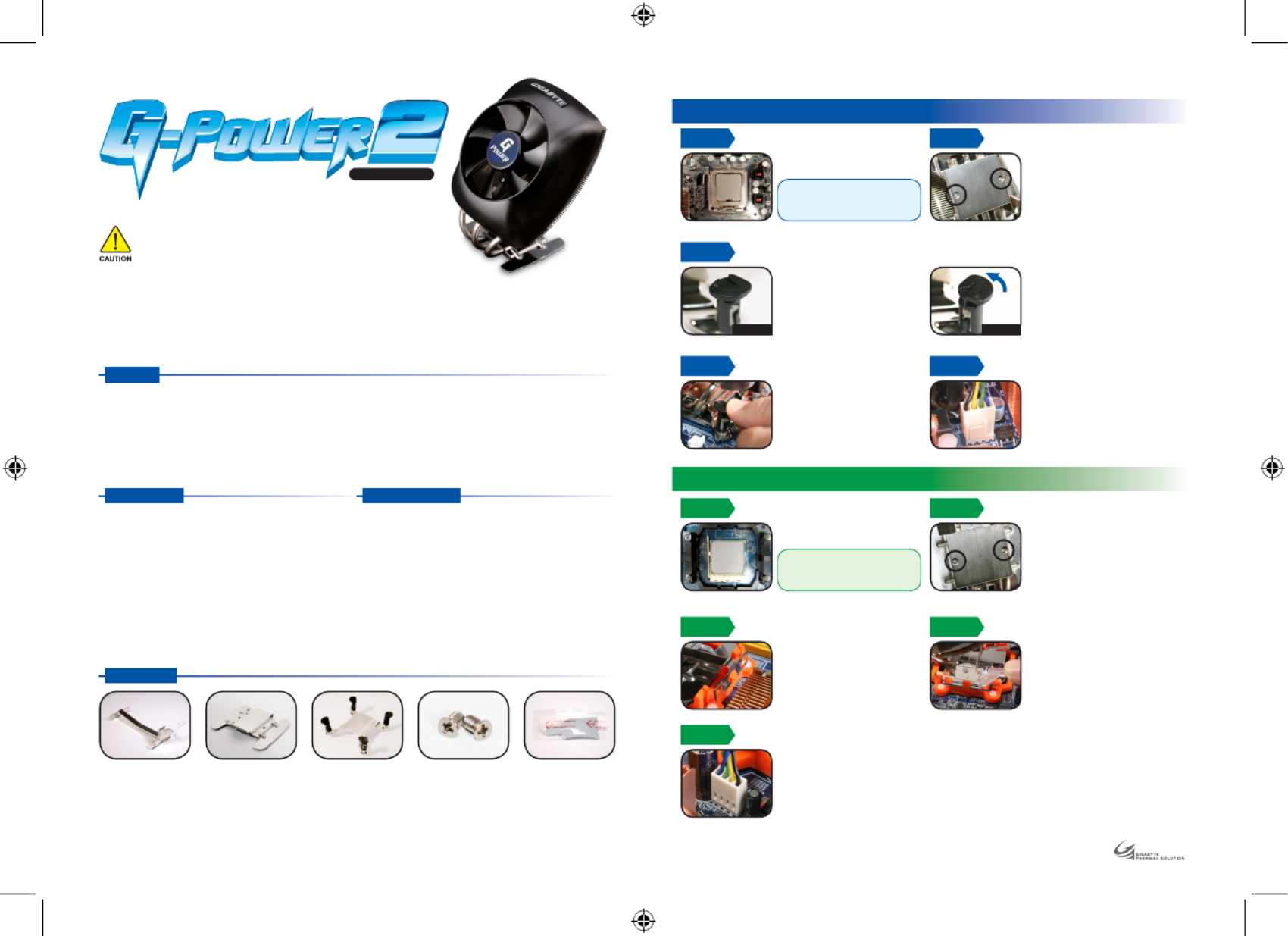
1. Universal design, supports LGA775 & AMD K8 / AM2 platform.
2. Curve design combines CPU and MOSFEAT cooling together.
3. 9CM silent fan with PWM function, highest fan speed can reach 2300RPM.
4. Highly heat conducting heat pipe, provides extreme cooling performance.
5. Pure copper base with aluminum fin, extra large heat dissipation area allows heat been carried away faster.
6. Hassle-free installation.
STEP 3
STEP 4 STEP 5
Before installation, please make
sure the pin is on the right
direction. (as Figure A)
Plug the 4-pin connector of the
cooler into the motherboard’s CPU
fan socket.
Align the pin of the cooler with
the hole of the CPU on the
motherboard and push down
the pin diagonally.
Please make sure the four pins
are firmly secured.
To remove the cooler, turn the four
pins to the removing direction and
pull them up.(as Figure B)
The followings are not covered by the warranty :
1. Use the product incorrectly or in a manner other than the designed purpose.
2. Nonobservance of the proper operation. ( e.g. over-clocking )
3. Malfunction due to interference from other devices.
4. Unauthorized modification of the product.
5. Malfunction due to unfit specifications on Motherboard.
6. Malfunction arising from casualties ( earthquake, thunder, fire, and flood ).
The cooler fan speed levels provided are for reference use only.
Please refer to the motherboard BIOS to verify actual fan speed levels.
Dimension : 102 x 122 x 139 mm
Fan Dimension : 90 x 90 x 25 mm
Heat Pipe : 3
Base Material: Copper
Fin Material : Aluminum
Rated Voltage : 12 V
Rated Current : 0.2 Amp
Fan Speed : 2,300 rpm
Noise Level : 25dBA
Bearing Type : EBR
Fan Life Expectancy : 30,000 hr
AMD K8 / AM2 Clip AM2/K8 Bracket LGA775 Bracket screws x 2
Apply some thermal grease on
the CPU properly.
STEP 2
Place the 775 bracket between the
copper base and the cooler unit.
Align the holes of the bracket with
the holes of the copper base. Secure
the 775 bracket with supplied
bracket screws. Make sure the screws
are evenly and firmly fastened.
Thermal grease
Installation Guide
G H-P SU 22 - P C
STEP 1
STEP 3
Lock the tab on one side of AMD
K8 / AM2 clip in the salient point
of the CPU cooler.
Lock the tab on the other side of
AMD K8 / AM2 clip in the salient
point of the CPU cooler bracket;
push down and secure the bar on
the clip firmly.
STEP 4
STEP 5
Plug the 4-pin connector of the
cooler into the motherboard’s
CPU fan socket.
STEP 2
Apply some thermal grease on
the CPU properly.
Caution :
Before installation, please turn off the
power, unplug the power cord, and
be sure to remove the sticker from the
bottom of the cooler unit.
Place the AM2/K8 Bracket between
the copper base and the cooler unit.
Align the holes of the bracket with
the holes of the copper base. Secure
the AM2/K8 Bracket with supplied
bracket screws. Make sure the screws
are evenly and firmly fastened.
Features
7. The product’s warranty label has been removed or damaged.
8. The devices inside, including power supply, hard disk, CD-ROM drive,
motherboard, cooler, etc, are not detached from the chassis prior to the
transportation of the computer product, resulting in damage to the cooler
or computer-related devices.
9. Any damage caused by nonobservance of the installation instruction contained
in this manual.
Specification
Intel® CoreTM 2 Extreme Processor Series
Intel® CoreTM 2 Quad Processor Series
Intel® CoreTM 2 Duo Processor Series
Intel® Pentium® Extreme Edition Series
Intel® Pentium® D Processor Series
Intel® Pentium® 4 Processor Series (LGA775)
AMD AM2
AMD AthlonTM FX Series
AMD AthlonTM 64x2 Series
AMD AthlonTM 64 Series
AMD Sempron Series
Compatible CPU
Accessories
STEP 1
LGA 775 Platform Installation
AMD K8 / AM2 Platform Installation
Caution :
Before installation, please turn off the
power, unplug the power cord, and
be sure to remove the sticker from the
bottom of the cooler unit.
Figure A Figure B
Problemløsning Gigabyte G-Power II
Hvis du har læst manualen omhyggeligt, men ikke fundet en løsning på dit problem, bed andre brugere om hjælp
Specifikationer
| Type: | Luftkøler |
| Produktfarve: | Sort |
| Dimensioner (BxDxH): | 108.4 x 101.8 x 150.8 mm |
| Materiale: | Aluminium,Cooper |
| Rotationshastighed: | 2300 rpm |
| Effektkrav: | 12V |
| Stik: | 4-polet |
| Kompatible produkter: | Intel Core 2 Extreme/Core 2 Quad/Core 2 Duo/Pentium Extreme Edition/Pentium D/Pentium 4,\nAMD AM2/Athlon FX/Athlon 64x2/Athlon 64/ Sempron |
| Støjniveau (høj hastighed): | 25 dB |
| Nominel strøm: | 0.2 A |
| Produktlevetid: | 30000 t |