Brother ADS-2500W Brugsanvisning
Her er Brother ADS-2500W (Scanner) brugervejledning. 36 sider på sprog Engelsk med en vægt på 6.4 Mb. Hvis du ikke kan finde svar på dit problem Spørg vores community.
Side 1/36
1
Start Here
Quick Setup Guide
USA/CAN Version 0
ADS-2500W
Thank you for choosing Brother, your support is important to us and we value your business. Your Brother product
is engineered and manufactured to the highest standards to deliver reliable performance, day-in and day-out.
Please read the Product Safety Guide first before you set up your machine. Then, please read this Quick Setup
Guide for the correct setup and installation.
1
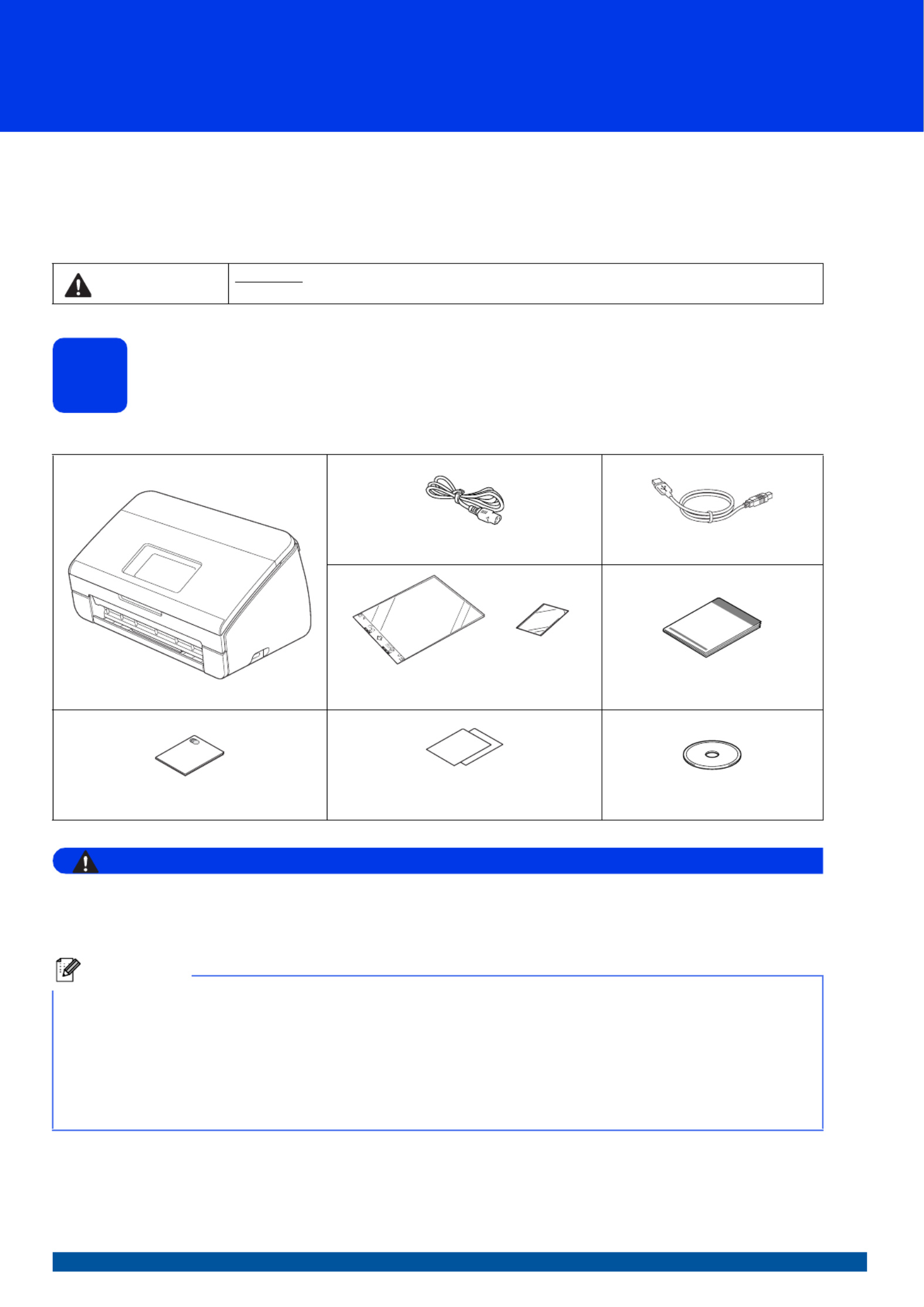
Unpack the machine and check the components
The components included in the box may differ depending on your country.
WARNING
• This product was packaged in a plastic bag. To avoid suffocation, keep such plastic bag away from
babies and children. Do not use the bag in cribs, beds, carriages or play pens. The bag is not a toy.
• Only use the power cord supplied with this product.
aRemove the protective tape and film covering the machine and the LCD.
bMake sure you have all the components.
WARNING WARNING indicates a potentially hazardous situation which, if not avoided, could result in death
or serious injuries.
AC Power Cord USB Interface Cable
Carrier Sheet/
Plastic Card Carrier Sheet
Quick Setup Guide
Product Safety Guide Product Registration Sheet (USA only)
Warranty Card (USA only) DVD-ROM
Note
• We recommend that you save the original packaging in case you must ship your machine.
• Please use the supplied USB cable if you wish to connect the machine to a computer.
USB cable
It is recommended to use a USB 2.0 cable (Type A/B) that is no more than 6 feet (2 meters) long.
Network cable
Use a straight-through Category5 (or greater) twisted-pair cable for 10BASE-T or 100BASE-TX Fast Ethernet
Network.
Problemløsning Brother ADS-2500W
Hvis du har læst manualen omhyggeligt, men ikke fundet en løsning på dit problem, bed andre brugere om hjælp
Specifikationer
| Bredde: | 300 mm |
| Dybde: | 221 mm |
| Højde: | 180 mm |
| Vægt: | 3580 g |
| Produktfarve: | Black, Grey |
| Skærm diagonal: | 3.7 " |
| Berøringsskærm: | Ja |
| Wi-Fi: | Ja |
| USB-port: | Ja |
| Ethernet LAN: | Ja |
| Strømforbrug (standby): | 4 W |
| Strømforbrug (typisk): | 20 W |
| Scanner type: | ADF-scanner |
| Optisk scanningsopløsning: | 600 x 600 dpi |
| Input farvedybde: | 30 Bit |
| Output farvedybde: | 24 Bit |
| Skærm: | LCD |
| Strømforbrug (slukket): | 2 W |
| Intern hukommelse: | 256 MB |
| Strømforsyningstype: | Vekselstrøm |
| USB version: | 2.0 |
| Niveauer i gråtoneskala: | 256 |
| Understøttede Mac-operativsystemer: | Mac OS X 10.6 Snow Leopard, Mac OS X 10.7 Lion |
| Understøttede Linux-operativsystemer: | Ja |
| Sensortype: | CMOS dual CIS |
| Standard grænseflader: | Ethernet, USB 2.0, Wireless LAN |
| Drivere inkluderet: | Ja |
| Duplex scanning: | Ja |
| Scan til: | E-mail, File, FTP, OCR, USB |
| Minimum plads på lagerdisk: | 1536 MB |
| Maksimal scanningsstørrelse: | 215.9 x 863 mm |
| Farvescanning: | Ja |
| ADF-scanningshastighed (sort/hvid, A4): | 24 sider pr. minut |
| ADF-scanningshastighed (farve, A4): | 24 sider pr. minut |
| Daglig driftscyklus (maks.): | 1500 Sider |
| Scan drivere: | ICA, ISIS, TWAIN, WIA |
| Automatisk dokumentføder (ADF) indgangskapacitet: | 50 ark |
| Maksimalt scanningsområde (ADF): | 215.9 x 863 mm |
| Mindste scanningsområde (ADF): | 50.8 x 70.1 mm |
| Scanning af film: | Ingen |
| Duplex ADF-scanningshastighed (sort/hvid, A4): | 48 ipm |
| Duplex ADF-scanningshastighed (farve, A4): | 48 ipm |
| Scanning af understøttede medietyper: | Business Card, Plain paper, Plastic Card |
| Scan filformater: | JPG, PDF |
| Forbedret scanningsopløsning: | 1200 x 1200 dpi |
| Multi feed detektion: | Ja |