Acer Predator X25 Brugsanvisning
Her er Acer Predator X25 (Skærm) brugervejledning. 3 sider på sprog Engelsk med en vægt på 0.4 Mb. Hvis du ikke kan finde svar på dit problem Spørg vores community.
Side 1/3
English
Acer LCD Monitor Quick Start Guide (QSG)
Important safety instructions
Please read the following instructions carefully.
1. To clean the LCD monitor screen:
• Turn off the LCD monitor and unplug the power cord.
• Spray a non-solvent cleaning solution onto a rag and clean the screen gently.
2. Do not place the LCD monitor near a window. Exposing the monitor to rain, moisture or sunlight can severely damage
it.
3. Do not apply pressure to the LCD screen. Excessive pressure may cause permanent damage to the display.
4. Do not remove the cover or attempt to service this unit yourself. An authorized technician should perform servicing of
any nature.
5. Store the LCD monitor in a room with a temperature of -20° to 60° C (-4° to140° F). Storing the LCD monitor outside
this range may result in permanent damage.
6. Immediately unplug your monitor and call an authorized technician if any of the following circumstances occur:
• Monitor-to-PC signal cable is frayed or damaged.
• Liquid spills onto the LCD monitor or the monitor is exposed to rain.
• The LCD monitor or case is damaged.
Attaching the monitor to the base
1. Remove the monitor from the packaging.
2. Attach the footstand to the base. (for selected models).
3. Turn clockwise to lock. Ensure that the base in locked onto the stand. (for selected models)
4. Secure the base to the stand by turning the screw using the intergrated tab or a suitable coin. (for selected models)
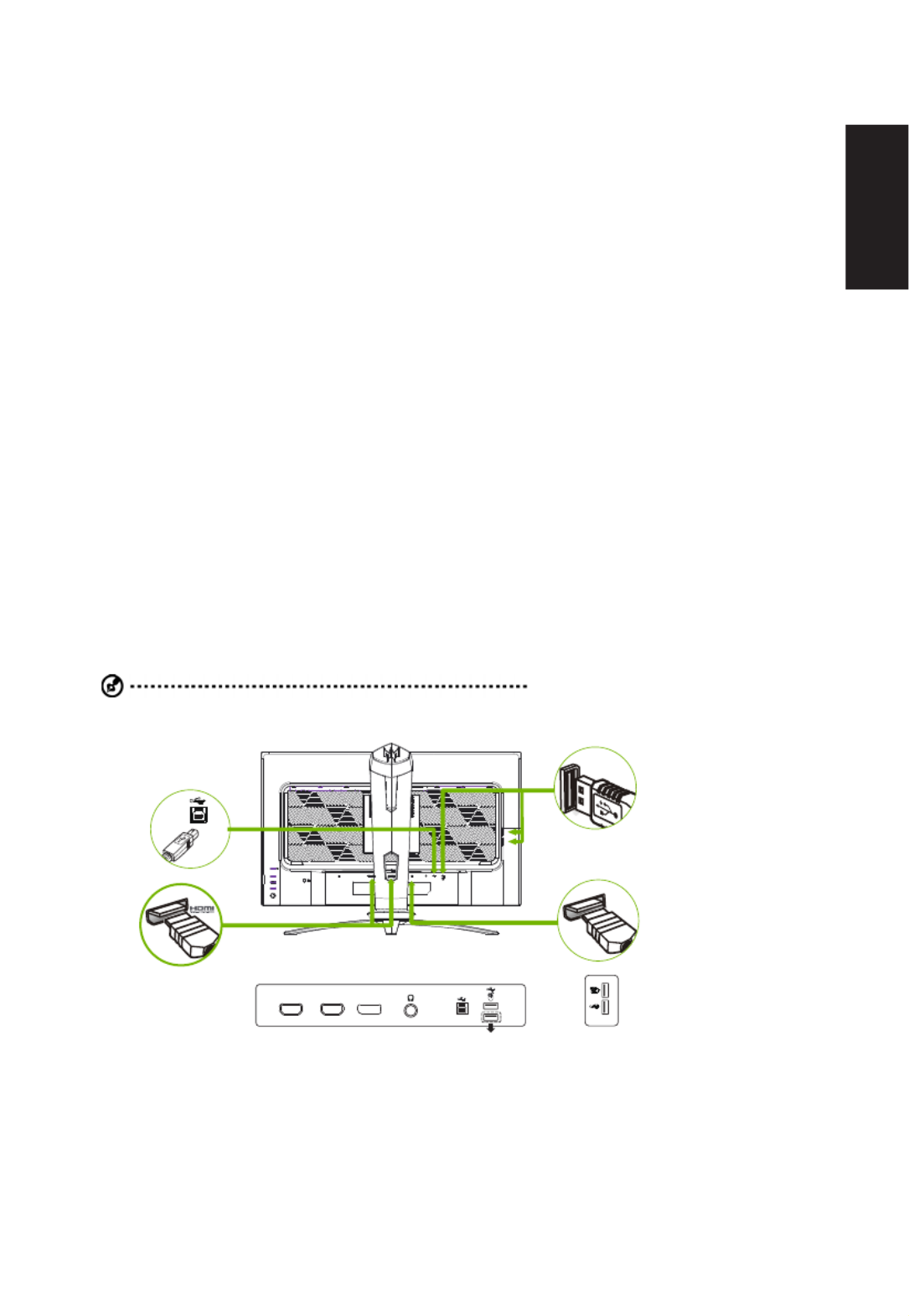
Connecting your monitor to a computer
1. Turn off your computer and unplug your computer's power cord.
2. Connect the signal cable to the DP (optional) and/or HDMI (optional) input socket of the monitor, and the
DP(optional) and/or HDMI (optional) output socket of the graphics card on the computer.
3. Connect the USB Cable(Optional)
Connect the USB cable to port for fast charge.
Connect the USB cable to port.
4. Insert the monitor power cable into the power port at the back of the monitor.
5. Connect the power adapter and power cord to the monitor, then to a properly grounded AC outlet.
Note: Audio output is only for audio output model. Please check user manual for more instruction.
DP
USB
DP
HDMI 1(2.0) HDMI 2(2.0)
Reflex Latency Analyzer
G-SYNC :
G-SYNC requires an NVIDIA GeForce GTX 1070 BOOST GPU or higher. For more information, visit the nVidia
® website:
http://www.nvidia.com/page/home.html
Problemløsning Acer Predator X25
Hvis du har læst manualen omhyggeligt, men ikke fundet en løsning på dit problem, bed andre brugere om hjælp
Specifikationer
| Produktfarve: | Sort |
| Skærm diagonal: | 24.5 " |
| Skærmopløsning: | 1920 x 1080 pixel |
| Berøringsskærm: | Ingen |
| HD-type: | Fuld HD |
| Skærmteknologi: | LCD |
| Naturligt aspektforhold: | 16:9 |
| Responstid: | 1 ms |
| Synsvinkel, horisontal: | 178 ° |
| Synsvinkel, vertikal: | 178 ° |
| Skærm form: | Flad |
| Skærm diagonal (metrisk): | 62 cm |
| Indbyggede højttaler(e): | Ja |
| Antal højttalere: | 2 |
| Udgangseffekt (RMS): | 4 W |
| Antal HDMI-porte: | 2 |
| Udgange til hovedtelefoner: | 1 |
| VESA montering: | Ja |
| Panel montering grænseflade: | 100 x 100 mm |
| Strømforbrug (standby): | 0.5 W |
| Strømforbrug (typisk): | - W |
| Bredde (uden stativ): | 558 mm |
| Dybde (uden stativ): | 81 mm |
| Højde (uden stativ): | 329 mm |
| Vægt (uden stativ): | 3830 g |
| Bredde (med stativ): | 1414.8 mm |
| Dybde (med stativ): | 236 mm |
| Højde (med stativ): | 507 mm |
| Vægt (med stativ): | 5880 g |
| Markedspositionering: | Spil |
| Strømforbrug (slukket): | 0.3 W |
| Kabler inkluderet: | AC, DisplayPort, HDMI, USB |
| High Dynamic Range (HDR) understøttet: | Ja |
| HDR-teknologi (High Dynamic Range): | DisplayHDR 400 |
| Energiforbrug (SDR) pr. 1000 timer: | 25 kWh |
| Strømforbrug (maks.): | 95 W |
| Energieffektivitetsklasse (SDR): | G |
| Energieffektivitetsklasse (HDR): | G |
| Energiforbrug (HDR) pr. 1000 timer: | 37 kWh |
| Energieffektivitetsskala: | A til G |
| HDMI: | Ja |
| Spiltilstand: | Ja |
| Harmoniseret systemkode (HS): | 85285210 |
| Indbygget kamera: | Ingen |
| Paneltype: | IPS |
| Slot til kabellås: | Ja |
| Farvedybde: | 8 Bit |
| Billedformat: | 16:9 |
| Vis antal farver: | 16.7 millioner farver |
| Type af baggrundslys: | LED |
| Maksimal opdateringshastighed: | 360 Hz |
| RGB-farverum: | sRGB |
| Skærmens lysstyrke (typisk): | 400 cd/m² |
| Kontrastforhold (typisk): | 1000:1 |
| Kontrastforhold (dynamisk): | 100000000:1 |
| Pixel pitch: | 0.2825 x 0.2825 mm |
| Synlig størrelse, horisontal: | 544 mm |
| Synlig størrelse, vertikal: | 303 mm |
| Overfladehårdhed: | 3H |
| AMD FreeSync: | Ingen |
| NVIDIA G-SYNC: | Ja |
| HDMI-version: | 2.0 |
| DisplayPort-version: | 1.4 |
| Indbygget USB-hub: | Ja |
| Antal DisplayPorts: | 1 |
| Udgang til hovedtelefoner: | Ja |
| Antal USB type-A downstream-porte: | 4 |
| Højdejustering: | Ja |
| Akse: | Ja |
| Drejelig: | Ja |
| Drejevinkel område: | -20 - 20 ° |
| Hældningsvinkelområde: | -5 - 25 ° |
| Kabellåseslids type: | Kensington |
| Stativ inkluderet: | Ja |
| Antal upstream-porte: | 1 |
| Pivot vinkel: | 0 - 90 ° |
| Farveområde: | 99 % |
| Hældningsindstilling: | Ja |